Retransmit Unsuccessful Purchase Orders in Bulk
You can use the Select Orders to Retransmit and Initiate Retransmission job to retransmit POs that weren't initiated successfully.
The retransmission will occur for these document types:
- Purchase Order - Outbound
- Purchase Order Change - Outbound
- Purchase Order Cancellation - Outbound
You can improve your operational efficiency and reduce any potential interruption of B2B message exchange with your suppliers.
Steps to enable and configure
Enable the Extensible Data Model Used for Electronic Messaging (PO_ELECTRONIC_COMM_DATA_MODEL) profile option to make this option available for use.
Here's how you retransmit purchase orders:
- From the Scheduled Processes area, schedule the Select Orders to Retransmit and Initiate Retransmission job.
- The Process Details dialog appears.
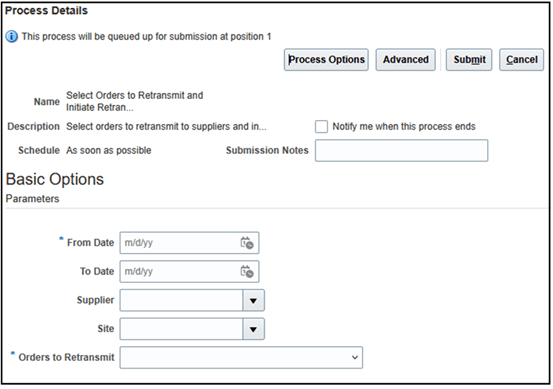
Select Orders to Retransmit and Initiate Retransmission ESS
- You can choose these options for the Orders to Retransmit field:
- Orders for which B2B transmission wasn't initiated: Retransmits all untransmitted POs including prior untransmitted versions.
- Orders with terminated B2B messaging status: Retransmits POs that have a Terminated status.
- All: Retransmits all untransmitted POs and those with a Terminated status.
- Select Submit to initiate retransmission of the selection of orders. The scheduled process ID is displayed. The ESS log shows the status of the orders that were retransmitted.
Tips and considerations
- Retransmission from the existing page is no longer available.
- You can't search or download the list of POs found to initiate retransmission anymore.
- When scheduling the process, consider running it during off-peak hours to minimize performance impact on other supply chain operations.
Access requirements
Users who are assigned a configured job role that contains these privileges can access this feature:
- Manage Collaboration Messaging Configuration (CMK_MANAGE_COLLAB_MESG_CONFIG_PRIV)
- Manage Collaboration Messaging History (CMK_COLLAB_MESG_HISTORY_PRIV)
- Manage Collaboration Message Definitions by Web Service (CMK_MANAGE_COLLAB_MESG_DEFINITION_WEB_SERVICE_PRIV)
These privileges were available prior to this update.