Synchronize Items, Item Usage, and Bill-only Requisitions Between Oracle Cloud ERP and Oracle Health
You can synchronize items, including substitute and replacement items and item locations, from Oracle Cloud ERP to Oracle Health using Oracle Health REST services. You can also synchronize the on-hand quantities between Oracle Health and Oracle Fusion Cloud Inventory Management based on item usage and create bill-only requisitions in Oracle Cloud Procurement for nonstock items.
Prerequisites
- Deploy the existing healthcare library. The standard integration works with the predefined healthcare library. For additional details about healthcare library, see Use Predefined Extensible Flexfield Attributes for Maintaining Healthcare Product Data.
- Deploy and setup the Oracle Fusion Cloud SCM—Oracle Health EHR | Synchronize Items accelerator in Oracle Integration.
- Opt in for Synchronize Item Information With Oracle Health feature and then perform the steps provided in the Steps to Enable section in the Synchronize Item Information With Oracle Health What’s New.
- Enable the automatic update of the Last Contract Price attribute value with the most recent price at which an item was purchased from Oracle Procurement Cloud. For details, see the Steps to Enable section in the Track Last Contract Price of an Item What's New.
- Opt in for the Create Bill-Only Requisitions and Purchase Orders feature and then enable Bill-Only Requisitions on Oracle Cloud ERP. For details, see the Create Bill-Only Requisitions and Purchase Orders What's New.
Oracle Health Item Integration Processes
To integrate items, item location, and item cost:
- Product Data Steward performs the following:
- Creates a filter using a predefined spoke system called Oracle Health for items that must be synchronized with Oracle Health EHR.
- Schedules the Synchronize Items with Oracle Health scheduled process.
- Oracle Fusion Cloud SCM—Oracle Health EHR | Synchronize Items accelerator performs the following:
- Downloads the zip files from Oracle WebCenter Content.
- Transforms data and creates files for Oracle Health EHR.
- Passes the data into interface tables.
- Communicates with administrator for resolution if data transfer fails.
The following screenshot shows the integration process with the Oracle Health.

End-to-end Integration Process for Items
To integrate transactions:
- Clinician completes case picking or documentation, or both in Oracle Health.
- Oracle Fusion Cloud SCM—Oracle Health EHR | Synchronize Items accelerator performs the following:
- Fetches the transactions from Oracle Health using a schedule process.
- Transforms data.
- Adjusts On Hand Quantity in Oracle Fusion Cloud Inventory Management if the item is stocked.
- Creates Bill-only Requisitions in Oracle Fusion Cloud Procurement if the item isn't stocked.
- Communicates with administrator for resolution if data transfer fails.
The following screenshot shows the integration process with the Oracle Health.
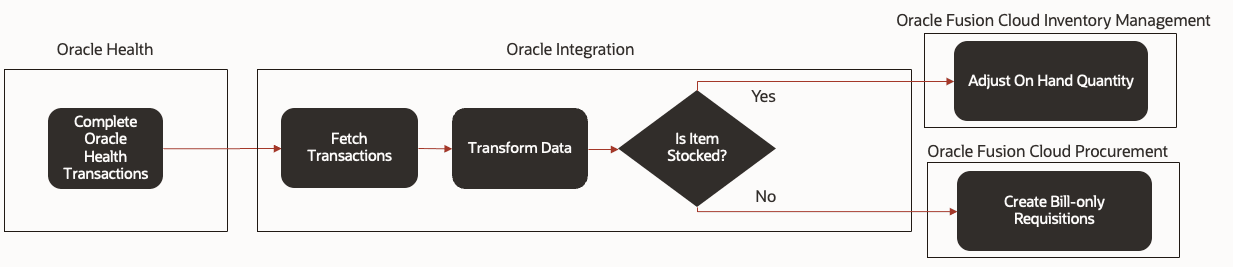
End-to-end Integration Process for Transactions
This feature benefits your business by providing the following:
- Plug and play native integrations with Oracle Health and Oracle Fusion Cloud SCM
- Elimination of siloed EHR data and the potential introduction of duplicate items.
- Quick and efficient access to enriched item data utilized in distinct provider organizations.
- Clear near real-time view updated based on available inventory at facilities.
- Automated bill-only requisitions for non-stocked products
Steps to enable and configure
After you complete the prerequisites, do the following to integrate transactions and bill-only requisitions:
- In the Setup and Maintenance work area, go to the Manage Special Handling Types task.
- In Special Handling Type, enter Bill Only and click Search.
- In Search Results, clear the Requires Single Supplier checkbox.
- Click Save and Close.
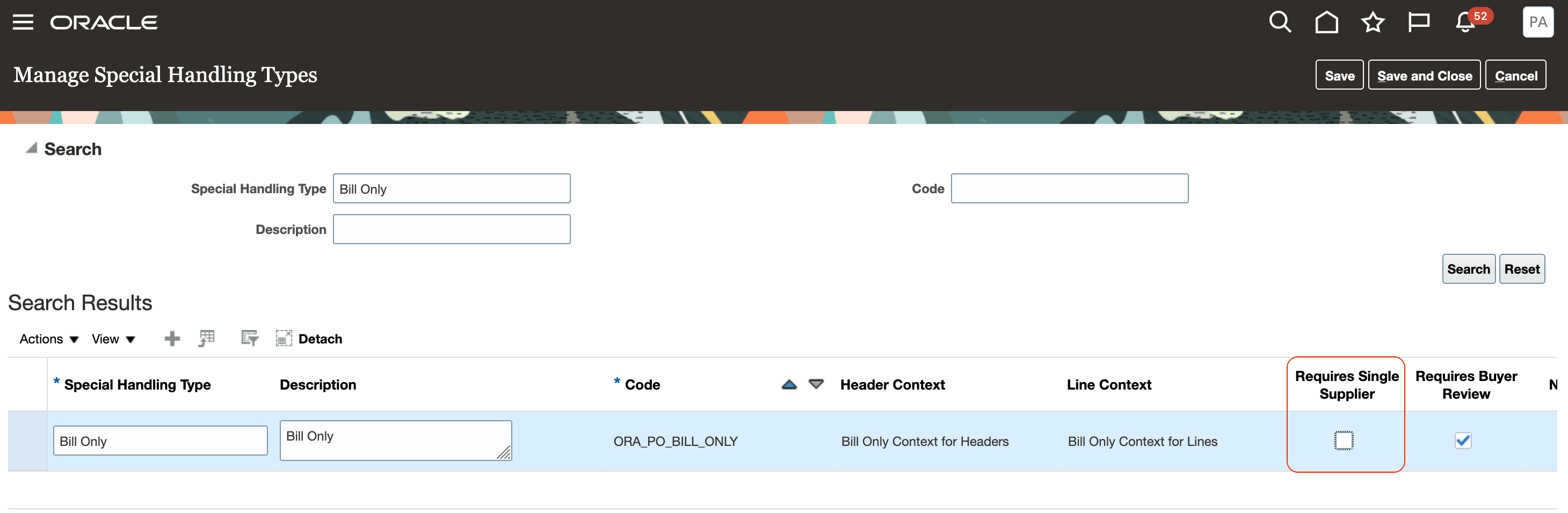
Bill Only Special Handling Setup
Key resources
- Refer to the Oracle Fusion Cloud SCM: Using Product Master Data Management guide, available on the Oracle Help Center
- For details on configuring and using special handling documents, refer to the Create Requisitions and Purchase Orders Requiring Special Handling What's New.
- For details on Inventory Transactions, refer to the Process REST-Based Inventory Transactions Efficiently for High-Volume Requests What's New.
Access requirements
Users who are assigned a configured job role that contains these privileges can access this feature in Product Management:
- Manage Item (EGP_MANAGE_ITEM_PRIV)
- Manage Item Source System (EGI_MANAGE_ITEM_SOURCE_SYSTEM)
- Publish Item (EGI_PUBLISH_ITEM)
Users who are assigned a configured job role that contains these privileges can create special handling requisitions in the Responsive Self Service Procurement application:
- Manage Requisition with the Responsive Self Service Procurement Application (POR_MANAGE_REQ_WITH_PWA_PRIV)
- Create Requisition with Special Handling (POR_CREATE_REQUISITION_WITH_SPECIAL_HANDLING)
Users who are assigned a configured job role that contains this privilege can access this feature in Purchasing:
- Create Purchase Order (PO_CREATE_PURCHASE_ORDER_PRIV)
Users who are assigned a configured job role that contain this privilege can access this feature:
- Manage Staged Inventory Transaction Web Service (INV_MANAGE_STAGED_INVENTORY_TRANSACTION_WEB_SERVICE_PRIV)
These privileges were available prior to this update.