AI Agent: Autonomous Sourcing Assistant
Use AI Agents to automate the sourcing process from creation to award for lower-dollar and high-volume negotiations, reducing buyer effort while maintaining policy compliance, and competitive outcomes. New Agentic AI Templates in the AI Agent Studio accelerate the source-to-pay process, automating simple purchases that require competitive bidding, such as indirect or tail spend categories. These ready-to-use AI templates process eligible requisition lines into negotiations, select suppliers, award the best supplier response, and generate purchasing documents. By minimizing manual intervention through the negotiation lifecycle, you can achieve increased efficiency, reduce costs, and free up resources to focus on more strategic sourcing initiatives and supplier relationship management.
To support end-to-end autonomous sourcing, the following new AI Agent templates are now available in AI Studio:
- Autonomous Sourcing Assistant - Automatically creates negotiations by converting eligible requisition lines as per your sourcing policy, submits them for approval, and publishes upon final approval. It also generates a synopsis and title, and invites relevant suppliers based on historical data for a streamlined and efficient sourcing process.
- Supplier Negotiation Award Assistant - Automates award decisions for eligible negotiations by applying sole-source or line-level awards to achieve optimal pricing. Eligible negotiations are those in a closed status that have received the minimum number of supplier responses specified in the policy document. When approvals are enabled, the award is submitted for approval. Once approved, the agent finalizes the award and generates the purchasing documents.
The agents use a sourcing policy document for criteria on identifying requisition lines that qualify for autonomous sourcing. A sample sourcing policy document is provided which defines eligible item categories, negotiation template names, bidding durations, minimum number of supplier bids requirement, and maximum line amount for each category. You can tailor these values in the policy document to meet your business needs, then add the document to the Autonomous Sourcing Policy tool in the AI Agent Studio.
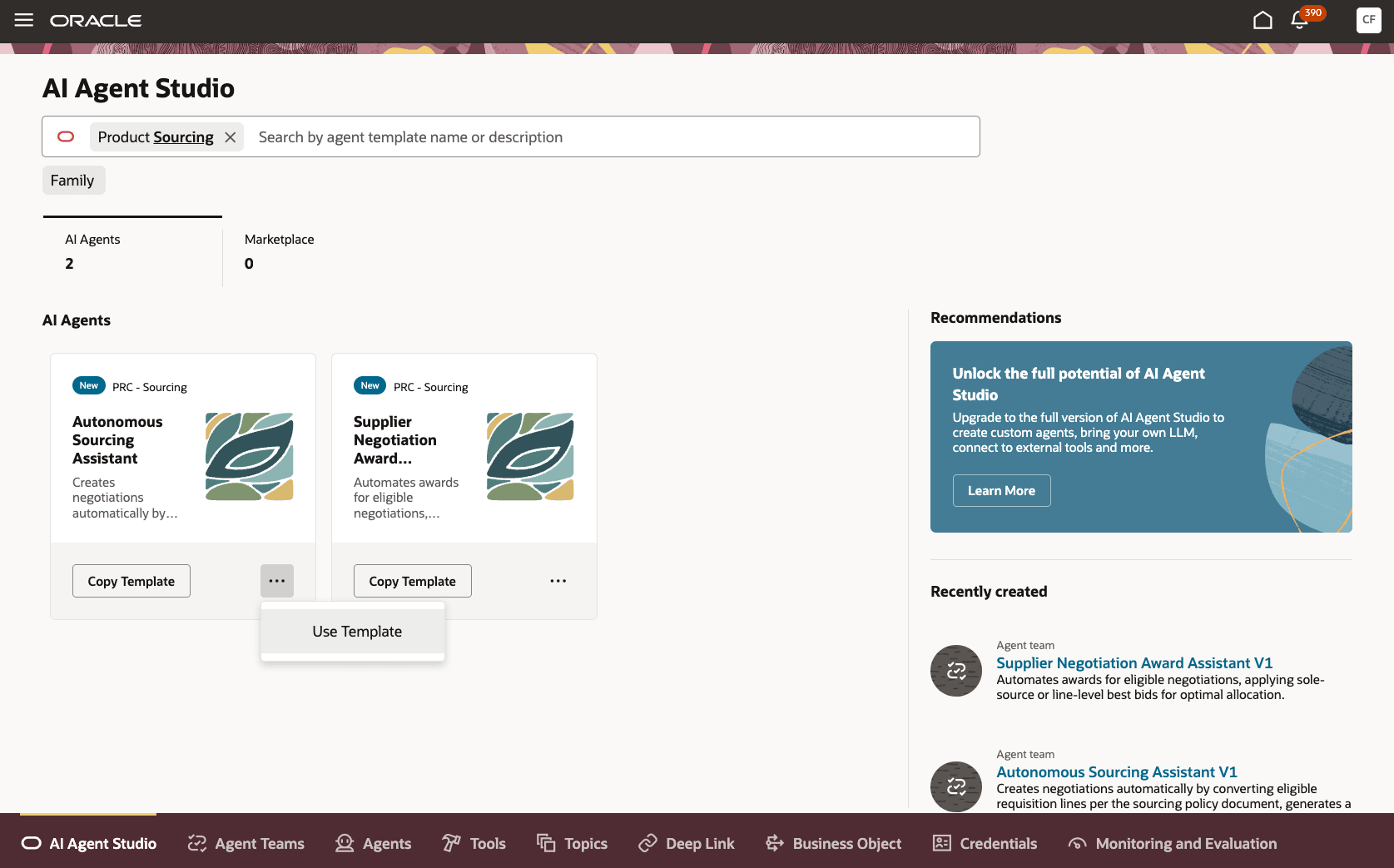
Seeded AI Agents: Autonomous Sourcing and Supplier Negotiation Award Assistant
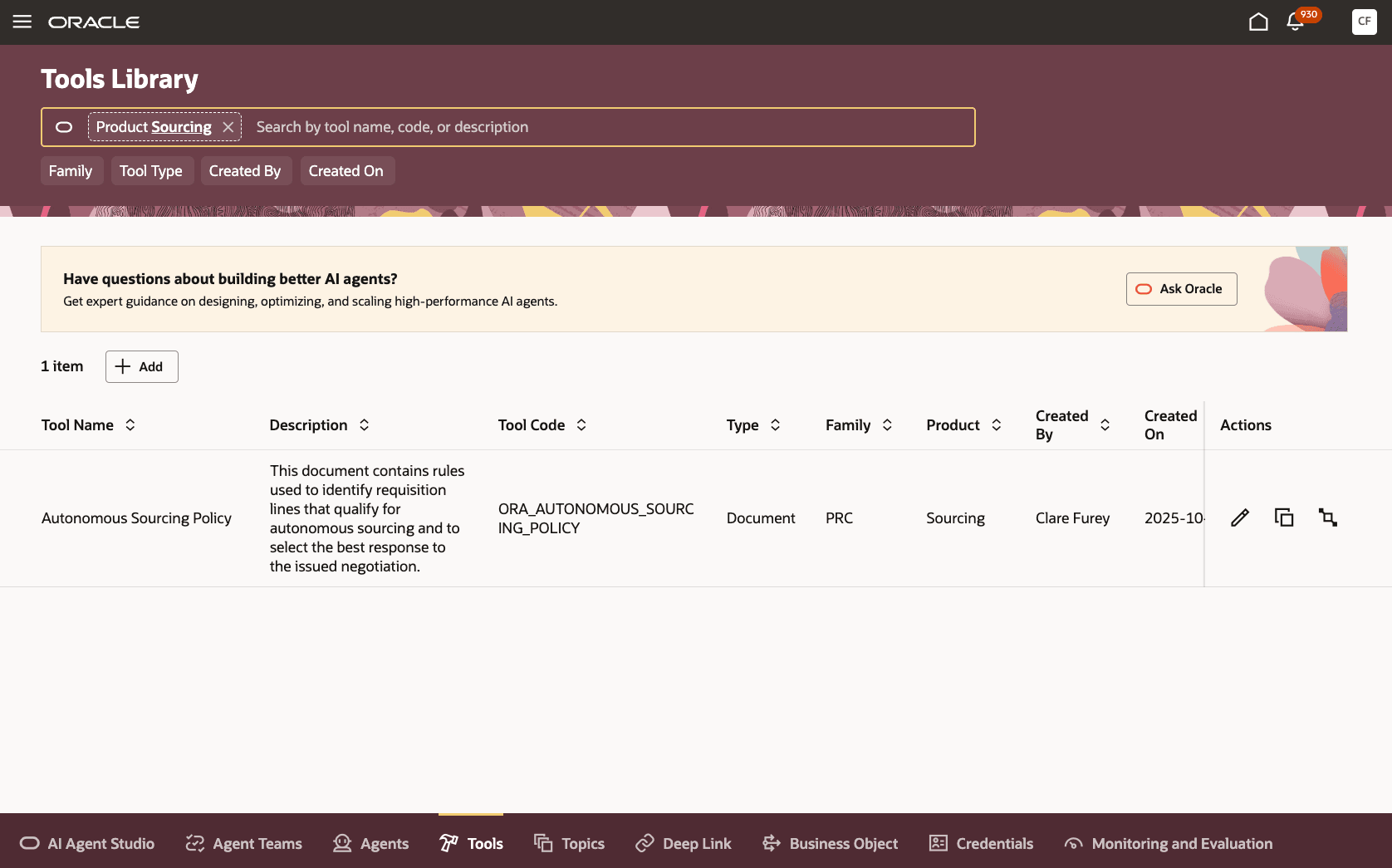
Autonomous Sourcing Policy Tool
Requisition lines marked as negotiation required and meeting the item category and amount thresholds in the policy document are automatically processed into a negotiation using your selected negotiation templates. Lines from the same requisition that share the same policy criteria such as negotiation template name, maximum line amount, minimum supplier bid count, and negotiation open duration, are grouped together into single negotiation.
After the negotiation is created, it’s automatically submitted for approval when approvals are enabled. Once approved, the negotiation is published and suppliers can submit their responses. When the negotiation closes, awards are automatically applied, either sole-source or line-level, and then submitted for approval. After the award is approved, the purchase documents are created. If any errors occur during the process, the negotiation owner receives an email notification.
Steps to enable and configure
To enable the feature, complete the following steps:
- Create and publish instances of Autonomous Sourcing Assistant and Supplier Negotiation Award Assistant in AI Agent Studio:
- For each Assistant, create an instance of the seeded template using either these methods:
- Copy Template: Automatically copies all underlying artifacts from the seeded agent team and adds a suffix you specify. You can edit the agent team’s settings, agents, and tools
- Use Template: Takes you through a step-by-step configuration of each artifact in the agent team.
- Publish the instance.
- Go to the agent teams and note the agent team code and version - you’ll need these values later.
- For each Assistant, create an instance of the seeded template using either these methods:
- Login to My Oracle Support (MOS) and search for Knowledge Base article KB858736. Follow the instructions in this article to configure your autonomous sourcing policy document.
- Add the autonomous sourcing policy document to the tool.
- In AI Agent Studio, open the Tools Library and search for the Autonomous Sourcing Policy tool within the Sourcing product.
- Add your policy document to the tool and set its status to Ready to Publish when finalized.
- Set the default owner for the autonomous sourcing eligible negotiations.
- In the Setup and Maintenance work area, go to the Manage Administrator Profile Values setup task.
- Update profile value:
- Profile Option Code: ORA_PON_AUTONOMOUS_NEG_OWNER
- Profile level: Site
- Profile value: Selecting the default negotiation owner for autonomous sourcing.
- Click Save and Close.
- Create the profile option for the Autonomous Sourcing Assistant’s agent team code.
- In the Setup and Maintenance work area, go to the Manage Profile Options setup task.
- Create a profile option for Autonomous Sourcing Assistant’s Agent Team Code:
- Profile Option Code: PON_AUTONOMOUS_SOURCING_AGENT
- Profile Display Name: Autonomous Sourcing Agent
- Application: Sourcing
- Module: Sourcing
- Start Date: < Enter today's or desired date >
- End Date: <leave empty>
- Site Level: Enabled and Updatable
- Click Save and Close.
- In the Setup and Maintenance work area, go to the Manage Administrator Profile Values setup task.
- Update profile value for Autonomous Sourcing Assistant’s agent team code:
- Profile Option Code: PON_AUTONOMOUS_SOURCING_AGENT
- Profile level: Site
- Profile value: Agent team code for the Autonomous Sourcing Assistant noted earlier.
- Click Save and Close.
- Like Step 5, create the profile option and update the profile value for the Autonomous Sourcing Assistant’s Agent Team Version using the following values:
- Profile Option Code: PON_AUTONOMOUS_SOURCING_AGENT_VERSION
- Profile Display Name: Autonomous Sourcing Agent Version
- Profile value: Agent team version noted earlier.
- Like Step 5, create the profile option and update the profile value for the Supplier Negotiation Award Assistant code using the following values:
- Profile Option Code: PON_AUTONOMOUS_AWARD_AGENT
- Profile Display Name: Autonomous Award Agent
- Profile value: Agent team code noted earlier.
- Like Step 5, create the profile option and update the profile value for the Supplier Negotiation Award Assistant version using the following values:
- Profile Option Code: PON_AUTONOMOUS_AWARD_AGENT_VERSION
- Profile Display Name: Autonomous Award Agent Version
- Profile Value: Agent team version noted earlier.
- Run the following scheduled jobs in this order:
- Process Agent Documents to read and parse the policy document. Run the Process Agent Documents scheduled job once after adding the policy document to the Autonomous Sourcing Policy tool and setting it to Ready to Publish status.
- Process Requisition Lines with Autonomous Sourcing Assistant to convert eligible requisition lines into negotiations automatically. This job should be scheduled to run at regular intervals (for example, daily or weekly).
- Process Closed Negotiations with Autonomous Award Assistant to award eligible negotiations and create purchase documents automatically. This job should be scheduled to run at regular intervals (for example, daily or weekly).
Tips and considerations
- When a requisition includes lines with different suggested buyers, the buyer who appears most frequently will be assigned as the negotiation owner. If every line has a unique buyer, one of these buyers will be designated as the negotiation owner. If no suggested buyers are provided on any line, the default buyer specified in the profile option (ORA_PON_AUTONOMOUS_NEG_OWNER) will be used. Ensure that this profile option is configured with the appropriate user.
- Use a negotiation style with the Send invitation to all contacts option enabled to create negotiation templates for autonomous sourcing.
- Enable the Global template check box in the negotiation templates for autonomous sourcing.
- Setting the schedule to Open immediately in the negotiation template for autonomous sourcing ensures that negotiations open automatically upon approval.
- Set the negotiation owner as the first-level approver in both negotiation and award approvals to ensure a human reviews the autonomously created negotiations and awards.
- After an autonomously awarded negotiation is approved, the subsequent ESS job run finalizes the award and generates the purchasing documents.
- For best results, ensure that the section headings and column headers in your policy document aren't changed from the provided template.
- Use only the text-based PDF attachments for policy document; image-based PDFs (such as scanned documents) may not be processed correctly.
Key resources
- For information on using AI Agent Studio, see How do I use AI Agent Studio?
Access requirements
- To access the Oracle AI Agent Studio for Fusion Applications and manage PRC AI agents, users must be assigned a configured job role that contains these duty roles:
- PRC Intelligent Agent Management Duty (ORA_PO_PRC_AI_AGENT_MANAGEMENT_DUTY)
- PRC Intelligent Agent Management Duty (ORA_PO_PRC_AI_AGENT_MANAGEMENT_DUTY_HCM)
- Fai Genai Agent PRC Administrator Duty (ORA_DR_FAI_GENERATIVE_AI_AGENT_PRC_ADMINISTRATOR_DUTY)
To interact with AI agents in product pages, users must be assigned a configured job role that contains this duty role:
- Fai Genai Agent Runtime Duty (ORA_DR_FAI_GENERATIVE_AI_AGENT_RUNTIME_DUTY)
In the Security Console, filter by Roles and Permission Groups to find this duty role.
To allow users to interact with agents, you must also enable permission groups in the Security Console on those users’ configured job roles that contain the Fai Genai Agent Runtime Duty role. You can enable permission groups when you manage the basic information of your configured job roles.
Users’ configured job roles must also contain privileges that allow access to the pages where AI agents are enabled.
- To schedule the ESS jobs that process requisitions and award negotiations using REST services, create an integration user (a new user with the Associated Person Type set to None) and assign it a configured job role that includes the following privileges:
- Initiate Autonomous Sourcing Process (PON_AUTONOMOUS_SOURCING_PRIV)
- Schedule and Run ESS (FND_MANAGE_SCHEDULED_PROCESSES_PRIV)
- Process Requisition Line (POR_PROCESS_REQUISITION_LINE_PRIV)
- Requisition Viewing Using REST Service aggregate privilege (ORA_POR_USE_REST_SERVICE_VIEW)
- Supplier Negotiation Management Using REST Service aggregate privilege (ORA_PON_USE_REST_SERVICE_MANAGE_NEGOTIATION)
- Supplier Negotiation Award Using REST Service aggregate privilege (ORA_PON_USE_REST_SERVICE_AWARD_NEGOTIATION)
- Purchase Order Management Using REST aggregate privilege (ORA_PO_USE_REST_SERVICE_MANAGE)
- Purchase Agreement Management Using REST aggregate privilege (ORA_PO_PA_USE_REST_SERVICE_MANAGE)
Note: Do not assign the Procurement REST Service Duty (ORA_PO_PROCUREMENT_REST_SERVICE_DUTY) or aggregate privileges to user-defined, duty, or abstract roles that are granted to end users as it grants unrestricted access to all data and may lead to unauthorized access by individuals. You can copy the Procurement REST Service Duty role, remove all privileges except those specifically required, and assign the resulting custom duty role to the integration user through their job role.