Redwood: Enable Deep Links to Source Data from Supplies and Demands Page
You can use the Redwood user experience to create deep links from orders on the Supplies and Demands page to their source data, such as purchase orders in Oracle Supply Chain Execution modules, to facilitate better plan analysis. You can drill down to purchase orders in Oracle Procurement, work orders in Oracle Manufacturing, sales orders in Oracle Order Management, and transfer orders and on-hand in Oracle Inventory.
You can now access additional real-time order-level details directly from the Supplies and Demands page. This enhancement supports on-hand quantities, purchase orders, transfer orders, work orders, and sales orders.
From the Supplies and Demands page, select an order and select Source Details from the Actions menu to navigate to the originating transaction in the source application. This feature is available for both unconstrained and constrained supply plans, enabling you to quickly trace supply and demand information back to the source order and improve planning visibility and issue resolution.
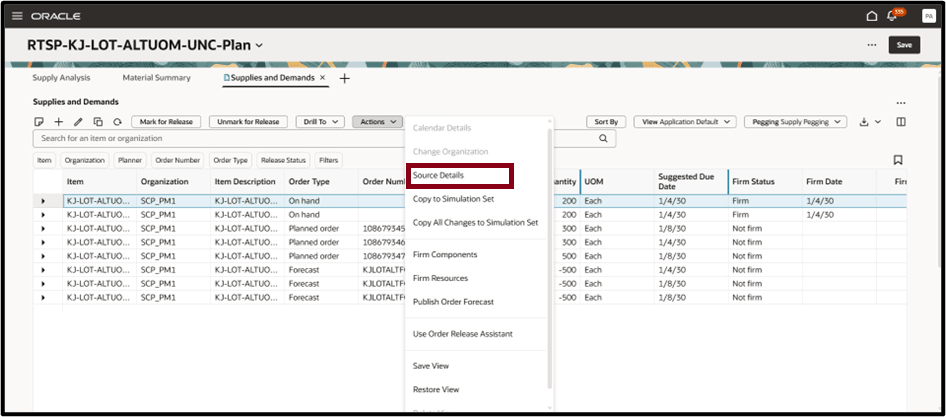
Source Details Option
When you select Source Details, the appropriate Oracle Inventory, Procurement, Manufacturing, Logistics, or Order Management page opens in a new browser tab (or as configured) to display details for the selected order.
The details page includes a deep link URL, which consists of two parts for the following order types:
- Base URL: Provides the host information.
- Parameters: Filter the data based on the context passed for each order type:
- On Hand - Organization, Item, and Lot Number
- Purchase Orders - Purchase Order Header ID
- Work Orders - Work Order ID and Organization
- Transfer Orders - Transfer Order Number
- Sales Orders - Sales Order Header ID
For example:
On Hand (Inventory)
https://< hostname>/fscmUI/redwood/inventory-availability/item-quantities/manage-lots?organizationId=207&inventoryItemId=663914&lotNumber=D-L001
Purchase Orders (Procurement)
https://< hostname>/fscmUI/redwood/purchase-orders/view?intent=NonAgentUser&poHeaderId=300100661515343
Work Orders (Manufacturing)
https://< hostname>/fscmUI/redwood/manufacturing-work-orders/work-orders/edit-work-orders?workOrderId=445701&organizationId=207
Transfer Orders (Logistics)
https://< hostname>/fscmUI/redwood/inventory-transfer-orders/view-transfer-order/landing?transferOrderNumber=101001
Sales Orders (Order Management)
https://< hostname>/fscmUI/redwood/order-management-orders/manage/order?headerId=300100679694439&mode=view
Steps to enable and configure
Use the Opt In UI to enable this feature. For instructions, refer to the Optional Uptake of New Features section of this document.
Offering: Supply Chain Planning
Tips and considerations
If you want to use the Redwood: Enable Deep Links to Source Data from Supplies and Demands Page feature, then you must opt in to its parent feature: Replenishment Planning. If you’ve already opted in to this parent feature, then you don’t have to opt in again
This feature is applicable only for Oracle Fusion Source Systems.
You must have the needed data security access for each of the following entities:
- Item Quantities
- Work Orders
- Purchase Orders
- Transfer Orders
- Sales Orders
Multiple row selection is not valid to drill to the source page for a particular order type.
Key resources
See Redwood: Analyze Supply Plans Using a Configurable Redwood Page feature.
Access requirements
Users who are assigned a configured job role that contains these privileges can access this feature:
On Hand
- Item-quantities (INV_VIEW_ONHAND_QUANTITY_USING_RESPONSIVE_INVENTORY_PWA_PRIV)
Work Order
- View Work Order (WIP_VIEW_WORK_ORDERS_PRIV)
- Edit Work Order (WIP_MANAGE_WORK_ORDER_HEADERS_PRIV)
Purchase Order
- View Purchase Order (PO_VIEW_PURCHASE_ORDER_PRIV)
Transfer Order
- View Transfer Order (INV_VIEW_INVENTORY_TRANSFER_ORDER_PRIV)
Sales Order
- View Sales Order (FOM_VIEW_ORDERS_PRIV)