Selected Order Management Bug Fixes in This Update
This update includes some bug fixes that can change the way Oracle Order Management works. This isn't a full list of all the bug fixes in this update. This list includes the bug fixes that can cause a noticeable change in application behavior.
Make Sure Orchestration Process Can Process Returns
In update 26A, Order Management introduced the DOO_VALIDATE_CREATE_OUTBOUND_REQUEST processing constraint:
- If a return line specifies an orchestration process that doesn't process returns, then don't send the return line to shipping. Display a message instead.
It comes predefined as enabled.
| Validation Entity | Validation Rule Set | Record Set | Message |
|---|---|---|---|
| Create Shipment Service | Create Shipping Request Validation | Fulfillment Line Default Record Set | Assignment rule assigned fulfillment line where line's Category contains Return, but the orchestration process doesn't process returns. Assign it to one that processes returns. |
| Order Fulfillment Line | Return Line Specifies Orchestration Process That Ships | Fulfillment Line Default Record Set | Create an assignment rule to specify an orchestration process that processes returns. |
racle reference: 38506725
Use the New OrderFulfillmentProcess
Order Management replaced the old predefined DOO_OrderFulfillmentGenericProcess with the new DOO_Enhanced_OrderFulfillmentProcess, starting in update 26B.
You can continue to use DOO_OrderFulfillmentGenericProcess, but we recommend you start using DOO_Enhanced_OrderFulfillmentProcess at the next earliest opportunity.
DOO_OrderFulfillmentGenericProcess has these branches:
- Standard
- Back-to-Back
- Drop Ship
Problems come up when the flow moves between branches, such as from back-to-back fulfillment to a warehouse, or from drop ship to a reservation. For example:
- The flow never releases a lock on a fulfillment line.
- A hold on a change order remains active.
- An action request never moves to done even though it's done.
The new DOO_Enhanced_OrderFulfillmentProcess consolidates the standard and back-to-back branches into a single branch:
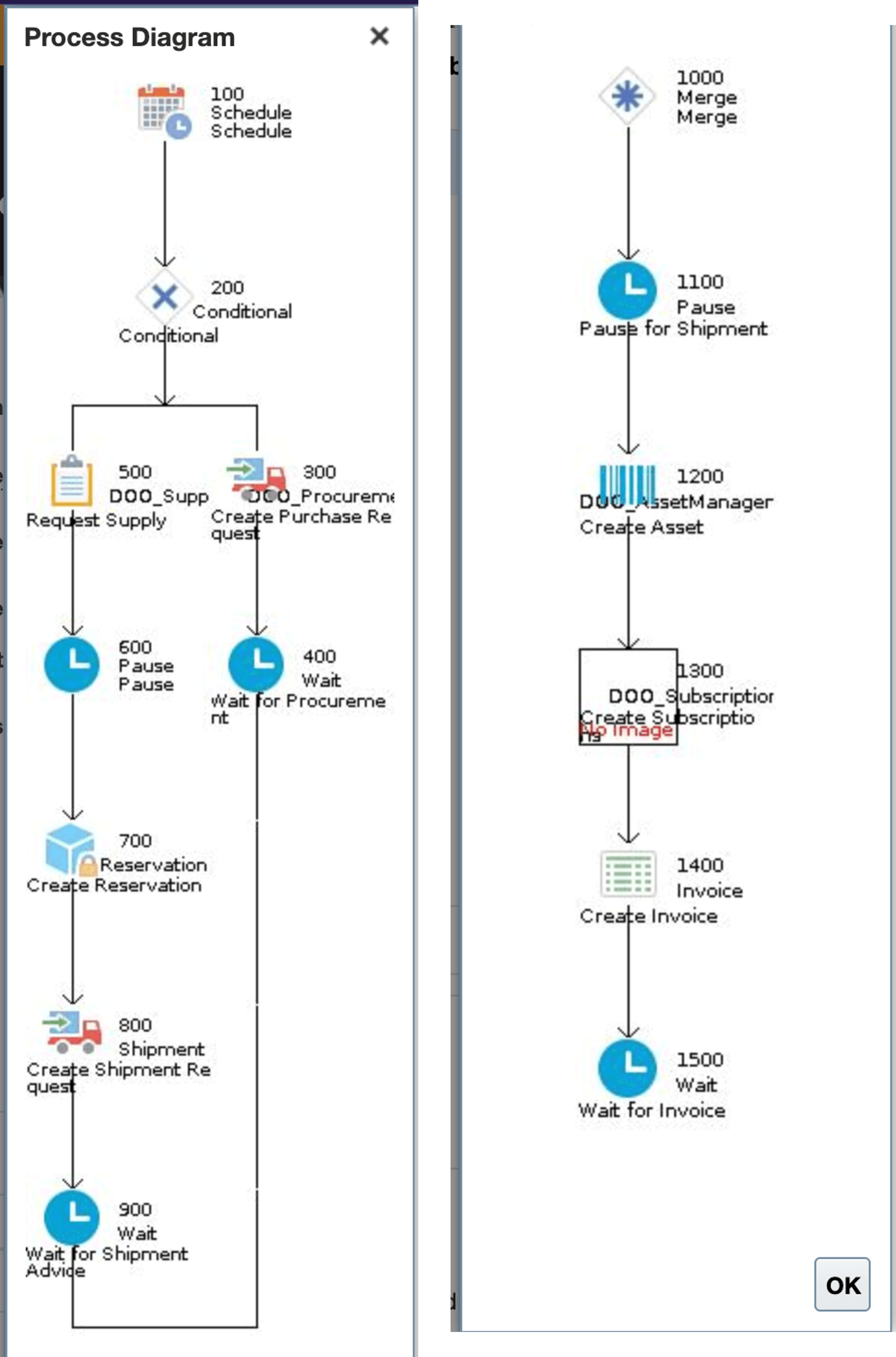
The new process has these step:
|
Step |
Service |
Description |
|
100, Schedule |
Create Scheduling |
Create a schedule that the process can use to fulfill the order line. It makes sure fulfillment meets the delivery dates that the sales order specifies. |
|
200, Conditional |
Select a branch according to the fulfillment flow. |
|
|
300, Create Procurement Request |
Create Procurement |
Create a procurement plan to make sure fulfillment ships the item through a supplier. |
|
400, Wait for Procurement |
Wait for Procurement |
If Oracle Procurement creates a purchase order, then wait to receive an update from Procurement. |
|
500, Request Supply |
Create Supply Request |
Send a request to Supply Chain Orchestration to create a supply order. |
|
600, Pause |
Create Pause |
If the scheduled ship date happens more than 5 days after the system date, then pause. |
|
700, Reservation |
Create Reservation |
If you enable inventory reservation for the item, or if inventory is available, then create an inventory reservation. |
|
800, Create Shipment Request |
Create Shipping |
Create a shipping plan that makes sure the carrier delivers the item on time. |
|
900, Wait for Shipment Advice |
Wait for Shipment |
Wait to receive confirmation that the carrier delivered the item. |
|
1000, Merge |
||
|
1100 Pause for Shipment |
Pause Process |
Pause until shipping ships the shippable line for a coverage or subscription. |
|
1200 Create Asset Management |
Create Asset Management |
If you're tracking the item as an asset, then send the fulfillment line to Oracle Asset Management. |
|
1300 Create Subscription |
Create Subscription |
If the item is a subscription, then send subscription details to Oracle Subscription Management so it can create the subscription with start and end dates. |
|
1400, Create Invoice |
Create Billing Lines |
Create billing lines that we can send to Oracle Receivables. |
|
1500, Wait for Invoice |
Wait for Billing |
Wait to receive confirmation from Oracle Receivables that billing is done. |
Selection Criteria and Compensation Pattern
The new process uses line selection criteria and compensation patterns to determine whether to run the fulfillment task:
|
Task |
Line Selection Criteria |
Compensation Pattern |
|
Reservation |
Use the Create Supply Request task only for flows that aren't back-to-back. |
If the fulfillment flow changes, and if the flow is back-to-back, and if the process already requested a reservation, then cancel that reservation. |
|
Shipping |
No change for standard and back-to-back flows. |
No change The new process won't use the cancel or create operation even if the fulfillment flow changes. |
|
Create Supply Request |
Run only for back-to-back flows. |
If the inventory item's ID changes, then use the CANCEL_CREATE operation. If the fulfillment flow changes, and if the flow is back-to-back, and if the process already requested supply, then cancel that request. |
Oracle reference 37966446
Use More Attributes with Order Fulfillment Response Service
Starting in update 26B, you can now use these new attributes in your Order Fulfillment Response Service payload:
|
Name |
Description |
|
ContractStartDateTime |
Date and time when the contract goes into effect. |
|
ContractEndDateTime |
Date and time when the contract will end according to the contract start date, time, and duration. |
|
EndDate |
Date when the subscription ends. Use it with the Integrate Order Management with Subscription Management to Process Subscriptions or Coverages feature. |
|
InvoiceInterfacedFlag |
Contains Y or N. Y: Order management sent the fulfillment line to your billing system. N: it hasn't. The YES_NO lookup type specifies the values. The default value is N. |
|
EndCreditMethodCode |
Abbreviation that identifies the credit method that Order Management used to end the subscription. The ORA_OSS_CLOSE_CREDIT_METHOD lookup type specifies the values. Use it with the Integrate Order Management with Subscription Management to Process Subscriptions or Coverages feature. |
|
ServiceDuration |
Duration for the coverage or subscription on the fulfillment line. |
|
ServiceDurationPeriodCode |
Abbreviation that identifies the unit of measure for the coverage or subscription on the fulfillment line. |
Oracle reference 38783496
Show Results Before Entering Criteria
Starting in update 26B, you can use the Show Results Before Entering Criteria option when you search for sales orders and order lines. Order Management ignored that option before 26B.
The Show Results Before Entering Criteria option comes predefined without a check mark to reduce the risk of accidentally displaying a large number of sales orders or order lines. The Sales Orders Search View and the Sales Order Lines Search View will no longer display results after you upgrade to 26B, by default. If you want the page to automatically display your search result:
1. Go to Home > Order Management > Show More > Search Views for Sales Orders, then click Sales Orders Search View or Sales Order Lines Search View.
2. Edit the search view, enable the Show Results Before Entering Criteria option, then save your changes.
If you don't enable the option, and if you don't use a filter or enter search text, then Order Management won't display a search result, by default.
Steps to enable and configure
You don't need to do anything to enable this feature.