AI Agent: Configuration Advisor
Use an AI agent to help you identify the optimal configuration for a configured item according to your inputs. Use the agent to compare two or more configurations and select the best one.
Realize these benefits:
- Deliver faster, data-driven configuration recommendations. Enable CSRs to respond quickly and accurately to customer needs.
- Improve customer satisfaction. Provide personalized, easy-to-explain solutions with clear alternative options.
- Enhance CSR productivity. Automate complex configuration analysis and streamline access to detailed information.
- Ensure consistent and accuracy. Provide error-free recommendations across the service team to support higher service quality and upsell opportunities.
Use the Configuration Advisor AI Assistant to quickly identify and compare the most suitable product configurations based on your specific requirements. Enter your key needs, and the assistant analyzes them against available options using advanced matching technology to recommend the best fit configurations.
Review alternative configurations with ease and access direct links to detailed product information to support informed decision making. This capability simplifies the selection process, improves efficiency, and helps ensure accurate decisions.
Try it:
- Go to Home > Supply Chain Execution > Supply Chain Orchestration > SmartConfigAdvisor > Ask Oracle.
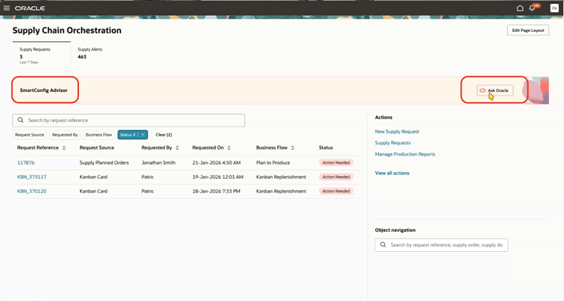
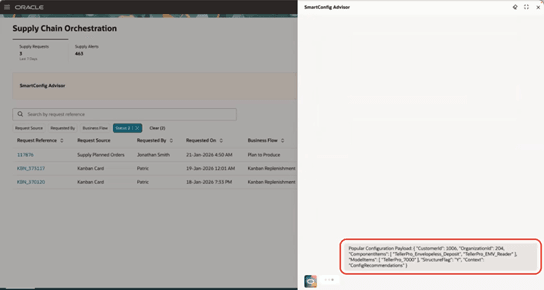
- To retrieve the most popular configuration recommendations, provide the user intent to the SmartConfigAdvisor agent in JSON format.
- Payload:
{
  "CustomerId": 1006,
  "OrganizationId": 204,
  "ComponentItems": [
    "TellerPro_Envelopeless_Deposit",
    "TellerPro_EMV_Reader"
  ],
  "ModelItems": [
    "TellerPro_7000"
  ],
  "StructureFlag": "Y",
  "Context": "ConfigRecommendations"
}
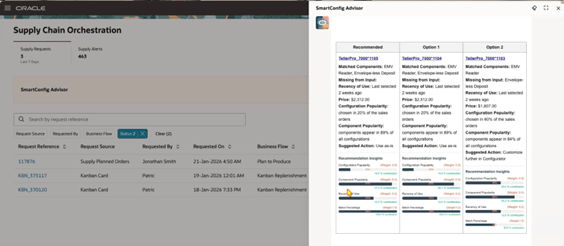
- The agent analyzes the provided inputs and returns intelligently ranked recommendations. Recommendations are generated using advanced fuzzy-matching technology and are ranked by relevance, popularity, and recency to help you quickly identify the most suitable options.
- Use the deep links provided with each recommendation to navigate directly to the configured item structure page and review the complete configuration details.
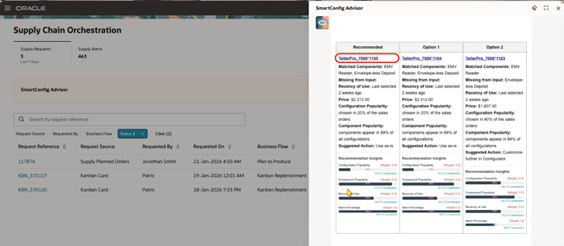
- You can also compare configurations side by side and review detailed comparison reports to support informed decision-making.
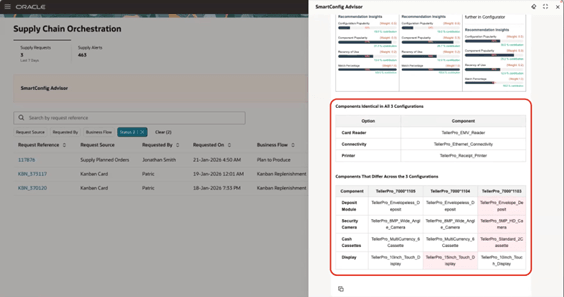
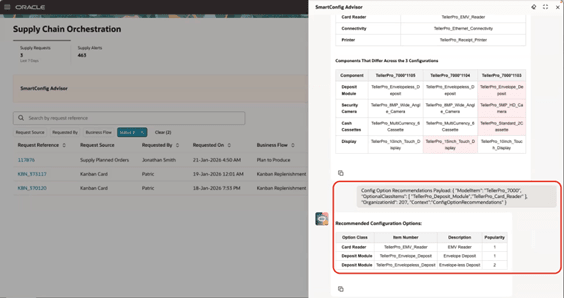
- To receive targeted option recommendations for a specific model based on historical sales order data, provide the input in JSON format.
- Payload:
{
  "ModelItem": "TellerPro_7000",
  "OptionalClassItems": [
    "TellerPro_Deposit_Module",
    "TellerPro_Card_Reader"
  ],
  "OrganizationId": 207,
  "Context": "ConfigOptionRecommendations"
}
Steps to enable and configure
You don't need to do anything to enable this feature.
Tips and considerations
- The SmartConfigAdvisor agent is a reusable workflow agent and can be invoked from another workflow agent to streamline configuration process.
- You can also use this as a standalone agent by providing input data in JSON format.
- Natural language inputs are not supported. You must structure all input in JSON format.
Key resources
- Overview of Setting Up Supply Chain Orchestration
- Using Supply Chain Orchestration
- Manage Exceptions for Configured Items
- Overview of Guided Journey
- Enable a Guided Journey for Redwood Pages
- How do I use AI Agent Studio?
Access requirements
To access the Oracle AI Agent Studio for Fusion Applications and manage SCM AI agents, users must be assigned a configured job role that contains these duty roles:
- SCM Intelligent Agent Management Duty (ORA_RCS_SCM_AI_AGENT_MANAGEMENT_DUTY and ORA_RCS_SCM_AI_AGENT_MANAGEMENT_DUTY_HCM - both duty role codes are required)
- Fai Genai Agent SCM Administrator Duty (ORA_DR_FAI_GENERATIVE_AI_AGENT_SCM_ADMINISTRATOR_DUTY)
In the Security Console, filter by Roles and Privileges to locate the SCM Intelligent Agent Management Duty role. Filter by Roles and Permission Groups to locate the Fai Genai Agent SCM Administrator Duty role.
To interact with AI agents in product pages, users must be assigned a configured job role that contains the duty role Fai Genai Agent Runtime Duty (ORA_DR_FAI_GENERATIVE_AI_AGENT_RUNTIME_DUTY).
In the Security Console, filter by Roles and Permission Groups to find this duty role.
To allow users to interact with agents, enable the required permission groups in the Security Console on those users’ configured job roles that contain the Fai Genai Agent Runtime Duty role. You can enable permission groups while managing the details of the configured job roles.
Users who are assigned configured job roles containing the following privileges can access this feature:
- View Configured Item Structures (CTO_VIEW_CONFIGURED_ITEM_STRUCTURES_PRIV)
- Manage Configured to Order Web Services (CTO_MANAGE_CONFIGURE_TO_ORDER_WEB_SERVICES_PRIV)
These privileges were available prior to this update.