Redwood: Receive an Order from Oracle Configure, Price, Quote (CPQ)
Use the new predefined Oracle CPQ message definition Oracle-1-0-A2A-CPQ-Quote-In to receive quote messages from Oracle CPQ and seamlessly transform them into the appropriate payload format required by Fusion Order Management for order ingestion.
You can now send status update notifications about the processing of the Oracle-1-0-A2A-CPQ-Quote-In message automatically to the initiating user in CPQ by leveraging the outbound application response message, Oracle-1-0-A2A-Application-Response-Out.
Here are some of the benefits of this feature:
- Streamlined Data Transfer: This integration simplifies the quote-to-order process, reducing manual effort, and enabling a smoother transition from configured quotes to actionable sales orders in Fusion applications.
- Automated Notifications: Success and error notifications are automatically handled and communicated back to CPQ so that the users are kept informed in real-time.
Steps to enable and configure
After you have enabled the feature Simplify Configuration and Processing for B2B Messaging, you'll need to perform the following high-level tasks to complete the setup:
- Select Connections from the in-app navigation bar.
- Select the Providers tab and search for Oracle CPQ to see the service provider details.
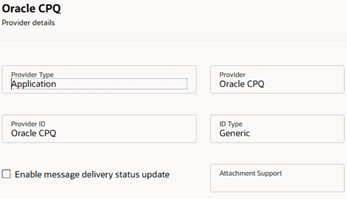
Oracle CPQ Provider
-
- Select the Delivery Methods tab to access the predefined delivery method ORA_CPQ_REST_WebService.
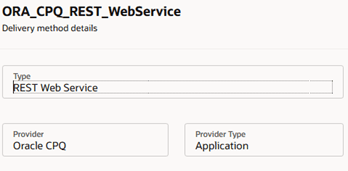
Oracle CPQ Delivery Method
-
- Select the Connections tab and filter by the provider Oracle CPQ to see all seeded connections.
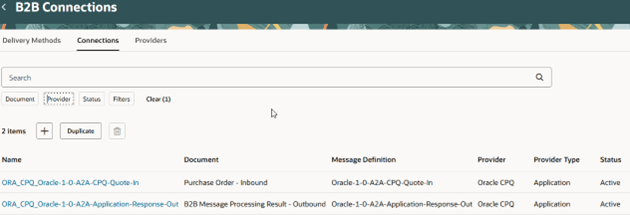
Oracle CPQ Messages
- Select Documents from the in-app navigation bar.
- Select the B2B Message Processing Result - Outbound document and set the Enabled field to Yes. You don’t need to assign a connection to this outbound document.
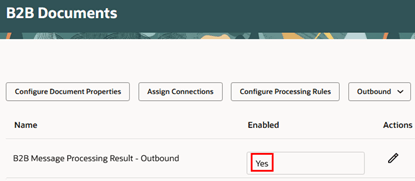
Documents
-
- Filter by Inbound documents.
- Select the Purchase Order – Inbound document and set the Enabled field to Yes.
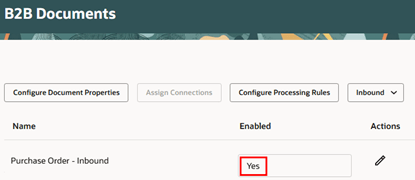
Documents
- You can also search for Oracle CPQ message definitions by provider in B2B Message Definitions:
- Select Definitions from the in-app navigation bar.
- Select Oracle CPQ in the Provider filter.
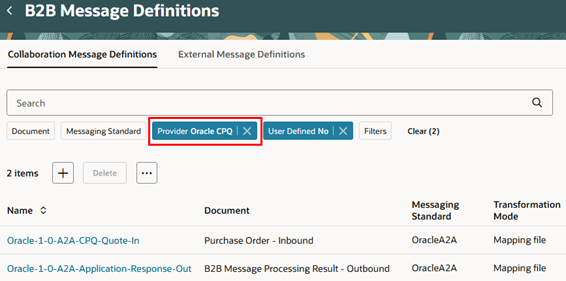
Oracle CPQ Message Definitions
- You can include additional attributes in your messages:
- Select Definitions from the in-app navigation bar.
- Select the predefined message definition you intend to customize - Oracle-1-0-A2A-CPQ-Quote-In or Oracle-1-0-A2A-Application-Response-Out - and choose Export Transformation Package. The transformation package has two folders: mappingFile and mappingFunctionFile.
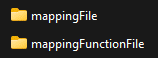
Transformation Package
-
- Edit the mapping file to include the additional attributes.
- Edit the mapping function file to edit or create business functions used by the mapping file.
- Select the predefined message definition you customized the mappings for (For example, Oracle-1-0-A2A-CPQ-Quote-In) and choose Duplicate. Enter a name and upload your modified file.
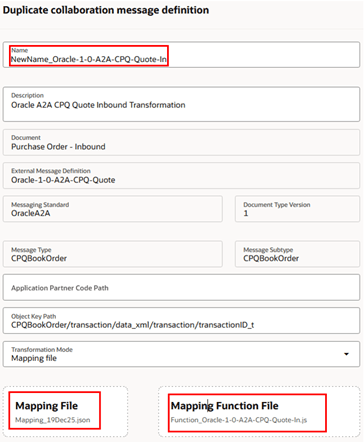
Duplicate Message Definition
- You can replace the predefined message definition - Oracle-1-0-A2A-CPQ-Quote-In or Oracle-1-0-A2A-Application-Response-Out - with the newly duplicated one.
- Select Connections from the in-app navigation bar.
- Select the Connections tab and filter by the provider Oracle CPQ to see the connections for all Oracle CPQ messages.
- Select the predefined ORA_CPQ_Oracle-1-0-A2A-CPQ-Quote-In connection. The duplicated message will appear in the Message Definition drop-down list.
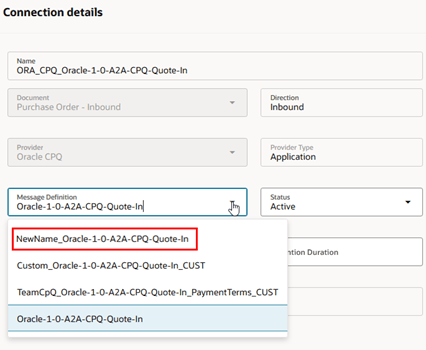
Replace Message Definition
- Transactions for both Oracle-1-0-A2A-CPQ-Quote-In and Oracle-1-0-A2A-Application-Response can be reviewed using the B2B Messages task and by selecting the applicable document.
- Select Messages from the in-app navigation bar.
- Filter the messages by Document, Provider, and Status Date.
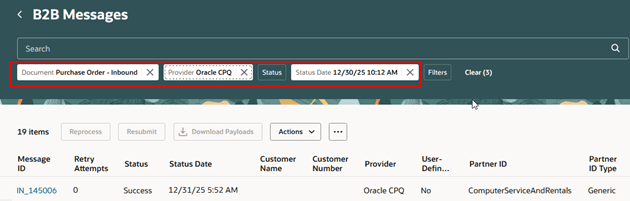
B2B Message Transactions
Tips and considerations
- The Application Provider Type which defines the Oracle CPQ provider is any internal Oracle application that you exchange messages with.
- Since the CPQ delivery method (ORA_CPQ_REST_WebService) facilitates communication between two Oracle applications, REST service details are not displayed on the page.
- Transformation mode displays options to specify whether the document will be transformed using an XSLT style sheet or a mapping file. For Oracle-1-0-A2A-CPQ-Quote-In and Oracle-1-0-A2A-Application-Response-Out messages, the transformation is performed using JSON instead of XSLT, so the transformation mode is set to mapping file.
- The mapping file contains the attribute mappings and may utilize functions defined in the JavaScript file when necessary. It also includes direct XML-to-JSON mappings for attributes that do not require further processing.
- The mapping function file contains all the functions used by the mapping file. It encapsulates the business logic necessary to perform the mapping operations.
- Even if only one file is modified, both the mapping file and the mapping function file must be uploaded when duplicating a message.
- There is no need to configure Customer B2B Properties for the Oracle-1-0-A2A-CPQ-Quote-In message.
- The B2B Message Processing Result - Outbound document is automatically generated in response to the processing of the Purchase Order - Inbound (Oracle-1-0-A2A-CPQ-Quote-In) document.
- There is no need to assign connections to it.
- All error information from the application will be available in the payload with the specific error message being extracted and displayed separately.
- The CPQ inbound message ID that the response correlates with will be included in the payload.
- Documents associated with either Oracle-1-0-A2A-CPQ-Quote-In or Oracle-1-0-A2A-Application-Response-Out can't be reprocessed or resubmitted from the B2B Messages page.
Key resources
Refer to the Configuring and Managing B2B Messaging for Oracle Fusion Cloud SCM guide on the Oracle Help Center.
Access requirements
Users who are assigned a configured job role that contains this privilege can access this feature:
- CMK_INVOKE_INBOUND_COLLAB_DOC_SERVICE_PRIV
This privilege was available prior to this update.