Redwood: Calculate Planning Percentages for Product Families
In manufacturing and distribution environments with many items that have minor differences, it’s easier to plan at an aggregate level, such as a product family, and have automated mechanisms to disaggregate the forecast to items. Oracle Fusion Cloud Supply Chain Planning now supports the end-to-end process for forecasting by product family in Oracle Demand Management and consuming the forecast in Oracle Supply Planning.
You can calculate planning percentages at the product-family level to support aggregate forecasting. You can roll up forecasts at the product-family level and disaggregate the forecasts to individual family members by calculated percentages. This functionality also enhances the integration between Demand Management and Supply Planning by enabling forecasts to be sent at either the item or product-family level.
This capability improves forecasting accuracy by enabling planning at the product-family level instead of only at the item level.
To configure a demand or demand and supply plan to calculate the planning percentage for a product family, follow these steps:
- In the guided process for creating or editing the plan, in the Demand step, select the Product-Family Settings tab.
- Select the Product-family percentages checkbox.
The field and lists on the tab will be enabled.
- Specify the settings for calculating the planning percentage for the product family:
- Planning Percentage History Periods: Enter the number of days to use for calculating the product-family percentage. The default value is 182 days.
- Planning Percentage History Calculation Measure: Select a measure to use for calculating the planning percentage. The default measures in the list are Final Bookings History and Final Shipments History.
- Planning Percentage Calculation Level: Select the level at which the planning percentage is calculated. The values are Item; Item and organization; and Item, organization, and demand class.
- Hierarchy for Product Family: Select a product hierarchy for calculating the planning percentage. The list displays all the product hierarchies in the dimension catalog selected on the General tab in the Plan definition step in the guided process for creating or editing the plan. The default value is the selected hierarchy in the Plan Items section on the Scope tab in the Plan definition step.
Note: If you change the product hierarchy on the Scope tab, and you want to use the same hierarchy for the product family, you need to also change the selection in the Hierarchy for Product Family list on the Product-Family Settings tab.
- Hierarchy Level for Product Family: Select a product hierarchy level for calculating the planning percentage. The list displays all the levels in the selected hierarchy in the Hierarchy for Product Family list. The default value is the selected level in the Plan Items section on the Scope tab in the Plan definition step.
Note: If you change the product hierarchy level on the Scope tab, and you want to use the same hierarchy level for the product family, you need to also change the selection in the Hierarchy Level for Product Family list on the Product-Family Settings tab.
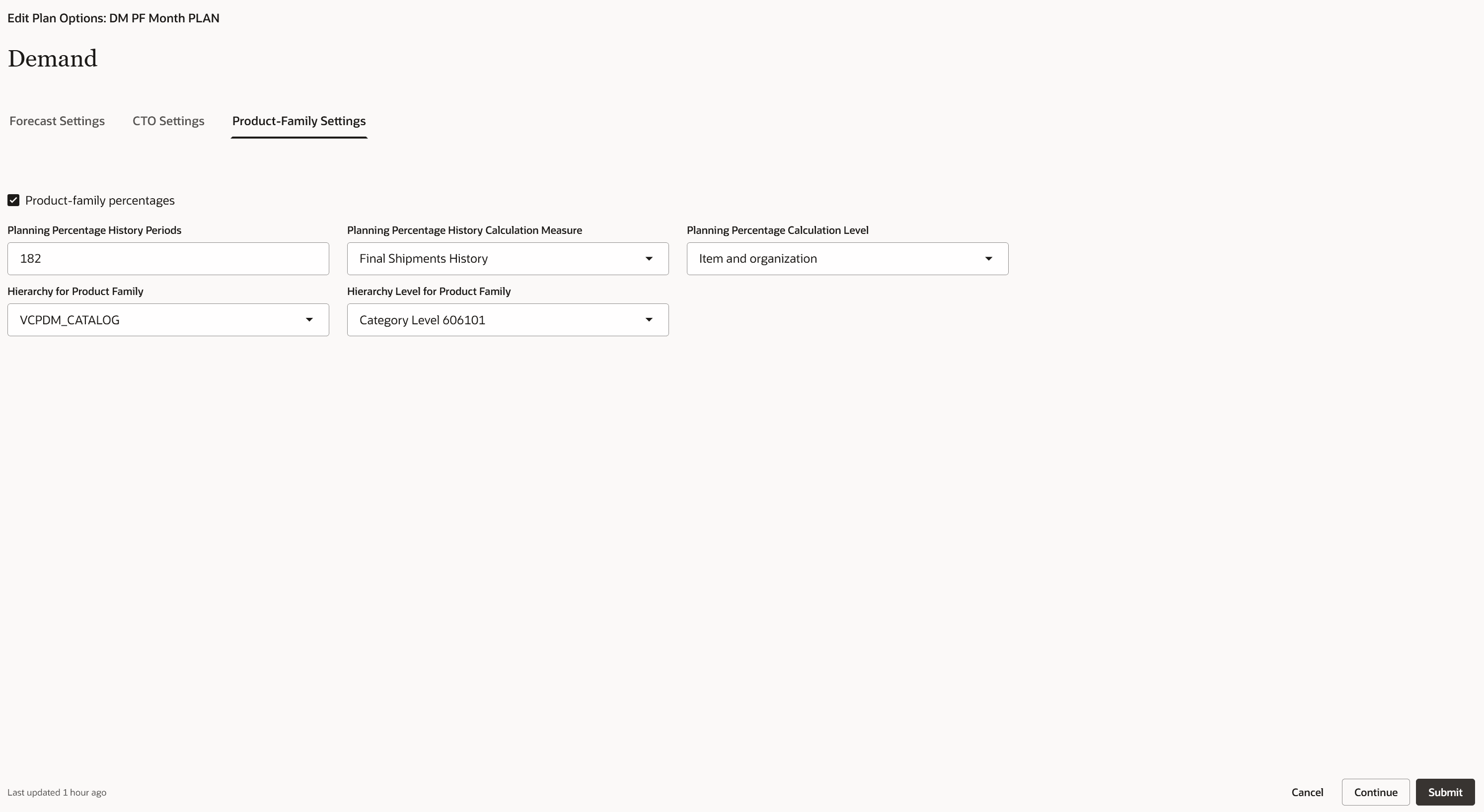
Product-Family Settings Tab
- Select Submit to save the changes.
How the Planning Percentage for the Product Family Is Calculated
The planning percentage for the product family is calculated as follows:
- The time range is determined by subtracting the value in the Planning Percentage History Periods field (which is in days) from the history end date of the plan. The specific time period for the resulting date is determined. The type of time period is determined by the selection in the Forecasting Time Level list on the Forecast Settings tab in the Demand step in the guided process for creating or editing the plan. The start date of this time period is the start of the time range, and the history end date is the end of the time range. The calculation uses the days for the entire time period that the start date falls into.
- The measure selected in the Planning Percentage History Calculation Measure list is aggregated across the time range at the aggregation level selected in the Planning Percentage Calculation Level list.
- The resulting value is divided by the sum of the same measure across the same time range at the aggregation level selected in the Hierarchy Level for Product Family list (in combination with the organization or organization and demand class according to the selection in the Planning Percentage Calculation Level list).
For example, the calculation could be as follows:
(Sum of Final Shipments History measure for 182 days of history for each item and organization combination)/(Sum of Final Shipments History measure for 182 days of history for each Category Level 2 and organization combination)
Here, Category Level 2 is selected in the Hierarchy Level for Product Family list and is the parent member for the item.
Measures and Measure Groups for Calculating the Planning Percentage for the Product Family
The following predefined measures have been introduced as a part of this feature:
- Planning Percentage for Product Family: Planning percentage calculated for a product family by Demand Management. The measure indicates the percentage for the product family in the selected hierarchy level.
- Adjusted Planning Percentage for Product Family: Override of the planning percentage calculated for a product family by Demand Management.
- Final Planning Percentage for Product Family: Final planning percentage calculated for a product family by Demand Management. If an override was done, then the value of the Adjusted Planning Percentage for Product Family measure is returned; otherwise, the value of the Planning Percentage for Product Family measure is returned.
- Aggregated Planning History at Calculation Level for Product Family: Aggregated history for the measure selected for calculation of the planning percentage for the specified history periods at the selected calculation level. This measure is used in the calculation of the Planning Percentage for Product Family measure.
- Aggregated Planning History at Hierarchy Level for Product Family: Aggregated history of the measure selected for calculation of the planning percentage for the specified history periods at the selected product hierarchy level and selected calculation level. This measure is used in the calculation of the Planning Percentage for Product Family measure.
The following predefined measure groups have been introduced as a part of this feature.
- Demand Management for Product Family: This measure group containing all the new measures.
- Planning History for Product Family: This measure group contains the measures used for product-family history during the calculation of the planning percentage. By default, this measure group includes the predefined Final Bookings History and Final Shipments History measures.
You can add the measures to a table. After you run the plan, you can view the planning percentage for the product family through the table.
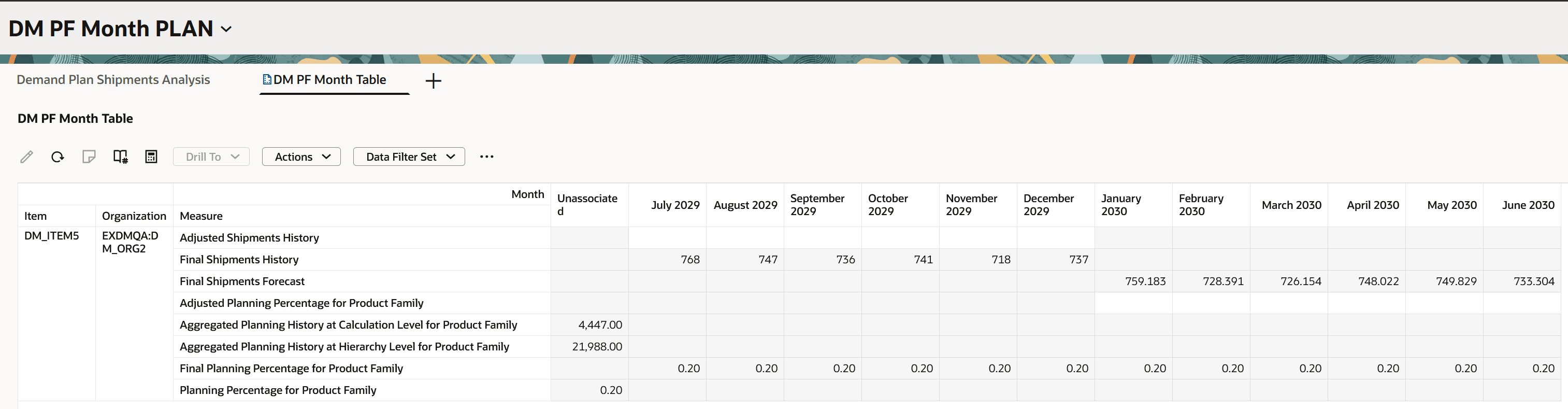
Table With Measures for Planning Percentage for Product Family
Steps to enable and configure
You don't need to do anything to enable this feature.
Tips and considerations
- The new measures aren’t included in any predefined measure catalog. To use this feature, you must add these measures to a user-defined measure catalog for your demand or demand and supply plan.
- If you want to use a specific measure for historical demand to calculate the planning percentage for the product family, you must add the measure to the measure group named Planning History for Product Family. Then, the measure will be available for selection in the Planning Percentage History Calculation Measure list on the Product-Family Settings tab in the Demand step in the guided process for creating or editing the plan.
- The calculation of the planning percentage for the product family is done during the plan run. In the Run plan drawer, you must select the Refresh with current data option.
- If you make changes on the Product-Family Settings tab in the Demand step in the guided process, then you must recalculate the planning percentage for the product family by running the plan again with the Refresh with current data option selected in the Run plan drawer.
Key resources
Refer to the Cloud Applications Readiness content for the 26C feature in Supply Planning titled “Redwood: Plan Supply for Forecasts Generated at Product Family Level” for information on passing a forecast from a demand plan to a supply plan or within a demand and supply plan at the planning level for the product family and using the calculated planning percentage for the product family for the forecast consumption.
Visit https://redwood.oracle.com/ for more information about the Redwood experience.
Access requirements
Users who are assigned a configured job role that contains this privilege can access this feature:
- Run Plan with Snapshot (MSC_RUN_PLAN_WITH_SNAPSHOT_PRIV)
This privilege was available prior to this update.