Redwood: Cancel a Receipt Delivery
In healthcare and other inventory intensive organizations, receipt deliveries are the final step in moving critical supplies to PAR locations, satellite supply areas, or people who requested them. However, operational situations, such as manual pickups of deliveries may require certain deliveries to be reversed after they have already been initiated.
Without an efficient way to cancel receipt deliveries, you may face inaccurate inventory records, misplaced stock, and manual correction. Now, you can cancel receipt deliveries as required, ensuring inventory is accurately reflected and can be redirected appropriately.
On the delivery workbench, you can select the deliveries you want to cancel, and then click on the Cancel Deliveries button under more actions to cancel the deliveries.
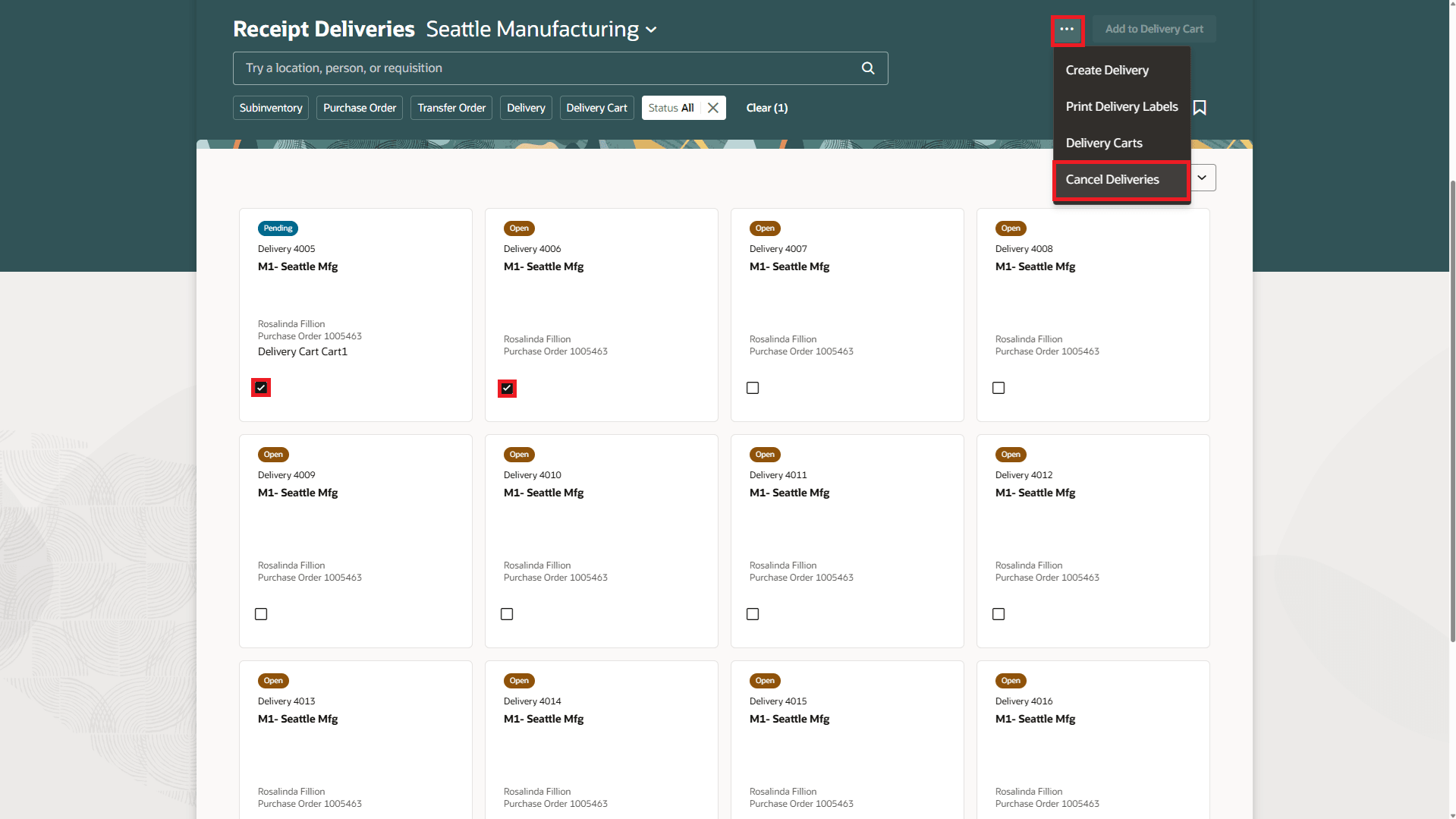
Delivery Workbench - Cancel Deliveries
On the Cancel deliveries drawer, review canceled deliveries, enter notes, and then click on the Cancel Deliveries button.
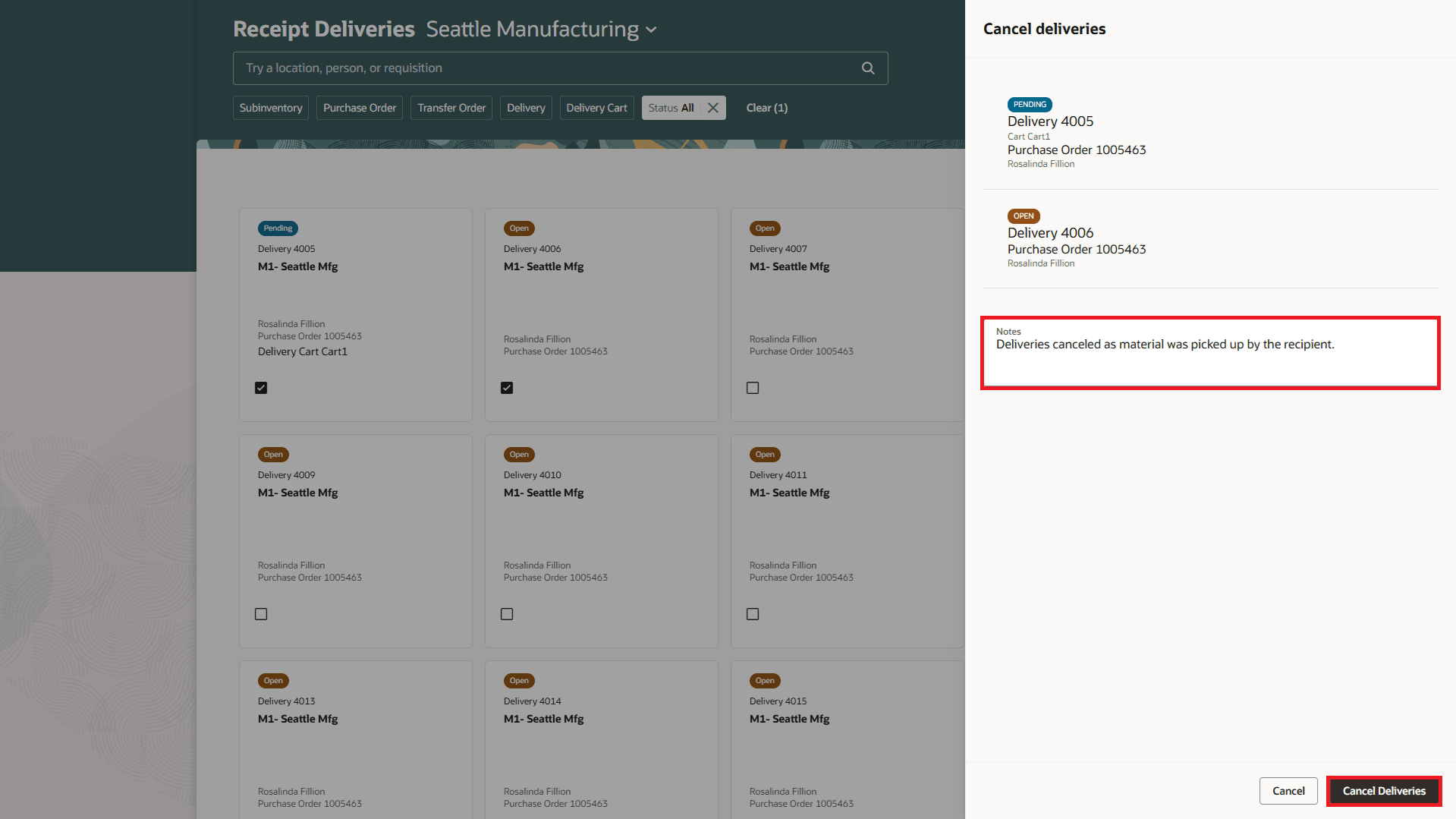
Cancel Deliveries - Enter notes and confirm cancellation of deliveries
On the delivery workbench, you can also print delivery labels for deliveries that are in Pending status. Select deliveries you want to print labels for, and then click on the Print Delivery Labels button under more actions to print the labels.
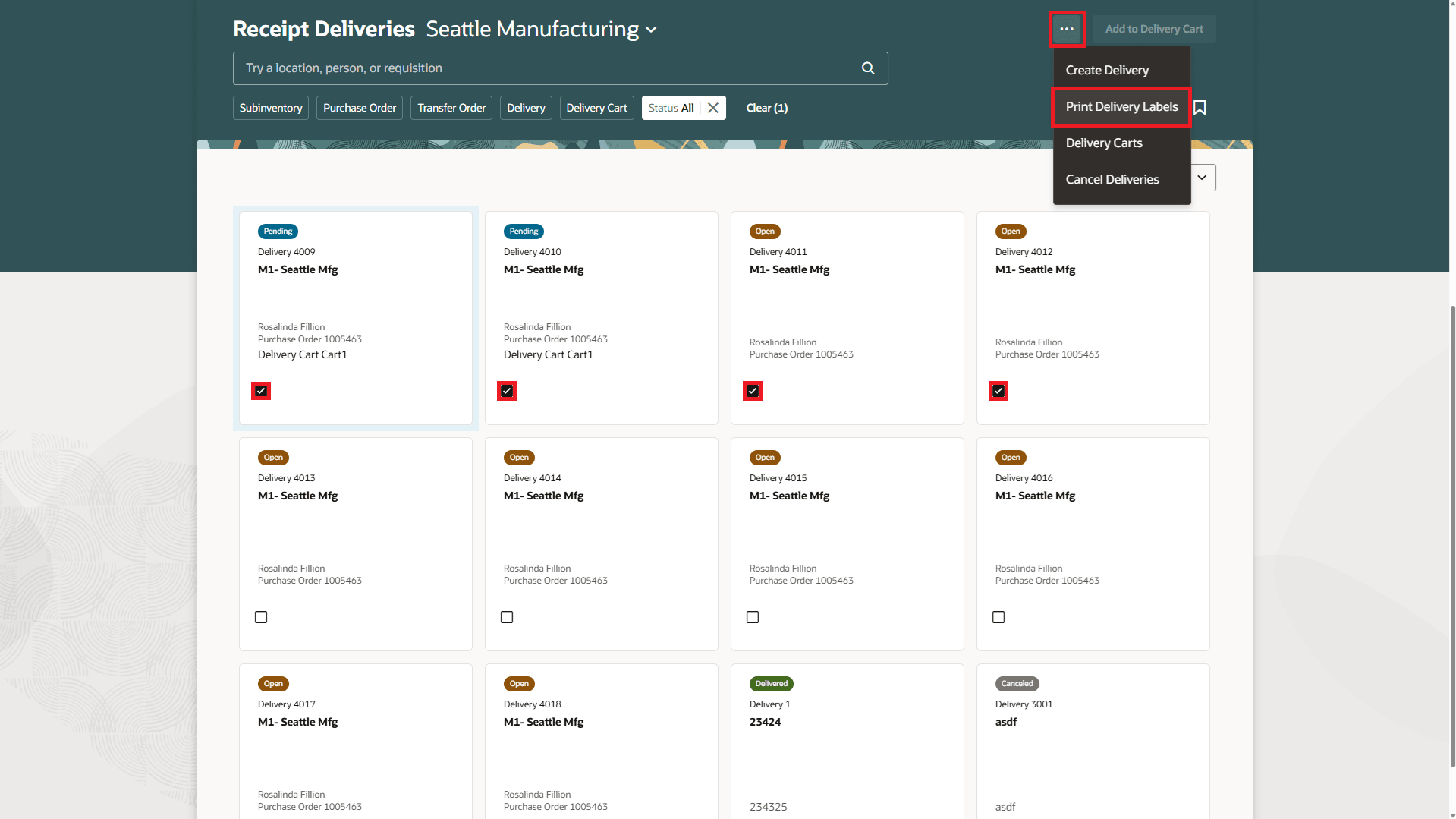
Delivery Workbench - Print Delivery Labels
On the Print Delivery Labels page, select the printer, review and update the number of labels for each delivery, and then click on the Print and Close button.
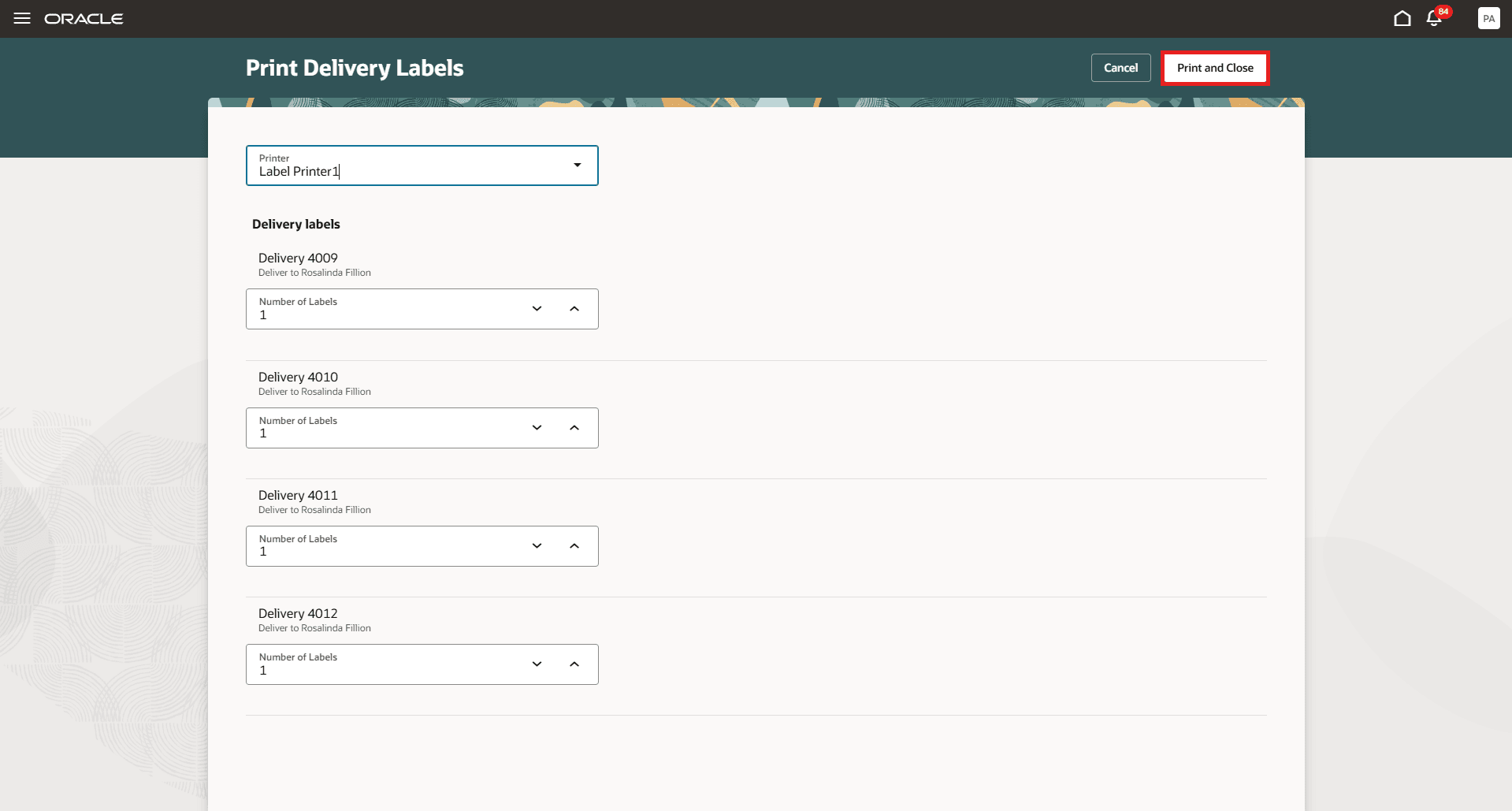
Print Delivery Labels - Select printer and click on Print and Close
Additionally, a new Skip Autocreate Delivery column has been introduced in the ReceivingReceiptImportTemplate FBDI template for scenarios where receipts are created through FBDI and there are no automatic deliveries created for those receipts.
Valid values for this column are:
- Y – Skip automatic delivery creation
- N – Allow automatic delivery creation
- Blank values are treated as N
If the column is set to Y, deliveries will not be created for the imported receipts, even if the system is configured to automatically create deliveries for receipts.
Similarly, for receipts created using the Receiving Receipt REST API, a new attribute, SkipAutoCreateDeliveryFlag, has been introduced. Valid values for this attribute are true and false. If the attribute is left blank, the default value is false.
This attribute behaves in the same way as the FBDI flag. When set to true, delivery creation is skipped for the receipts, even if the system is configured to automatically create deliveries for receipts.
This capability provides greater flexibility in managing last-mile distribution, reduces the need for manual adjustments, and helps organizations maintain accurate, up-to-date inventory across all locations.
Steps to enable and configure
Leverage the Visual Builder Studio to expose your applications. To learn more about extending your application using Visual Builder, visit Oracle Help Center > your apps service area of interest > Books > Configuration and Extension.
In VB Studio, under the page properties section, set Cancel Deliveries to true to enable the Cancel Deliveries action.
To enable printing delivery labels for deliveries in Pending status, update the Print Labels for Pending Receipt Deliveries to true.
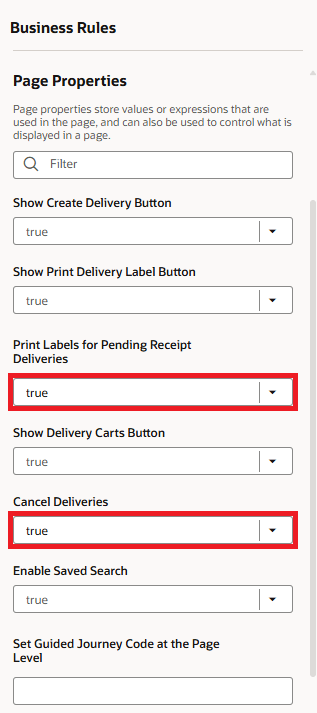
Page Properties
If one or both of these page properties are set to true, the delivery card displayed on the workbench will show a checkbox for deliveries in Pending status. This checkbox replaces the delivery cart and task information previously displayed for these deliveries.
To customize the delivery card display for deliveries in Pending status, use the following properties:
- Delivery Card Tertiary Text
- Delivery Card Secondary Text 3
These properties can be configured to display any of the following attributes:
- Document Number
- Requisition
- Delivery Cart
- Task Name
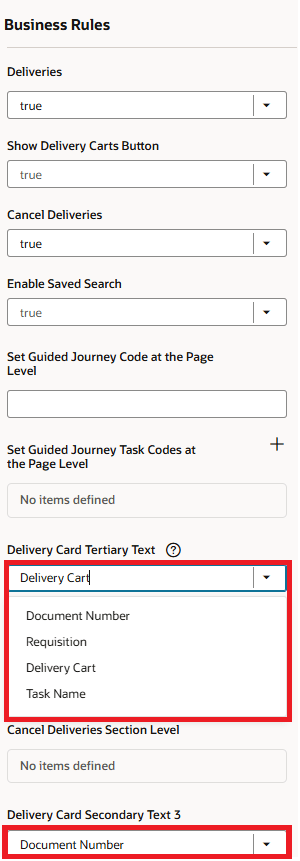
Page Properties - Customize card view for deliveries in Pending status
Tips and considerations
-
If a return or correction is performed on a receipt that has a receipt delivery in an Open or Pending status, the delivery will be canceled. Any remaining quantity on the receipt that still needs to be delivered must be put away.
Key resources
- Oracle Fusion Cloud SCM: Using Receiving guide, available on the Oracle Help Center.
- Oracle Fusion Cloud SCM: Implementing Manufacturing and Supply Chain Materials Management guide, available on the Oracle Help Center.
Access requirements
Users who are assigned a configured job role that contains this duty role can access this feature:
-
Monitor Receipt Deliveries Using Responsive Receiving (ORA_RCV_MONITOR_RECEIPT_DELIVERIES_PWA_DUTY)
This duty role was available prior to this update.