Redwood: Add Lines to an Existing Receipt Using a Mobile Device
In high-volume receiving environments, large purchase orders are often split across multiple receivers, working simultaneously to expedite order processing. As each receiver handles their own portion of the shipment, they may complete the processing at different intervals.
However, your internal procedures may require a one-to-one relationship between each order number and receipt for easy traceability. If mobile receiving does not allow you to add new lines to an existing receipt, receiving teams may be unable to follow these procedures. This can lead to delays, incomplete records, and additional reconciliation work later.
Now, you can add new receipt lines to an existing receipt in real-time when using a mobile device.
A new Add to Receipt action has been introduced for you to select an existing receipt to add to. After you click Add to Receipt, you will have a list of existing receipts to choose from. The Tracking Number and Packing Slip values will be automatically set to default. After you enter the receipt details and submit the receipt for processing, a toast message appears confirming that the line has been added to an existing receipt.
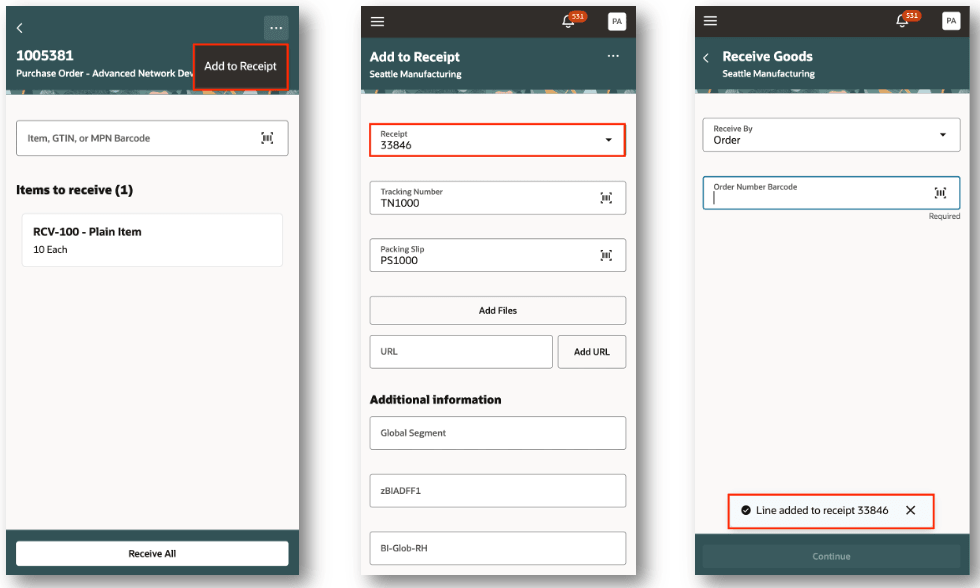
Add to Receipt
This feature ensures you can comply with internal policies while maintaining faster processing of large orders, improved coordination across receivers, and more accurate, complete receipt records.
Steps to enable and configure
You don't need to do anything to enable this feature.
Tips and considerations
- The Add to Receipt action will be displayed when the Order Type is purchase order or Return Material Authorization (RMA)
- The Add to Receipt action will not be displayed for an advanced shipment notice, transfer order, and in transit shipment
Key resources
- Oracle Fusion Cloud SCM: Using Receiving guide, available on the Oracle Help Center.
- Oracle Fusion Cloud SCM: Implementing Manufacturing and Supply Chain Materials Management guide, available on the Oracle Help Center.
- Oracle Fusion Cloud SCM: Security Reference for Manufacturing and Supply Chain Materials Management on the Oracle Help Center.
Access requirements
No additional access is required. Users with existing access to the Redwood Receive Goods mobile page can access this feature.