Use the Enhanced OTBI Subject Area to Report on Back-to-Back Transfer Orders
Use the enhanced Supply Chain Financial Orchestration OTBI subject area to analyze back-to-back transfer-order transactions in more detail. This update extends the existing source document-based transfer pricing support by exposing additional reporting attributes. Business users can now create personalized OTBI analyses for transfer flows that depend on source document pricing.
You can:
- Report on back-to-back transfer orders through the enhanced Supply Chain Financial Orchestration Real Time subject area.
- Use additional OTBI attributes relevant to source document-based transfer pricing flows.
- Build personalized analytics to review pricing, transaction, and intercompany transfer details.
- Extend the prior version of source document transfer pricing capability with richer reporting support.
Here's how it works:
1. Configure and run back-to-back transfer flows that use source document-based transfer pricing.
2. Open OTBI and select the Supply Chain Financial Orchestration Real Time subject area.
3. Add the enhanced transfer order attributes to an analysis.
4. Filter, group, and visualize the results to monitor intercompany pricing and transfer activity.
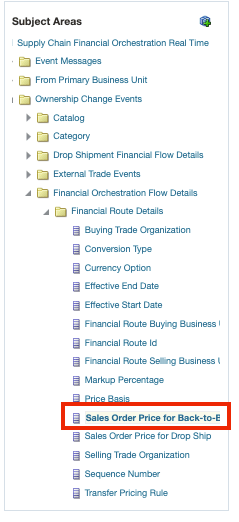
Additional Reporting Attributes Needed for Transfer Order Analytics
You now have better reporting visibility into back-to-back transfer orders that use source document-based transfer pricing. Analysts can review transfer order details, compare pricing related attributes, and create targeted OTBI reports without relying only on transactional inquiry pages.
Steps to enable and configure
You don't need to do anything to enable this feature.
Tips and considerations
- This feature is best applicable if you’re using the existing source document transfer-price basis for back-to-back flows.
- The reporting enhancement improves analysis and visibility. However, it doesn’t change the transfer order execution flow itself.
- Users still need the appropriate OTBI and BI administration access required in your environment.
Key resources
- Oracle Fusion Cloud SCM: Implementing Manufacturing and Supply Chain Materials Management Guide, available on the Oracle Help Center.
- Oracle Fusion Cloud SCM: Using Supply Chain Cost Management guide, available on the Oracle Help Center.
- For OTBI, refer to Oracle Fusion Cloud SCM: Using Supply Chain Cost Management Guide and Oracle Fusion Cloud SCM: Subject Areas for Transactional Business Intelligence in SCM, available on the Oracle Help Center.
Access requirements
Users who are assigned the BI Administrator role and also have permission to open, view, and edit repository files using the Administration tool or the Oracle BI Metadata web service can access this feature.