AI Agent: Sales Order Correction Assistant
Use this assistant to be sure that the orders you import in Oracle Order Management are accurate and ready to fulfill. This agent uses smart matching to examine existing sales orders and automatically detect and fix problems in your import data and orders submitted to fulfillment. The agent automatically resolves most problems based on what it learns over time or guides you to manually fix identified problems.
Get these benefits
This feature helps order operations teams reduce manual rework and clear failed imports more quickly. By automating error analysis, correction, and reprocessing, the Sales Order Correction Agent can improve order throughput, reduce operational overhead, and provide better visibility into what happened for each order and each run.
How it works
- The agent identifies failed orders based on the Workflow Agent Parameter Schedule (by default it goes back seven days from the current date).
- Once the failed orders are identified, the agent analyzes error messages for the order header and order lines and identifies any errors.
- An action request gets created by the agent for the problem orders to enable tracking of corrections.
- The agent Invokes the Smart Match Service which performs fuzzy matching of the error values against the master data (like Customer, Address, Items, Shipment attributes, Billing attributes and so on). If the confidence percentage is over the value specified in the agent (80%) then it uses the value found to update the interface table value, or else it checks the previous 10 orders for the same customer and checks frequently used values for the error attribute.
- The agent updates the interface table data with the corrected values. The corrections done are logged as warning against the action request. During the reprocessing the order may get imported successfully or new errors may be logged. The status would be visible against the action request or the actual order if it was imported successfully.
- The agent triggers the Import Sales Order ESS job to process the corrected order.
Using this feature
Let's say a create order request was sent using a file-based data import with the wrong customer name. For this example we'll say the customer name request was Computer Service Rentals. The correct name in the master data source should have been Computer Service and Rentals. Here's what happens:
- The ESS runs and has an error that the source order couldn't be updated or imported because customer Computer Service Rentals doesn't exist in Order Management Cloud or isn't active.
- The user schedules the agent to process the order with the error.
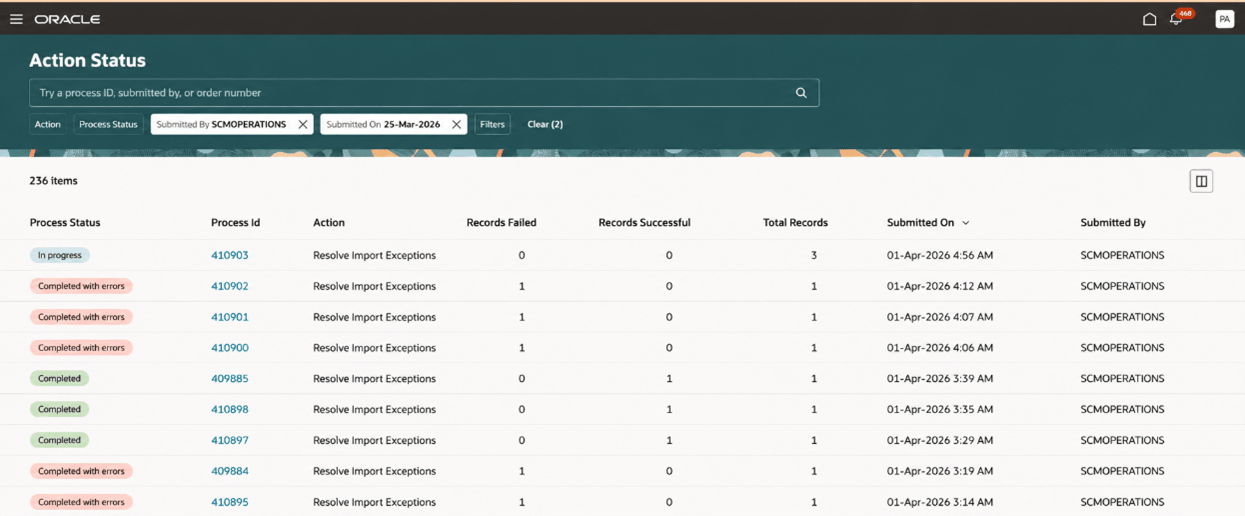
- The action request is created for the source orders being processed by the agent. The action type is Resolve Import Exceptions.
- The process status is shown as in progress if the agent is currently processing. Post processing if the orders were successful imported, the process status would be completed or completed with errors.
This example shows process status types, including actions in progress.
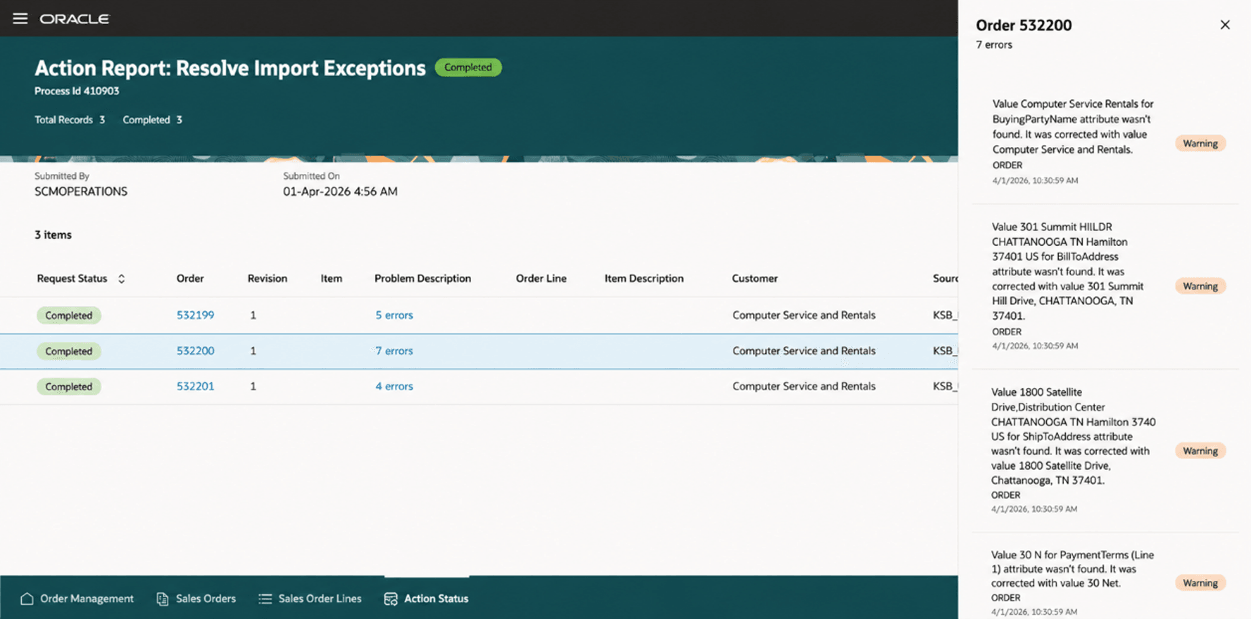
- Click the Process ID to see the error details. The order number is displayed along with the corrected errors. The customer name error is corrected by the agent using the customer master value of Computer Service and Rentals.
In this example, the warnings are also displayed on the order that was imported and are cleared on submit.
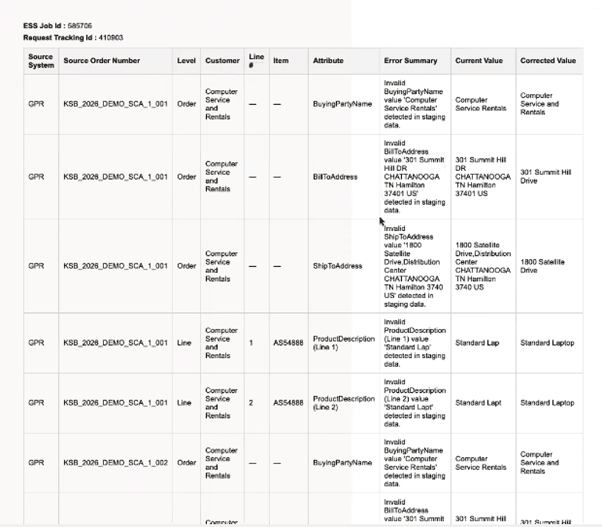
Note that the agent also has an option to send the list of corrections in the run to specified email IDs. This option needs to be setup when the agent is copied and customized. This is an example of the corrected actions list.
Steps to enable and configure
- Go to the Setup and Maintenance work area, then use the Manage Administrator Profile Values task to set the Enable VBCS Progressive Web Application User Interface (ORA_HCM_VBCS_PWA_ENABLED) profile to Y at the site level.
- Go to Home > Tools > AI Agent Studio, then search for Sales Order Correction Assistant.
- Click Actions > Copy Template, enter a suffix, then click Continue. We recommend that you use the suffix to indicate versions, such as 1, 2, 3. For this example, assume you enter 1 for the suffix.
- Click Publish, then confirm that the agent's status is Published.
- Click Agent Teams, then query for Sales Order Correction Assistant 1.
- Copy the value that's in the Agent Team Code attribute. For this example, assume it's SALESORDERCORRECTIONASSISTANT_1.
- To schedule the agent – select Settings icon
This is an example of the details drawer for the correction assistant agent. Notice the tabs for the various agent detail options.
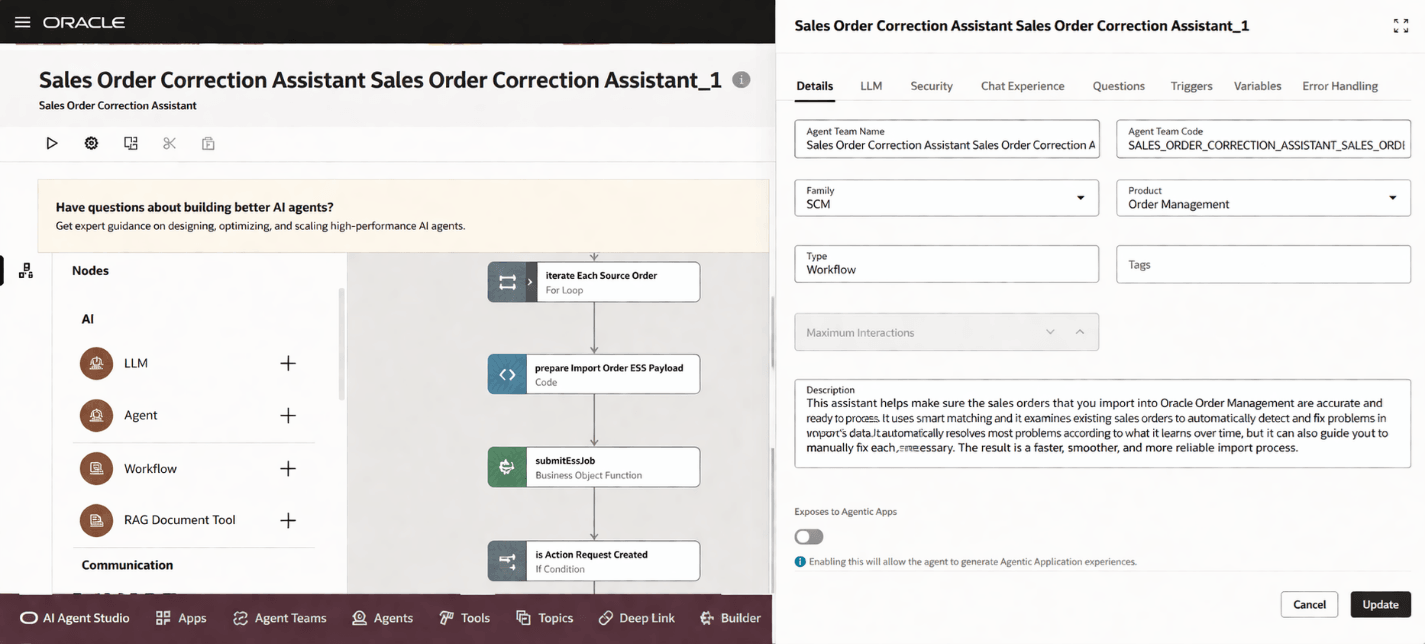
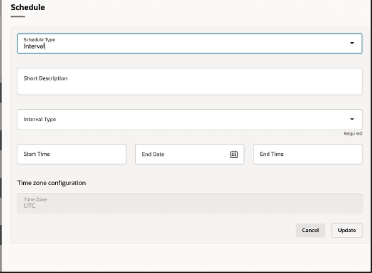
- Click on Triggers tab and schedule a start and end date for the agent to run. You can define email preferences and number of days in the Variables tab.
To view a similar procedure that has additional UI examples, see AI Agent: Data Access Advisor for Sales Orders.
Tips and considerations
- Be sure you are using the Oracle redesigned pages for this feature.
- Note that the corrections are done using the Smart match or fuzzy match feature. If there are matches with confidence score of more than 80 percent then the value is used as is.
- If there is history available, then the attributes are validated against these orders and the confidence score is enhanced in addition to the smart match confidence scores.
- The agent addresses the errors related to customer, addresses, item, UOM, description, salesperson, currency, FOB, freight terms, shipping method, shipment priority, warehouse, subinventory, supplier, supplier site, sales channel, demand class, line type, invoicing rule, and accounting rule.
Key resources
Implementing Order Management
Using Order Management
Access requirements
- To access the Oracle AI Agent Studio for Fusion Applications and manage SCM AI agents, users must be assigned a configured job role that contains these duty roles:
- SCM Intelligent Agent Management Duty (ORA_RCS_SCM_AI_AGENT_MANAGEMENT_DUTY and ORA_RCS_SCM_AI_AGENT_MANAGEMENT_DUTY_HCM both duty role codes are required)
- Fai Genai Agent SCM Administrator Duty (ORA_DR_FAI_GENERATIVE_AI_AGENT_SCM_ADMINISTRATOR_DUTY)
In the Security Console, filter by Roles and Privileges to find the SCM Intelligent Agent Management Duty role. Filter by Roles and Permission Groups to find the Fai Genai Agent SCM Administrator Duty role.
- To interact with AI agents in product pages, users must be assigned a configured job role that contains this duty role:
- Fai Genai Agent Runtime Duty (ORA_DR_FAI_GENERATIVE_AI_AGENT_RUNTIME_DUTY)
- In the Security Console, filter by Roles and Permission Groups to find this duty role.
- To allow users to interact with agents, you must also enable permission groups in the Security Console on those users configured job roles that contain the Fai Genai Agent Runtime Duty role. You can enable permission groups when you manage details for your configured job roles.
Users' configured job roles must also contain privileges that allow access to the pages where AI agents are enabled.
- To View Orders (FOM_VIEW_ORDERS_PRIV)