Selected Self Service Procurement Bug Fixes in This Update
Easier Access to Charge Account Combination Details
With this update, you can more easily review charge account combination details in both edit and read-only modes.
In edit mode, users can open the charge account actions menu and select Combination details to view the segment information for the entered charge account. You can also use the same menu to search for a different combination.
In read-only mode, you can click the charge account link to open the combination details. The details are displayed in a scrollable list, making it easier to review all segment values and descriptions, including longer text entries.
This update provides a more consistent and accessible way to view charge account combination details without relying on hover behavior.
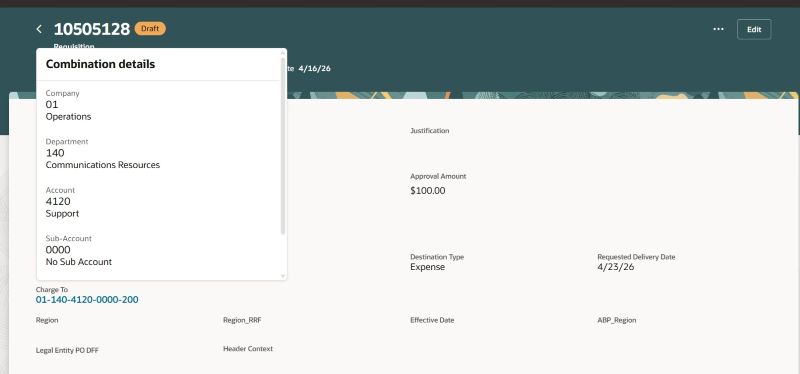
Review Charge Account Details
Oracle reference: 38096291
Identify Charge Account Cross-Validation Errors During Cart Review
When a requisition includes an invalid or missing charge account, the application automatically runs charge account validation on the Cart page loads and displays any related error.
For large requisitions, you can manually trigger Derive Charge Account to see the same validation behavior. This update helps you identify and resolve charge account issues before submitting the requisition.
Oracle reference: 39117588
Retain Last Assigned Buyer for Returned Requisition Lines
With this update, requisitions now retain the last assigned buyer for returned requisition lines when the POR_RETAIN_LAST_ASSIGNED_BUYER profile option is enabled.
Previously, when a buyer reassigned a requisition line and subsequently returned it to the preparer, the assigned buyer information was lost after the preparer edited and resubmitted the requisition.
This update provides a more consistent requisition processing experience by retaining buyer assignments and reducing the need for buyers to be manually reassigned after requisition resubmission.
Oracle reference: 38066601
Steps to enable and configure
You don't need to do anything to enable this feature.