Create a full copy of a demand plan
You can now make a full copy of a demand plan. The full plan copy preserves the complete planning history, including archived versions, the audit trail, and planner notes, enabling traceability, faster scenario creation, better governance, and continuity across planning cycles.
In the Redwood UI, in the Copy Type list in the Duplicate plan drawer, you can select Copy all plan data with no reference to base plan. This selection will make a full copy of the demand plan, including all archives, audit trail entries, notes, exceptions, product launches, and introductions.
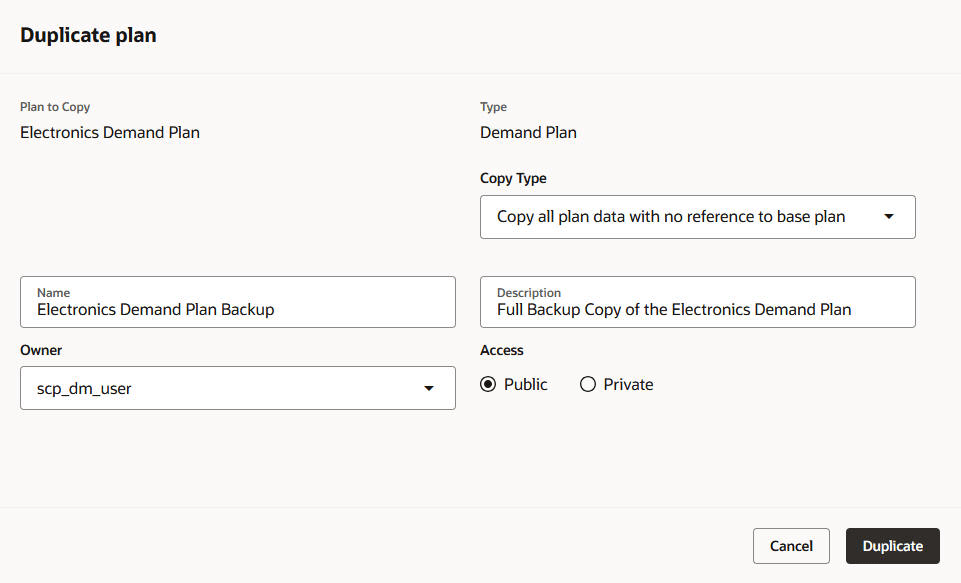
Duplicate plan drawer
The duplicated plan will be a standalone plan with no link to the source plan.
The duplicated plan can be opened and used without being run.
When you use the Copy Plan scheduled process for a demand plan, in the Copy Type list on the Parameters tab in the Process Details dialog box, you can select Copy all plan data with no reference to base plan.
Steps to enable and configure
You don't need to do anything to enable this feature.
Tips and considerations
- In the Classic UI, the Copy Type list in the Duplicate Plan dialog box doesn’t have the option to copy all plan data with no reference to the base plan.
Key resources
Visit https://redwood.oracle.com/ for more information about the Redwood experience.
Access requirements
If you’re using user-defined job roles, then you need to add the privileges identified as new in this update as well as validate that you have the existing privileges that are listed.
| Privilege status | Privilege name and code |
|---|---|
| Existing |
Monitor Demand Management Work Area MSC_MONITOR_DEMAND_MANAGEMENT_WORK_AREA_PRIV |