Use on-hand inventory by grade and expiration date in work orders
Manufacturers need greater visibility into onhand inventory by quality grade and expiration date, so that they can accurately identify inventory that meets production, customer, and regulatory requirements. Segmenting inventory by these attributes improves allocation decisions, reduces spoilage and manual analysis, and helps ensure compliant production and fulfillment. With this update, you can now use the grade and expiration date attributes in material and production transactions.
Inventory striping is visibility of inventory onhand by inventory controlled attributes garde and expiration date. Use grade and expiration date to select and transact lot controlled and serial-controlled onhand inventory when you report materials and complete products in discrete work orders. This feature extends work execution to use the inventory attributes that distinguish eligible onhand inventory, helping you process materials and products with the required quality and date attributes.
For components, you can pass a preferred grade from the work order to Inventory picking and detailed reservation processing. Inventory uses the requested grade to identify eligible onhand inventory. When you don't provide a grade, the existing higher-level picking and reservation behavior continues. For serial-controlled inventory, the feature uses the existing serial attribute flex field framework to capture and map grade and expiration date attributes.
The application also validates whether inventory striping is enabled before it processes supported transactions. This keeps transaction processing, onhand selection, and the Inventory striping model aligned across the user interface, REST services, and FBDI import.
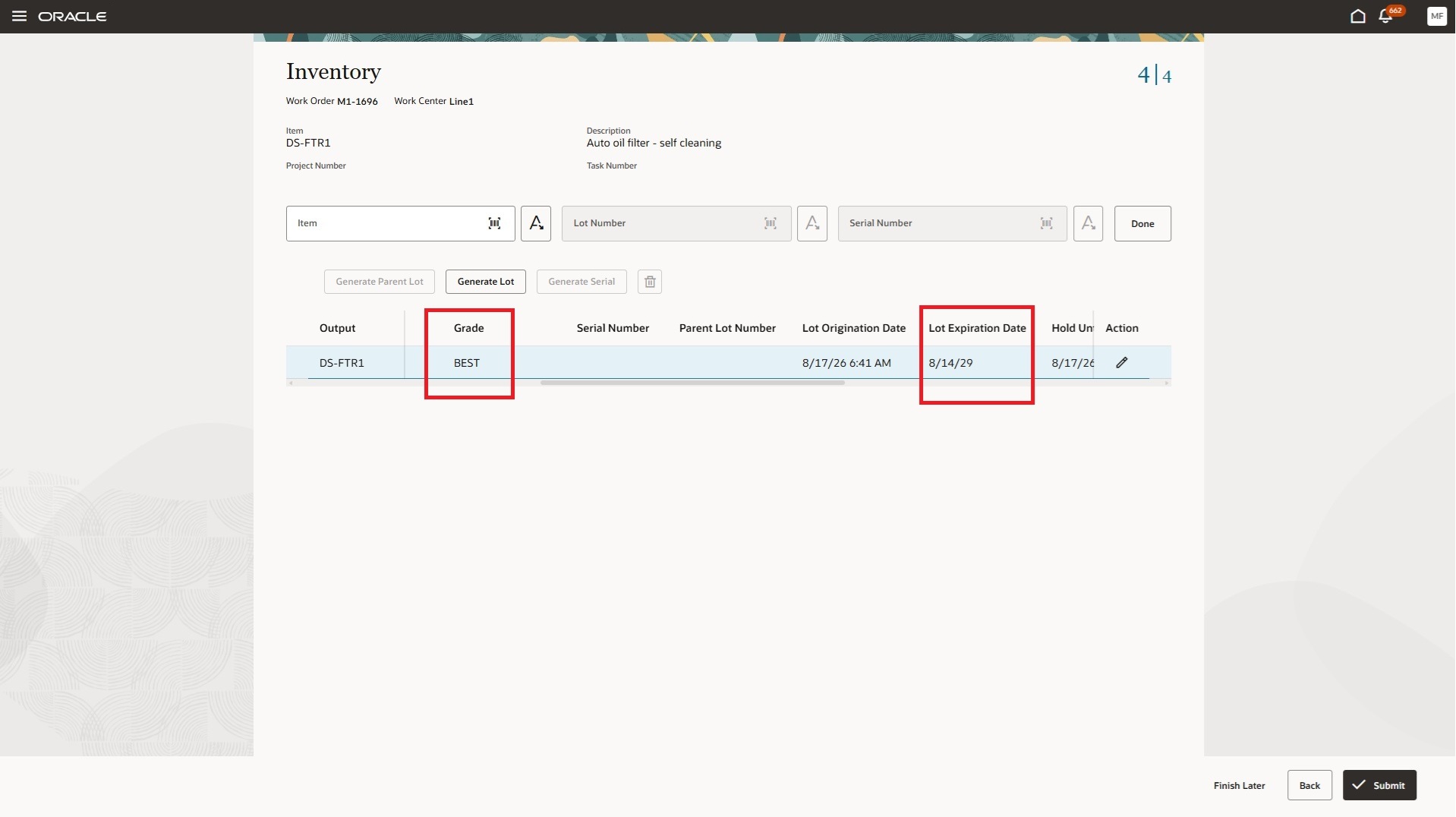
Capture Grade and Expiration date attributes during work order product completion
This update provides the following advantages:
- Supports the use of applicable grade and expiration date attributes in work order material and product transactions.
- Helps keep on-hand inventory configuration aligned with supported manufacturing processing.
- Preserves established lot and serial processing models by supporting grade and expiration date in the existing form.
Here's the demo of these capabilities:
Steps to enable and configure
Configure grade and expiration date attribution on the Configure Inventory Attributes page in Inventory for the lot controlled or serial controlled items that you use in work orders. Refer to the 26D feature Use Grade and Expiration Date as On hand Attributes in Inventory Management for complete details. You can modify the following details on the Configure Inventory Attributes page:
- Attribute Name: The name of the inventory attribute. For example, Item Grade is seeded by default and can be renamed when the inventory attribute is deployed.
- Onhand Column Name: The onhand column to which the inventory attribute is mapped. Item Grade is mapped to the ITEM_GRADE_CODE attribute.
- Status: Determines the lifecycle status of the inventory attribute.
- Value Set: Indicates the value set associated with the inventory attribute.
- Default Value: Indicates the value that defaults during transactions when the inventory attribute is not specified.
- Upgrade Default Status: Indicates the value used to associate existing onhand quantities for items enabled for the inventory attribute but not enabled for lot or serial control.
- Applicable for Item Types: Determines whether an inventory attribute can be enabled for lot controlled items, serial-controlled items, or items that are not enabled for lot or serial control.
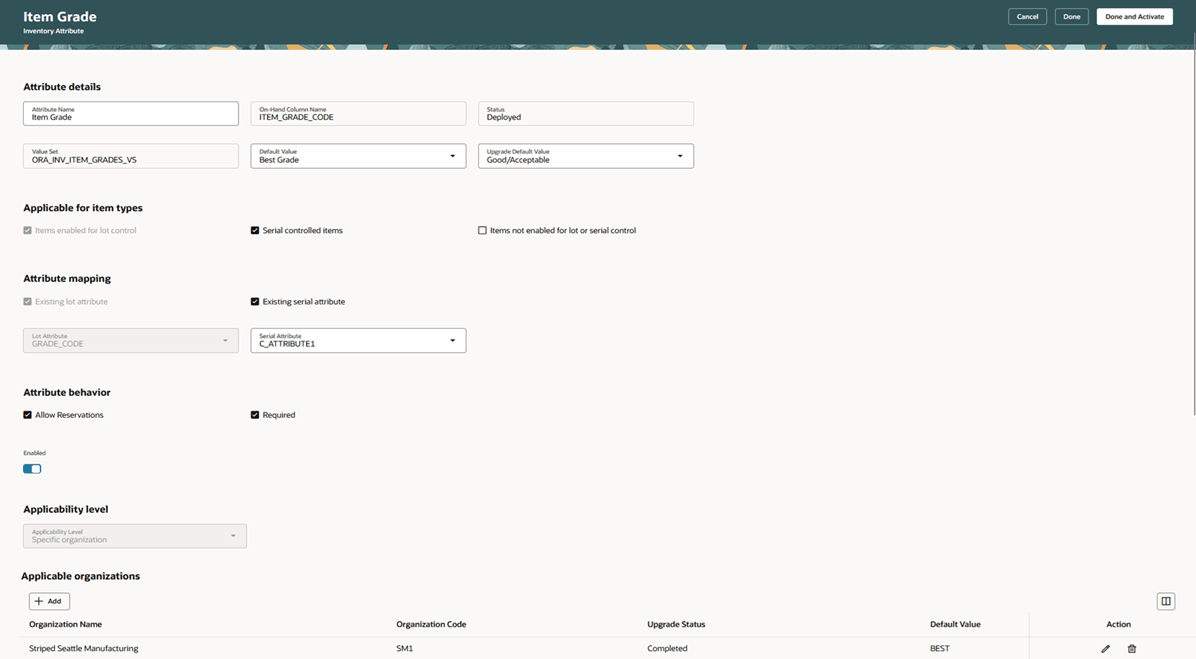
Status Values
- Draft: Indicates that the inventory attribute is being changed. Editing a deployed inventory attribute creates a copy in Draft status.
- Error: Indicates that the inventory attribute is in Error status.
- Deployed: Indicates that the inventory attribute is deployed and available for transactions.
- Redeploy Needed: Indicates that applicable organizations have been added to an inventory attribute, but the attribute has not been deployed.
- Deploying: Indicates that the Deploy Inventory Attributes scheduled process is still running.
Attribute Mapping
Attribute mapping determines whether an inventory attribute is already used as an existing lot or serial attribute.
- Lot Attribute: Item Grade is mapped to the grade_code ininv_lot_numbers. Item Expiration Date is mapped to expiration date in inv_lot_numbers.
- Serial Attribute: Indicates that the inventory attribute is mapped to an existing serial-number attribute.
Reservation and Required Attributes
By default, both Item Grade and Item Expiration Date are enabled for reservations and required for transactions.
Enabled: Turn on the Enabled Flag to enable the the inventory attribute.
Applicability Level
Applicability level determines the level at which the inventory attribute applies to transactions. The applicability can be set at these levels:
- All Organizations: The inventory attribute applies to all items in all inventory organizations.
- Specific Organization: The inventory attribute applies to specific items.
- Category: The inventory attribute applies to the items associated with a specific category.
Choose Default value for an inventory attribute for each applicable organization. This defaults the inventory attribute when you perform transactions for items which are enabled for serial control or items which aren't enabled for lot or serial control.
Click the Done and Activate button after you have updated the attribute details. This launches the Deploy Inventory Striping Attributes scheduled process.
To use a preferred grade for picking and detailed reservations, enable the applicable 26C feature "Specify the Preferred Grade of Materials and Products in a Recipe" opt-in and enter a preferred grade for the component.
Tips and considerations
- The striping is supported only for lot, serial or lot and serial items in manufacturing organizations.
- The application checks striping enablement before processing transactions submitted through the user interface, REST services, or FBDI imports.
- If you enable striping for inventory control attributes at the site or plant level, update REST and FBDI integrations to submit a separate manufacturing transaction for each lot. This is consistent with the Redwood user interface processing model.
- In a striping-enabled organization, you can't update the origination date or expiration date for an existing lot that has onhand inventory through manufacturing transactions. You can update a preassigned new lot that doesn't have onhand inventory.
- For serial-controlled items, capture serial attributes in the serial setup and map the serial attribute to the striping attribute.
- Serial attribute Descriptive Flexfields aren't updateable for Inventory issue transactions to Manufacturing, including component issues, product returns, and negative issues.
- Mobile pages don't support serial Descriptive Flexfields in 26D.
- When a preferred grade isn't provided, existing picking and reservation processing continues without grade input. When a preferred grade is provided, Inventory returns or reserves onhand inventory that honors the requested grade.
- Refer to the 26D feature "Use grade and expiration date as onhand attributes to enable viewing availability, reserving inventory, and picking stock by grade or expiration date across all item types." in Inventory Management for details on attribute definitions.
Key resources
- Watch the 26D feature 'Use onhand inventory by grade and expiration date in work orders' demo.
- Refer to the What's New entry for the related process manufacturing feature "Use on-hand inventory by grade and expiration date in production batches".
- Oracle Fusion Cloud SCM: Refer to the Using Manufacturing guide, available on the Oracle Help Center.
- Oracle Fusion Cloud SCM: Refer to the Implementing Manufacturing and Supply Chain Materials Management guide, available on the Oracle Help Center.
Access requirements
If you are using custom job roles, then you need to validate that you have the previously delivered privileges listed.
| Privilege status | Privilege name and code |
|---|---|
| Previously delivered |
Report Operation Transactions WIP_REPORT_OPERATION_TRANSACTIONS_PRIV |
| Previously delivered | Report Material Transactions WIP_REPORT_MATERIAL_TRANSACTIONS_PRIV |