Define customer inspection plans and compare inspection results
Organizations often enforce stringent internal specifications during production and inventory processes to manage variations in product quality and consistently meet broader external specifications. They also need the flexibility to evaluate existing inspection results against different customer specifications to determine product conformance and appropriately allocate or reallocate products for shipment.
With this feature, you can do the following:
- Create an inspection plan for a product or catalog and category that applies to all customers or selected customers and customer sites
- Compare final work in process or inventory inspection results against the customer inspection plan specifications
- Copy inspection results for inspection characteristics in common and enter additional inspection characteristics results
- Automatically determine whether inspection results pass or fail based on the customer inspection plan
Using the Redwood user experience, you can create an inspection plan with the Customer type for an item or an item catalog and category. The plan specifications define the customer's acceptance requirements. In the plan applicability, you can specify selected customers and, optionally, customer sites. To make the plan applicable to all customers, leave the applicability blank.
After you create the plan, you can search for it by selecting Customer as the inspection plan type.
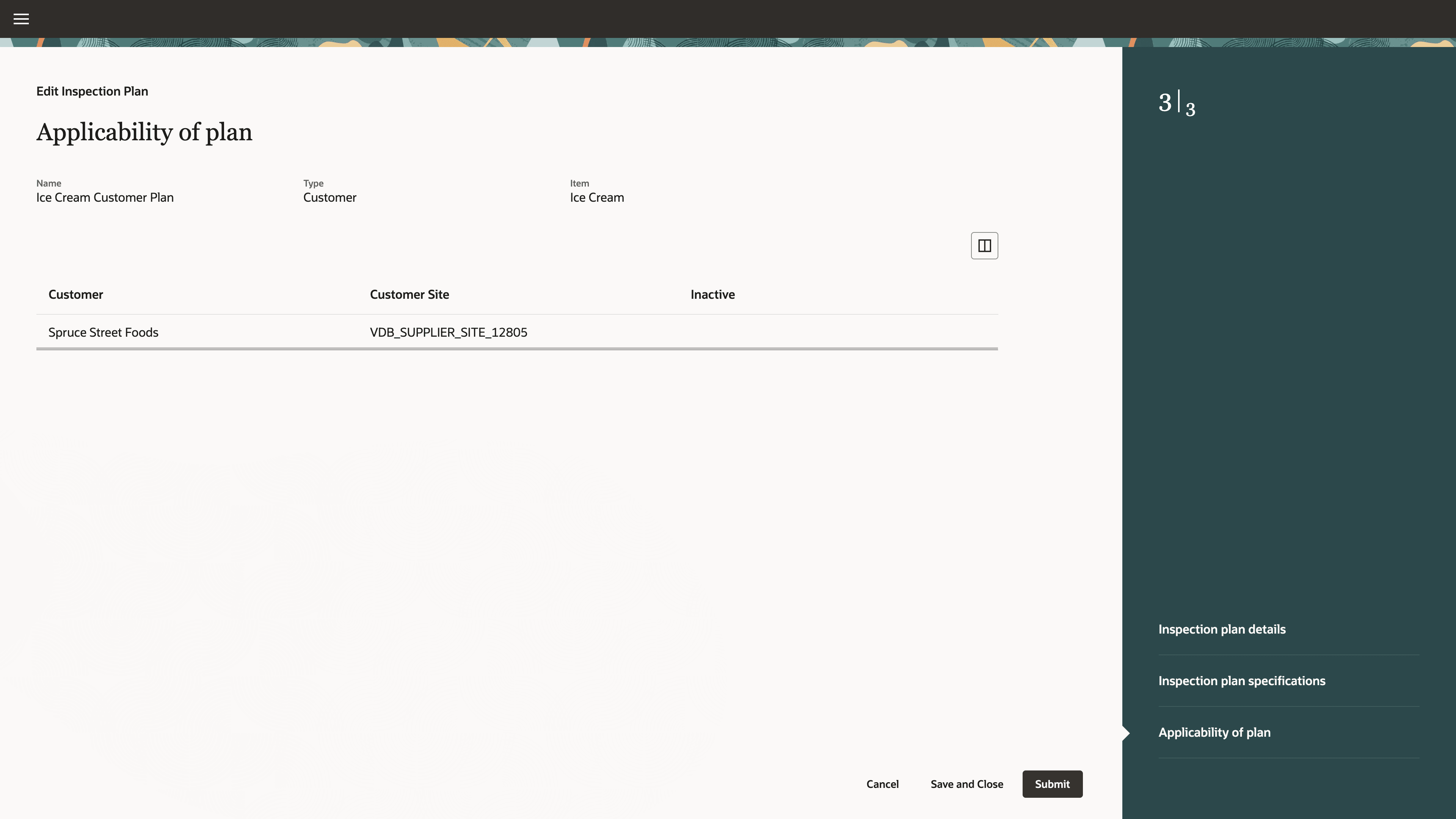
Inspection Plan Applicability for a Customer and Customer Site
Customer inspection plans leverage in process and final inspections to evaluate whether the product meets conformance for a customer. You can search for and edit a work in process (WIP) or inventory inspection that has completed with a final disposition of Accepted, Rejected, or Completed, then use the Match with Customer Plan action to compare the inspection results against the customer inspection plan.
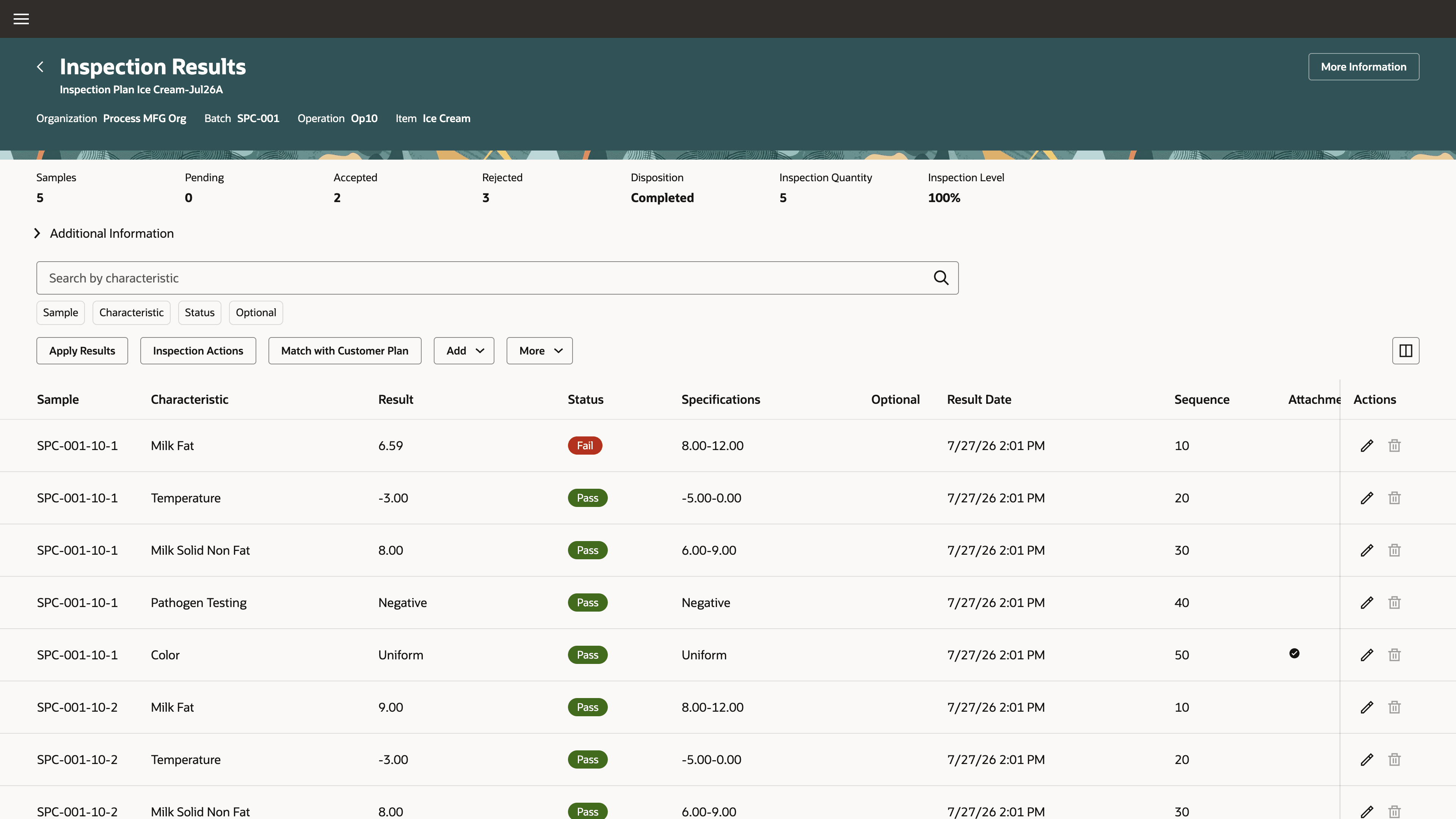
Original Inspection Results for Match with Customer Plan
In the unified view of the original WIP or inventory specifications and customer specifications, the selected sample or serial represents the final inspection results used as the basis for specification comparison and disposition. The existing inspection results are automatically evaluated as pass or fail against the selected customer inspection plan specifications. If the evaluation meets your requirements, you can save the results comparison.
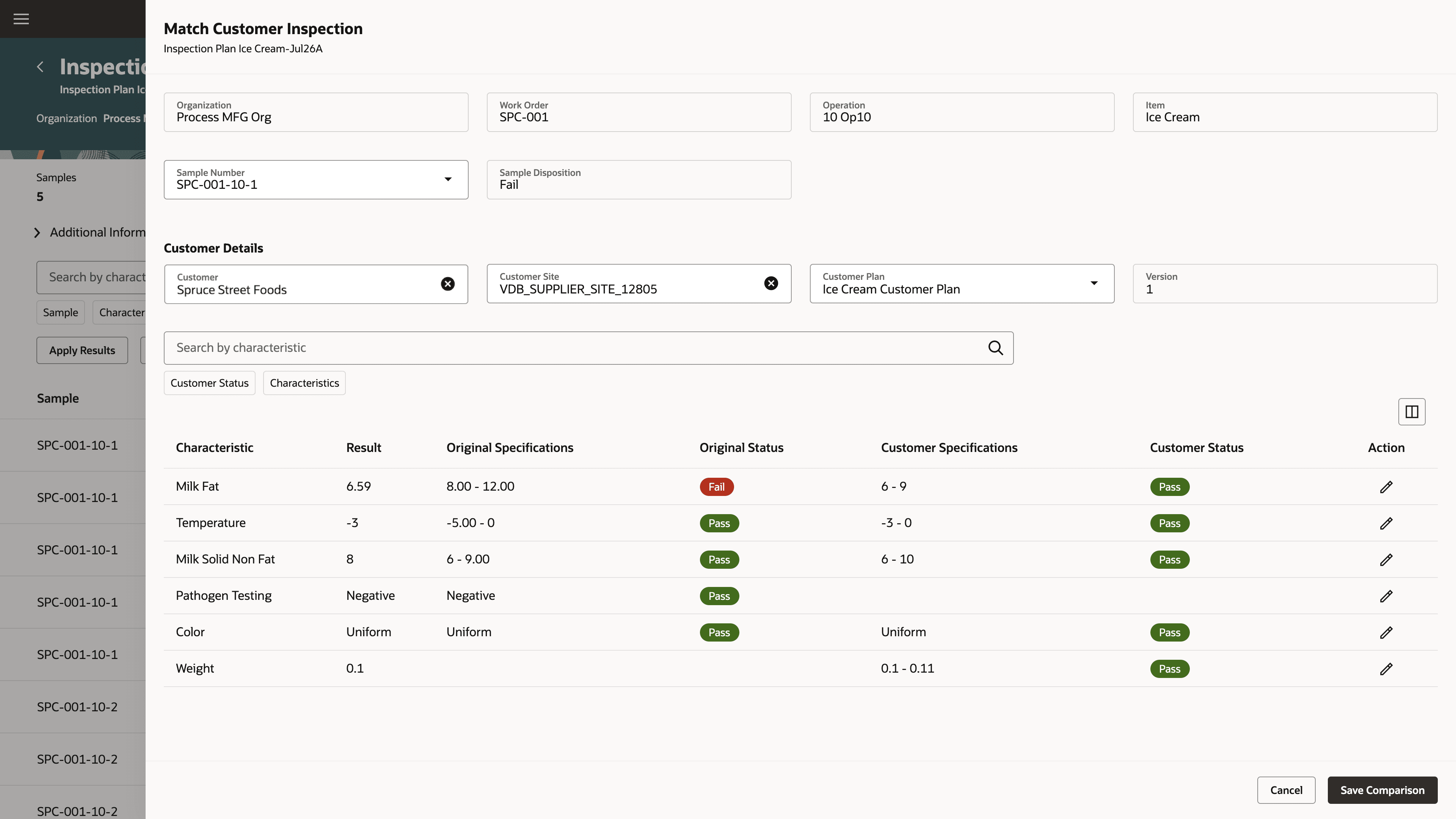
Results Comparison between Original and Customer Specifications
If the customer inspection plan requires additional inspection characteristic results, you can enter those results against the selected sample to determine conformance. When the inspection fails to meet the specifications for a specific customer, you can select another customer inspection plan and repeat the results comparison to determine acceptability and record the disposition.
For traceability purposes, you can view the inspection and use the View Specification Dispositions action to see the results compared against different customer inspection plans.
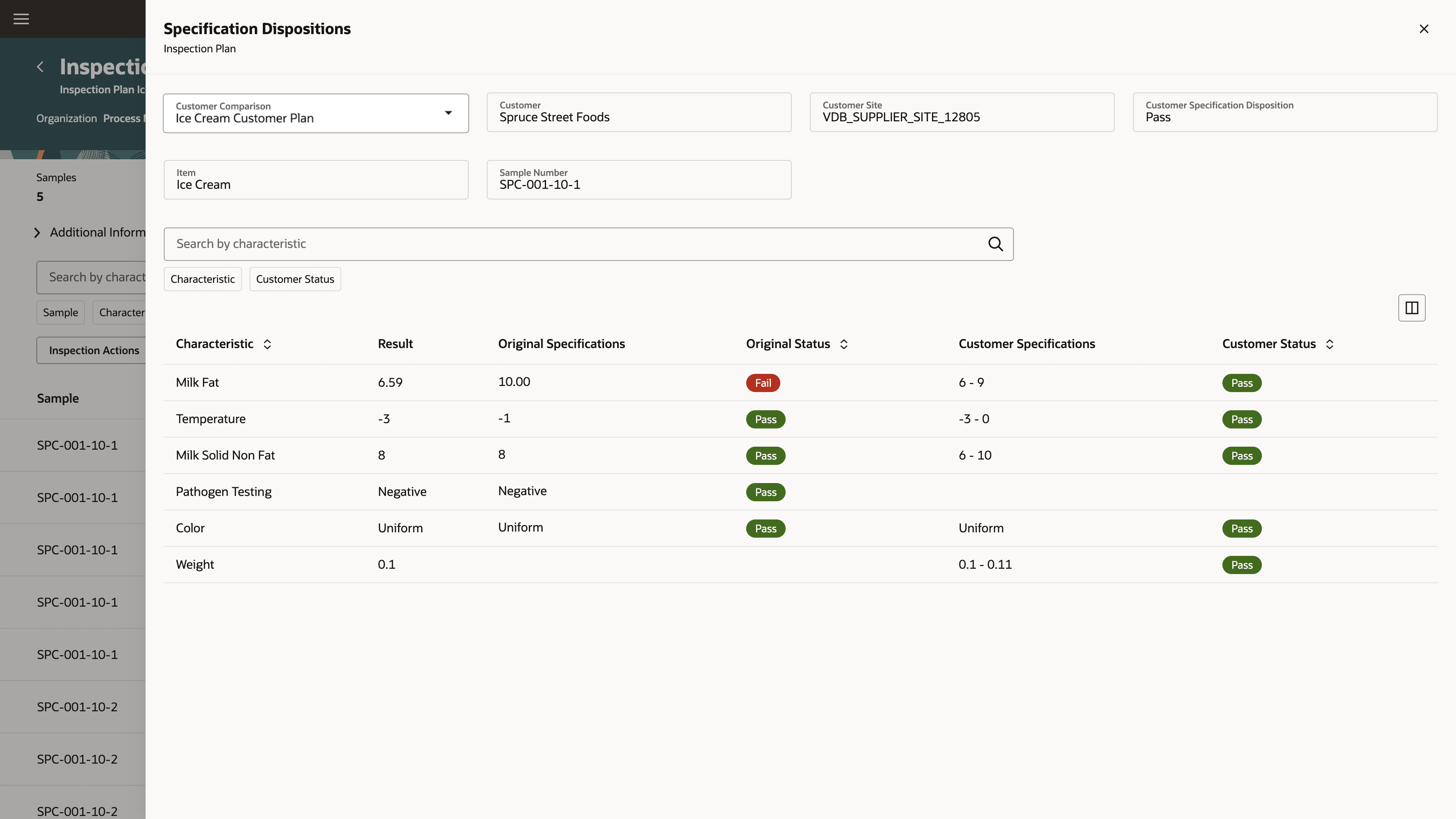
View Customer Specification Dispositions for an Inspection
REST API changes:
-
Inspection Plans REST API: You can now create customer inspection plans, define applicability for all customers or specific customers and customer sites, and find applicable customer inspection plans.
-
Inspection Events REST API: You can now create customer inspections from existing WIP or inventory inspection results, record the sample disposition, and add results required for customer specification comparison.
Results comparison reduces manual re-entry of inspection results and enables consistent evaluation of product quality against customer-specific requirements.
Steps to enable and configure
Use the Opt In UI to enable this feature. For instructions, refer to the Optional Uptake of New Features section of this document.
Offering: Manufacturing and Supply Chain Materials Management
- Enable the opt-in for the "Define Customer Inspection Plans and Compare Inspection Results" feature.
- Create a Redwood inspection plan with the Customer type for an item or item catalog category.
- Add customer specifications to the inspection plan.
- Define whether the plan applies to all customers or to specified customers and, optionally, customer sites. If you do not list any customers, the plan applies to all customers.
- From work in process or inventory inspection results with an Accepted, Rejected, or Completed status, start the customer specification comparison.
- Select the sample or serial when more than one is available, enter the customer and customer site, and select a matching customer inspection plan.
- Review the original results and specifications alongside the customer specifications. Enter any missing customer results as needed. You can't change any of the existing result values.
- Save the customer specification comparison if the results are satisfactory.
Tips and considerations
- Customer inspection plans are only available using the Redwood user experience. Enable the profile option for Redwood inspection plans to use this feature.
- Customer inspection plans can apply to all customers or specified customers and optionally customer sites. You can't change the plan applicability after approving the plan.
- Customer inspection plans don't directly drive customer inspections. Therefore the inspection plan can be optional or mandatory and defaults to the 100% inspection level.
- You can't define action rules for customer inspection plans at this time.
- You can copy a WIP or inventory inspection plan to create a customer inspection plan.
- Customer inspections and results comparison are only available in the Redwood user experience. Enable the profile option for Redwood inspections to use this feature.
- Customer inspections can be created only through results comparison. You can edit a WIP or inventory inspection as the basis to match with a customer inspection plan.
- You can compare only final inspection results with an Accepted, Rejected, or Completed status. If multiple samples or serials exist, you select one for the results comparison.
- You can enter missing result values to the sample or serial, but you can't edit copied result values.
- You can't use OTBI to include customer inspection plans, customer inspections, results comparison, and specification disposition at this time.
Key resources
- Oracle Fusion Cloud SCM: Using Quality Management, available on the Oracle Help Center.
- Oracle Fusion Cloud SCM: REST API for Supply Chain Management, available on the Oracle Help Center.
Access requirements
Users who are assigned a configured job role that contains these privileges and codes can access this feature.
| Privilege status | Privilege name and code |
|---|---|
| Existing |
Edit Inspection Plans QA_EDIT_INSPECTION_PLANS |
| Existing |
View Inspection Plans QA_VIEW_INSPECTION_PLANS |
| Existing |
Edit Inspection Results QA_EDIT_INSPECTION_RESULTS |
| Existing |
View Inspection Results QA_VIEW_INSPECTION_RESULTS |