Allow multisupplier access in Supplier Portal
Supplier portal users can now use a single contact user account to access and manage transactions for multiple suppliers in the portal. They can select the supplier context when viewing and taking action on supported transactions such as purchase orders, purchase agreements, shipments, invoices, and payments.
Internal supplier administrators can grant and update the contact's user account access for multiple suppliers or supplier sites, including suppliers that aren't related through a parent-child hierarchy. This capability streamlines supplier administration and eliminates the need to maintain multiple user accounts for a supplier contact.
After the feature is enabled, the user account data access UI for a supplier contact changes to a single-table layout in both the internal supplier profile and the supplier portal company profile flows. Only internal users can grant an external supplier user unrestricted access to any supplier. This capability doesn't extend to supplier portal self-service administrator users.
The capability to provide access to multiple suppliers within a parent child hierarchy remains. Both internal users and supplier portal self-service administrator users can continue to do so.
The application creates the contact in each supplier they've been granted access to. Contact information is synchronized across suppliers. This allows the same contact to be added to transaction documents for different suppliers. The contact can view transactions in supplier portal for all suppliers added to the contact's data access. For example, contact John Allens has user account data access to three suppliers: First Software, Blue Semiconductor, and Seven Corporation. You can find John Allens’s contact information in the profiles of all three suppliers. John Allens has only one user account, with one username, one set of roles, and one set of data access consisting of these three suppliers. The roles and data access control what actions John can perform and which transaction data John can view in supplier portal.
To revoke a user’s access to a supplier, remove the contact user account data access for that supplier. The contact status for that supplier will be set to inactive, which prevents the contact from being added to future transaction documents for that supplier. In addition, the contact user account will no longer be able to view transactions for that supplier in the portal.
Note that the contact user account will remain active as long as it has at least one role and is assigned to at least one supplier in data access.
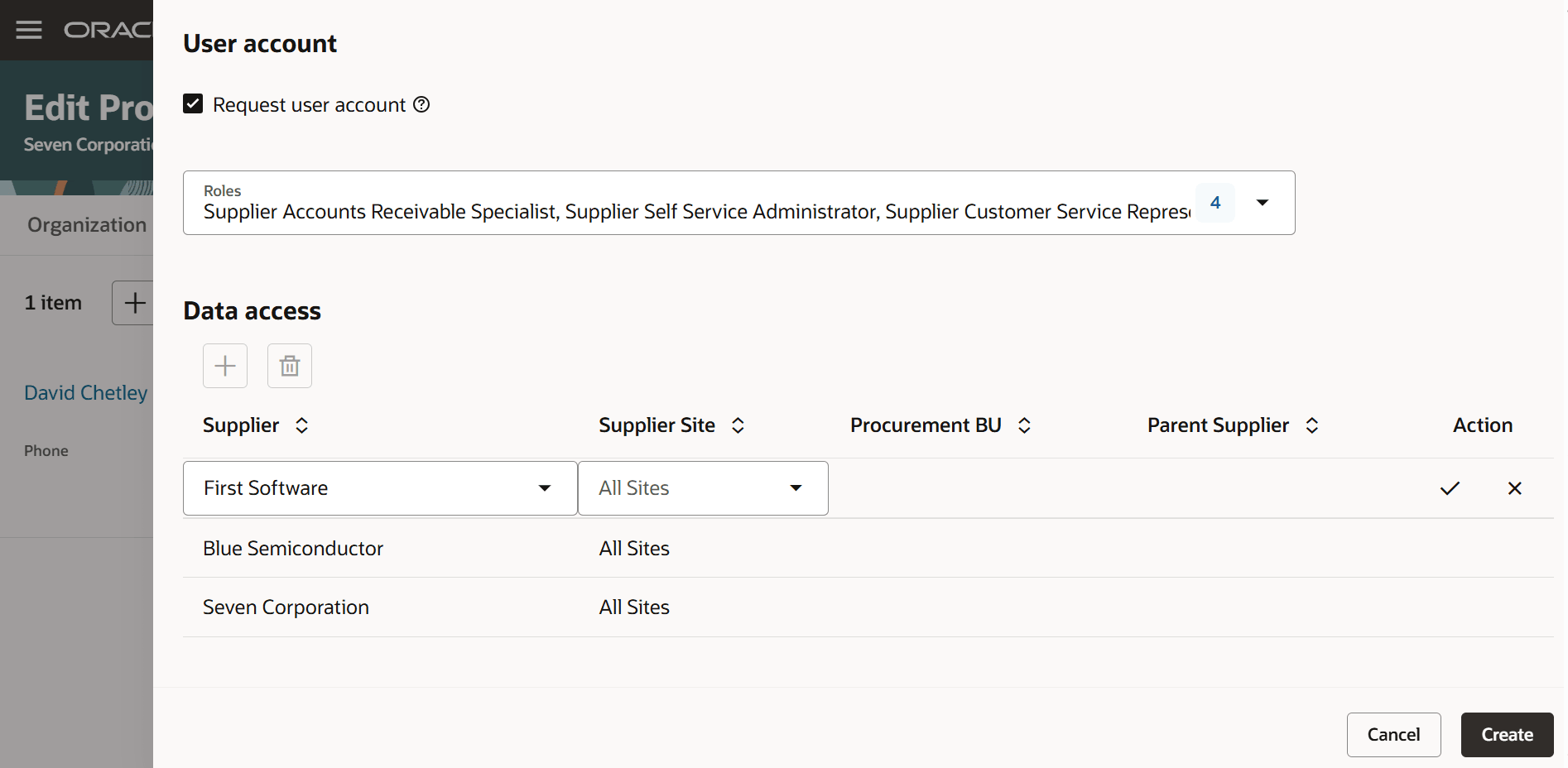
Assign multisupplier data access to a single contact user account
A contact with multisupplier data access can log into the supplier portal using a single login and manage transactions for the suppliers that the contact has access to. In this update, the contact can manage the following transaction documents:
- Orders
- Agreements
- Advance shipment notices
- Receipts and returns
- Invoices and payments
Negotiations and company profile are planned for a future release.
When the feature is opted in, and a supplier contact with access to multiple suppliers signs in to Supplier Portal, the application automatically displays supplier as a filter chip and search results column on the Purchase Orders and Purchase Agreements search pages. Select one or more suppliers to filter the results, or remove filters to view documents for all suppliers based on the data access. If the feature isn't enabled, or the logged in supplier contact has access to only one supplier, the supplier filter follows the default search view configuration.
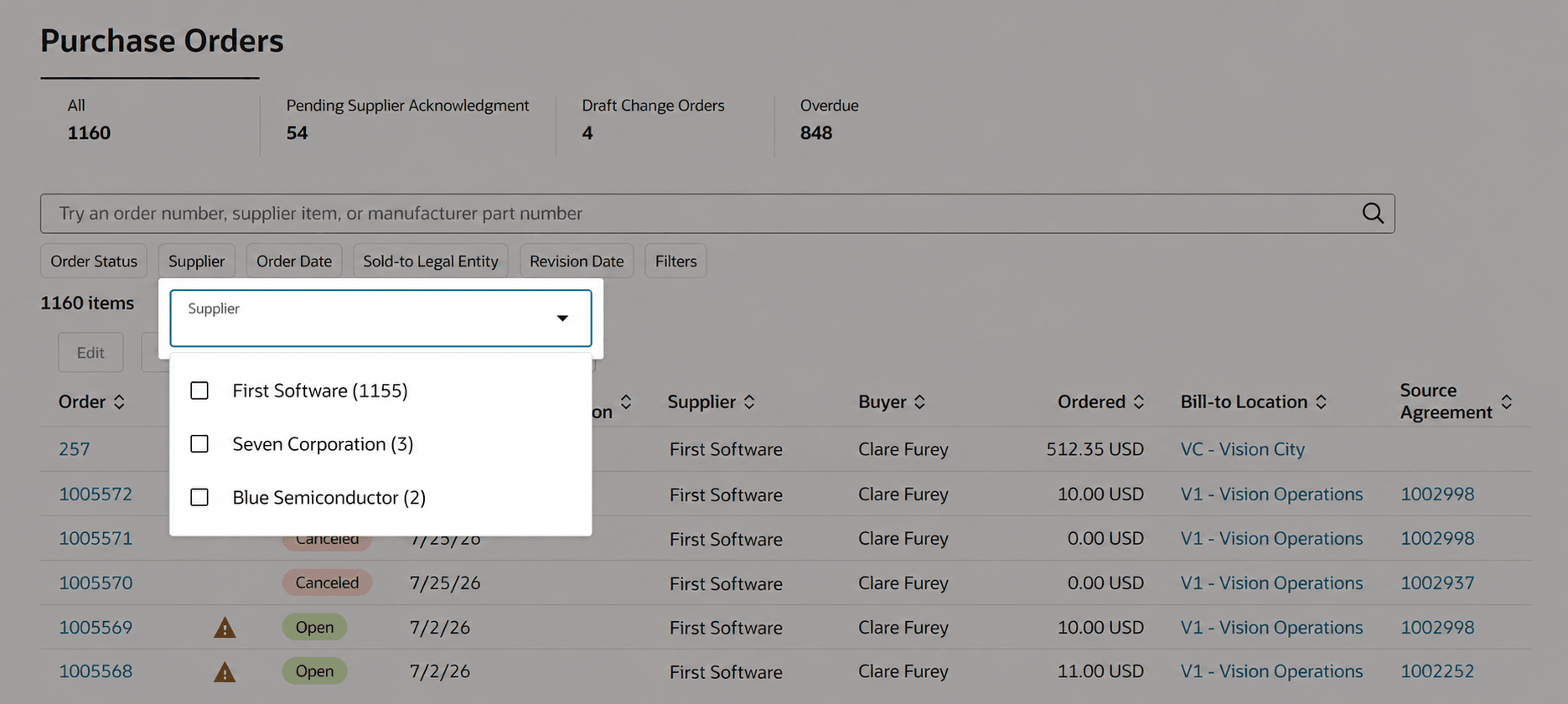
Select a supplier to manage orders
Steps to enable and configure
Use the Opt In UI to enable this feature. For instructions, refer to the Optional Uptake of New Features section of this document.
Offering: Procurement
To use this feature, you must enable the following features and profile options if you haven't already. Refer to the Set Profile Option Values topic for instructions on enabling a profile option.
Features:
- Allow multisupplier access in Supplier Portal - new
- Redwood: Enable the New Supplier Portal Home Page Experience - existing
Profile options for provisioning contact user account data access:
- Redwood Company Profile in Supplier Portal Pages Enabled (ORA_POS_COMPANY_PROFILE_SUPPLIER_PORTAL_REDWOOD_ENABLED) - existing
- Redwood Page for Supplier Management Enabled (ORA_POZ_SUPPLIER_MANAGEMENT_REDWOOD_ENABLED) - existing
- Redwood Pages for Supplier Profile Enabled (ORA_POZ_SUPPLIER_PROFILE_REDWOOD_ENABLED) - existing
Profile options for managing transaction documents in the supplier portal:
- Redwood Page for Purchase Orders Enabled for Supplier Portal (ORA_PO_SUPPLIER_PORTAL_PURCHASE_ORDERS_REDWOOD_ENABLED) - existing
- Redwood Page for Purchase Agreements Enabled for Supplier Portal (ORA_PO_SUPPLIER_PORTAL_PURCHASE_AGREEMENTS_REDWOOD_ENABLED) - existing
- Redwood Page for Supplier Portal Invoices and Payments Enabled (ORA_AP_INVOICES_PAYMENTS_SUPPLIER_PORTAL_REDWOOD_ENABLED) - new
After you opt in, perform these steps:
- Create a custom role that is able to manage supplier profile. You can start with copying the predefined Supplier Administrator or Supplier Manage role.
- Assign the new privilege Manage Multiple Supplier Access for a Supplier Contact (ORA_POZ_MANAGE_MULTI_SUPPLIER_ACCESS_SINGLE_CONTACT_PRIV) to the custom role.
- Assign the custom role to your supplier administrator users.
Tips and considerations
Note the following application behaviors after the feature is opted in:
- To manage data access for suppliers in a parent-child hierarchy, internal administrator users must be assigned the new privilege Manage Multiple Supplier Access for a Supplier Contact.
- Supplier administrator users who don't have the new privilege can assign data access only for the current supplier they are managing.
- The new privilege should be assigned only to internal users who need to manage multisupplier data access for supplier contact user accounts. There is no functional behavior change for portal admin users, such as self-service supplier administrators. They can continue to manage data access only within the parent-child hierarchy, as they can do today.
- Parent-child hierarchy-based data access established before the feature is enabled will remain intact. Supplier portal users with existing parent-child hierarchy-based data access will continue to work the same way as they do today.
- To remove access to a supplier, remove the data access for that supplier. This will inactivate the contact for that supplier.
- To remove access to all suppliers, inactivate the user account. This will remove data access for all suppliers and inactivate the contact for all suppliers. The user account will no longer be able to access supplier portal.
Key resources
For information about invoices and payments in Redwood Supplier Portal, refer to the Redwood Supplier Portal Invoice Submission and Status Tracking feature in the Oracle Fusion Cloud Financials 26D What's New.
Access requirements
If you're using custom job roles, then you need to add privileges identified as new in this update as well as validate that you have the existing privileges listed.
| Privilege status | Privilege name and code | Privilege purpose |
|---|---|---|
| New | Manage Multiple Supplier Access for a Supplier Contact (ORA_POZ_MANAGE_MULTI_SUPPLIER_ACCESS_SINGLE_CONTACT_PRIV) | Allow internal users to manage multisupplier access. |
| Existing | Maintain Supplier (POZ_MAINTAIN_SUPPLIER_PRIV) | Allow internal users to manage supplier profile. |
| Existing | Maintain Supplier Contact (POZ_MAINTAIN_SUPPLIER_CONTACT_PRIV) | Allow internal users to manage supplier contact. |
| Existing | Maintain Supplier Contact User Account (POZ_MAINTAIN_SUPPLIER_CONTACT_USER_ACCOUNT_PRIV) | Allow internal users to manage supplier contact user account. |
| Existing | Create Profile Change Request as Supplier (POZ_CREATE_PROFILE_CHANGE_REQUEST_AS_SUPPLIER_PRIV) | Allow supplier users to manage company profile in supplier portal. |
| Existing | Request Supplier Contact Change as Supplier (POZ_REQUEST_SUPPLIER_CONTACT_CHANGE_AS_SUPPLIER_PRIV) | Allow supplier users to manage contact change in supplier portal. |
| Existing | Request Supplier Contact User Account Change as Supplier (POZ_REQUEST_SUPPLIER_CONTACT_USER_ACCOUNT_CHANGE_AS_SUPPLIER_PRIV) | Allow supplier users to manage contact user account change in supplier portal. |
If you're using custom job roles, then you need to add the duty roles identified as new in this update as well as validate that you have the existing duty roles listed. These duty roles are needed to manage transaction documents in supplier portal.
| Duty role status | Duty role name and code |
|---|---|
| Existing | Purchase Agreement Management as Supplier (ORA_PO_BPA_CPA_CHG_AS_SUPPLIER_DUTY) |
| Existing | Purchase Order Management as Supplier (ORA_PO_PO_CHGS_AS_SUPPLIER_DUTY) |
| Existing | Shipment Management Supplier-Facing (ORA_RCV_SHIPMENT_MANAGEMENT_AS_SUPPLIER_DUTY) |
| Existing | Self Service Payables Invoice Entry (ORA_AP_SELF_SERVICE_PAYABLES_INVOICE_ENTRY_DUTY) |