Redwood: Renew Contracts
Renew Contracts and Contract Lines in Redwood
You can now renew eligible contracts directly from the Redwood Contracts user interface. This feature brings contract and contract-line renewal capabilities from the existing ADF experience into Redwood and provides a more guided way to configure, initiate, and review renewals.
The Redwood renewal experience includes these capabilities:
- Configure renewal rules for supported contract types in Manage Contract Types UI
- Define whether a contract is renewed manually or automatically.
- Renew a contract directly from the Renew action in Redwood.
- Configure the notice period, renewal duration, and co-termination behavior.
- Renew eligible contract lines independently for supported buy agreements.
- View renewal history for renewed contracts
- Run the Renew Contracts and Lines Using Renewal Settings scheduled process to renew eligible contracts and lines based on configured renewal settings.
- Determine the status of a renewed contract based on approval and customer or supplier acceptance requirements.
- Use REST service support for contract renewal scenarios.
Supported Contracts
Renewal in Redwood is supported for:
- Buy and Sell repository contracts.
- Buy agreements with Intent = Buy, Contract Class = Agreement, and Lines enabled.
Renewal of fulfillment lines and contract consolidation during renewal aren't supported.
Renewal is available only for:
- Contracts in Active or Expired status.
- The latest version of the contract.
- Non-evergreen contracts that have an end date.
In the renewal process, the existing contract is referred to as the source contract, and the newly created renewal is referred to as the target contract.
Configure Renewal Settings for Contract Types
Use the Renewal tab in the Manage Contract Types UI to define the default renewal behavior for supported contract types.
You can configure settings such as:
- Renewal Process – Specify whether contracts of the contract type are renewed Manually, Automatically, or not renewed.
- Customer Acceptance or Supplier Acceptance – Specify whether external acceptance is required for automatic renewals, based on the contract intent.
- Internal Approval – Specify whether renewed contracts require internal approval.
- Minimum Renewal Duration – Specify the minimum duration for which a contract is renewed.
- Renew Before End Date – Specify how many days before the contract end date it can be renewed by the scheduled process.
- Renewal Level – For contract types with lines, specify whether to renew All lines or Eligible lines.
- Co-terminate – For contract types with lines, specify whether renewed lines should use the Furthest end date or remain independently dated.
- Terms Version – For contract types with terms authoring enabled, specify whether to use the Source contract terms or the Latest terms template.
These settings establish the renewal behavior for contracts created using the contract type. Users can further manage renewal settings for individual contracts where applicable. For a contract, contract-level settings take precedence over the corresponding contract type-level settings.
Configure Renewal Settings
A new Renewal Settings tab is available in the Edit Contract page for supported contract types. The tab enables you to define how the contract should be renewed.
You can configure the following settings:
Renewal Process
Choose how the contract should be renewed:
- Manual – Creates the renewed contract in Draft status for review and further processing.
- Automatic – The value in the fields Internal Approval and External Acceptance will decide the status of the new contract
- Do Not Renew – Prevents the contract from being renewed.
- Blank – Supported for contracts created using the existing ADF experience.
Renewed Contract Status
| Internal Acceptance | Customer or Supplier Acceptance | Renewed Contract Status |
| Not required |
Required |
Renewed contract is created in Pending Signature status if signature is enabled for the contract type, if not contract is created in active status |
|
Not required |
Not Required | Renewed contract is created in Active status |
|
Required |
Required |
Renewed contract is submitted for approval. Status of the contract is Pending Approval |
| Required | Not Required | Renewed contract is submitted for approval. Status of the contract is Pending Approval |
A contract can be renewed manually from the Renew action or through the scheduled process when the configured renewal settings permit renewal.
Renewal Notice Period
Specify the number of days in advance that a party must provide a notice to the other party.
Renew Before End Date
Specify how many days before the contract end date the contract becomes eligible for renewal through the scheduled process.
Minimum Renewal Duration
Specify the minimum number of days for which the contract should be renewed. When the source contract duration is shorter than this value, the minimum renewal duration is used for the target contract.
Co-terminate
For contracts with lines, specify whether renewed lines should be aligned to a common end date:
- Furthest End Date
- Do Not Co-terminate
These settings can be configured at the contract type level and, where applicable, at the contract level.
Renew a Contract from the Edit Contract UI
You can manually renew an eligible contract using the Renew action from the Edit Contract page.
The Renew action is available when:
- The contract is a supported contract type.
- The contract is in Active or Expired status.
- The contract is the latest version.
- The contract isn't evergreen and has an end date.
When you select Renew, a renewal drawer opens where you can specify the renewal duration and period. The renewed contract start date is the day after the source contract end date. The target contract end date is then calculated using the specified renewal duration and period. If you don't provide these values, the source contract duration is used.
When a contract is renewed manually, the target contract is created in Draft status.
Renew Contracts Through Scheduled Process
You can use the scheduled renewal process to identify and renew eligible contracts.The system evaluates the configured renewal settings and determines whether the contract is eligible for renewal based on its end date and renewal horizon.
You can also configure whether the renewed contract requires:
- Internal approval
- Customer acceptance for sell-intent contracts
- Supplier acceptance for buy-intent contracts
These settings determine the status of the renewed contract.
For example, a renewed contract can be created in Active, Pending Signature, or Pending Approval status depending on the configured approval and acceptance requirements and whether signature is enabled for the contract type.
Renew Contract Lines
For supported buy agreements with lines, you can control renewal behavior at the individual line level.
A new Renewal Process field is available on the Lines tab with the following values:
- Renew
- Do Not Renew
- Keep Duration
- Blank
This allows you to determine whether individual lines should be renewed and how their duration should be handled.
A line is considered eligible for renewal when:
- The contract header is in Active or Expired status.
- The contract isn't configured as Do Not Renew.
- The line isn't closed or cancelled.
- The line hasn't already been renewed.
- The line isn't configured as Do Not Renew.
When renewal is initiated from the Redwood UI, the renewal level setting is not used to determine line eligibility; eligible lines based on their status are renewed.
Determine Renewed Line Dates
The start date of a renewed line is always the day after the source line's end date.
The renewed line end date depends on:
- Whether the line is configured as Renew, Keep Duration, or left blank.
- Whether renewal is initiated from the UI or through the scheduled process.
- The configured minimum renewal duration.
- The duration specified by the user for a manual renewal.
- Whether the line is an item-based line and the item remains active and valid for renewal.
Co-termination
When Furthest End Date is selected, the system first calculates the renewed end date for each eligible line. It then extends the other renewed lines to the end date of the line with the furthest end date.
For example:
Contract Lines
|
Line |
Calculated renewed end date |
|
Line 1 |
31-Dec-2026 |
|
Line 2 |
31-Mar-2027 |
|
Line 3 |
30-Jun-2026 |
With co-termination enabled, all renewed lines end on 31-Mar-2027.
The renewed contract header dates are then derived from the renewed lines: the contract start date is based on the earliest renewed line start date, and the contract end date is based on the latest renewed line end date.
Review Renewal History
A Renewal History tab is available for renewed contracts. Use it to review information about previous renewals and understand the relationship between the source contract and its renewed target contract.
Contract Numbering for Renewals
The target contract number depends on the contract type's numbering setup.
You can use:
- Automatic contract numbering.
- Manual contract numbering.
- Contract modifiers when modifier support is enabled for the contract type.
When a modifier is enabled, the renewed contract can use the original contract number together with a generated modifier based on the renewal date and time.
Existing Contracts Created in ADF
Contracts previously created or renewed using the ADF experience remain supported in Redwood.
For example:
- A contract that wasn't renewed in ADF can be renewed from Redwood.
- A contract that was already renewed in ADF can have its renewal history viewed in Redwood.
- A contract that was renewed or partially renewed in ADF can be opened in Redwood.
- Existing ADF contract values that aren't applicable to the Redwood renewal experience are handled according to the Redwood behavior.
Classic and Redwood Renewal Experience
Because renewal was previously available in ADF, the Redwood experience is controlled through an opt-in mechanism.
The feature is enabled by default. When enabled, the new Redwood renewal capabilities are available and the relevant ADF renewal actions are hidden. Customers can opt out to continue using the existing ADF renewal functionality.
For automatic renewals, Internal Approval and Customer Acceptance or Supplier Acceptance settings determine the target contract status. If internal approval is required, the renewed contract is created in Pending Approval status. If internal approval is not required and customer or supplier acceptance is not required, the renewed contract is created in Active status. If internal approval is not required but customer or supplier acceptance is required, the renewed contract is created in Pending Signature status when signature is enabled for the contract type; otherwise, it is created in Active status.
Renewal Settings in Manage Contract Types UI
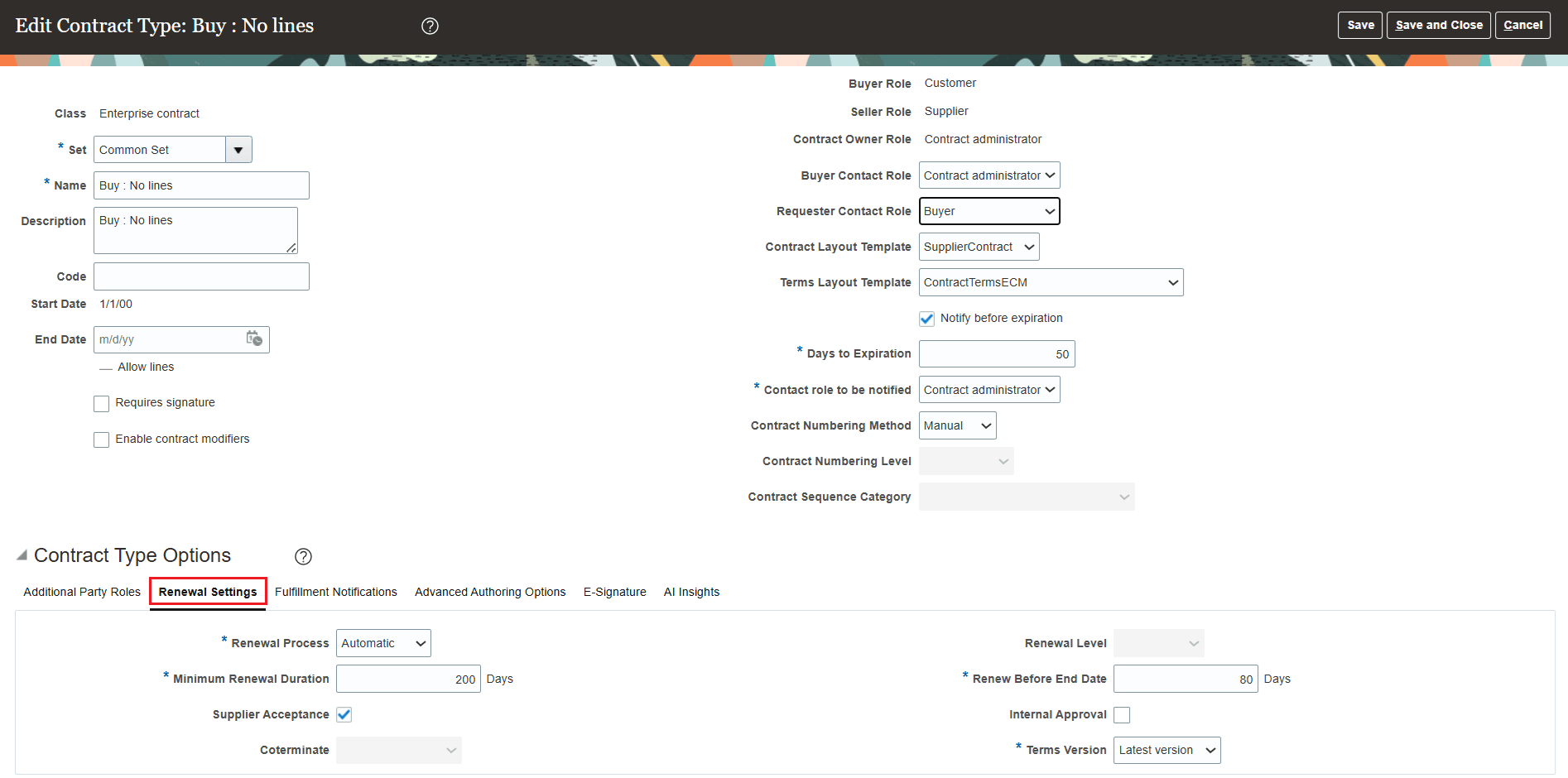
Manage Contract Type
Renewal settings at contract level
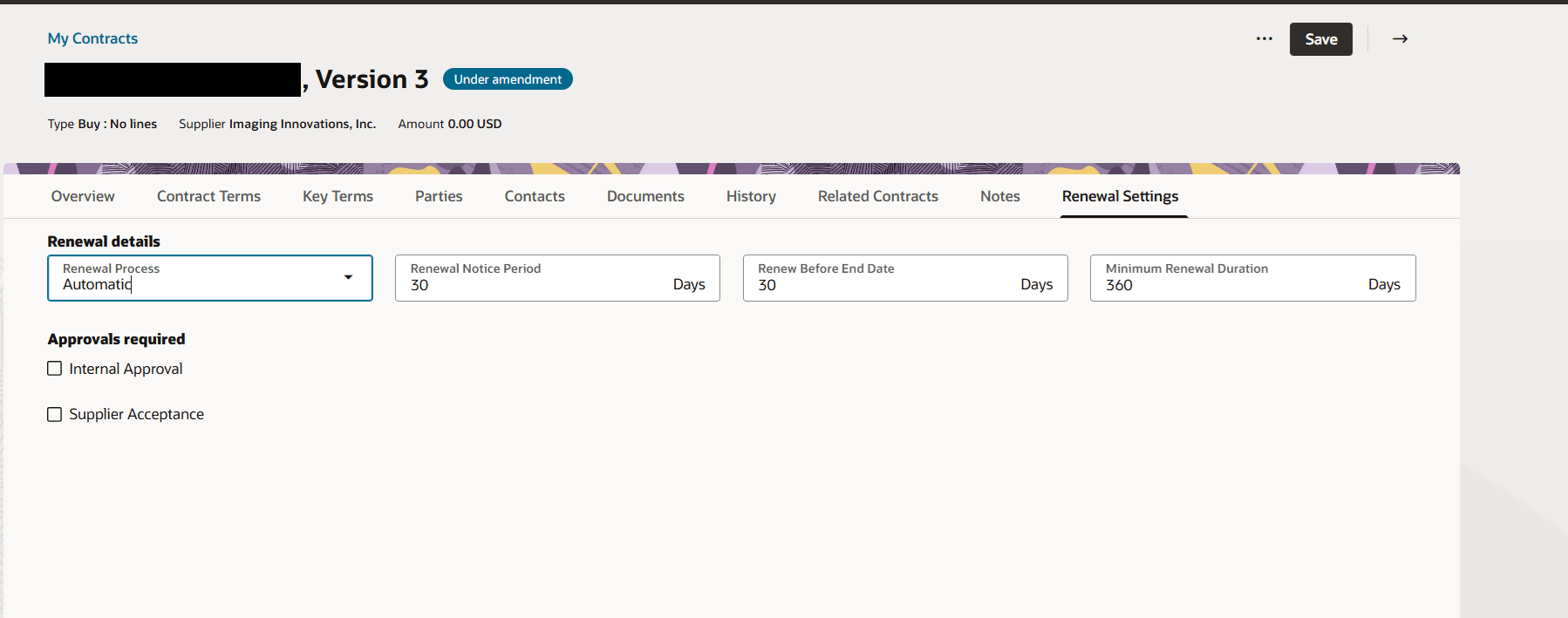
Contract Renewal Settings
Renew action in Edit Contract UI
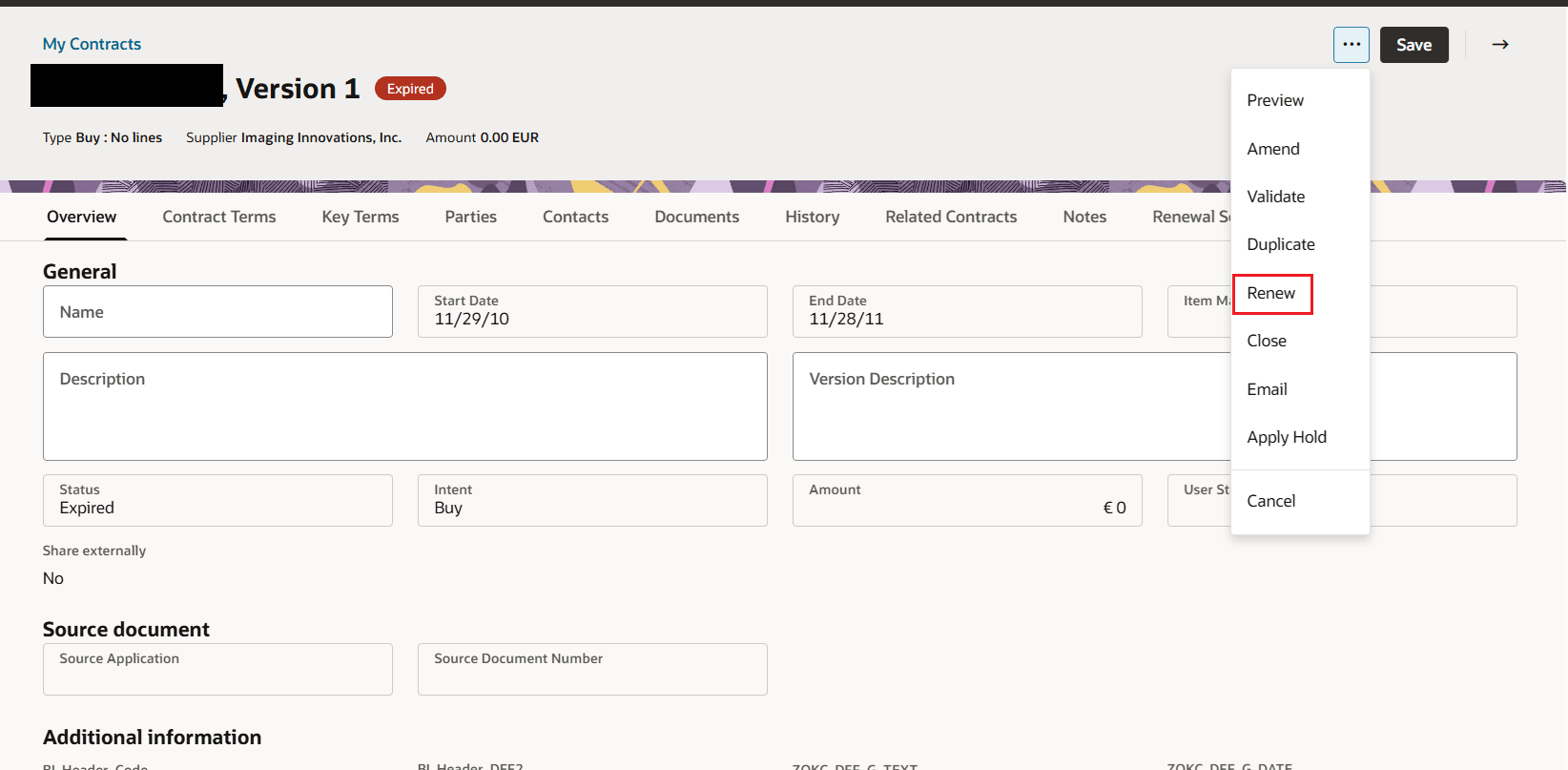
Renew Action
Improve renewal consistency and reduce manual renewal effort by managing renewal rules directly in Redwood. Contract managers can capture renewal intent earlier, automate eligible renewals, preserve lifecycle visibility through renewal history, and avoid renewing ineligible contract lines.
Steps to enable and configure
Use the Opt In UI to enable this feature. For instructions, refer to the Optional Uptake of New Features section of this document.
Offering: Enterprise Contracts
1. Review the Redwood: Renew Contracts opt-in, ORA_OKC_REDWOOD_RENEW_CONTRACTS.
The feature is opted in by default. If customers opt out, the Redwood renewal tabs and Renew action are hidden, and the new scheduled process fails with an error.
2. Configure Renewal Settings for supported contract types in Manage Contract Type.
Configure values such as Renewal Process, Renew Before End Date, Minimum Renewal Duration, Customer Acceptance or Supplier Acceptance, Internal Approval, Renewal Level, Coterminate, and Terms Version when applicable.
3. Review or update contract-specific renewal settings on the Renewal Settings tab in the Edit Contract UI.
Contract-level values are used for renewal when available. If a contract-level value is blank, the scheduled process uses the applicable contract type value.
4. To automate renewals, submit the Renew Contracts and Lines Using Renewal Settings scheduled process.
Use the Business Unit parameter to limit processing to selected business units, or leave it blank to consider all business units. Use Notify Contract Owners when contract owners should receive renewal notifications.
Tips and considerations
- Renewal is supported only for Active or Expired contracts, the latest contract version, and non-evergreen contracts with an end date.
- Supported contract types are Buy and Sell repository contracts and Buy agreement contracts with Intent Buy, Class Agreement, and lines enabled.
-
Manual renewal always creates the renewed contract in Draft status.
-
Manual renewal ignores Renewal Level and renews all eligible lines based on line status and other eligibility rules.
-
Automatic renewal uses Renewal Level to determine whether all eligible lines are renewed when the earliest line is eligible, or only individually eligible lines are renewed.
-
Closed and canceled lines are not renewed. Item-based lines are not renewed when the item is inactive or end dated.
- When co-termination is set to align to the latest renewed line end date, renewed lines are extended to that date. The renewed contract header dates are derived from the minimum renewed line start date and maximum renewed line end date.
Access requirements
The feature is controlled by the Redwood:Renew Contracts opt-in,
ORA_OKC_REDWOOD_RENEW_CONTRACTS