Respect minimum remaining shelf life material constraints in Supply Planning
You can now use constrained supply planning to account for minimum remaining shelf life days when planning supply for supported end demands. Oracle Supply Planning considers the demand's remaining shelf life date and supply expiration date when allocating existing supplies and recommending planned orders.
Supply Planning will peg demands to the earliest-expiring eligible supply that still meets the demand's minimum remaining shelf life requirements and outbound lead times. This first expired, first out (FEFO) behavior applies to supported end demands, such as sales orders, forecasts, manual demands, and transfer order demands when the transfer order demand drives the flow.
You can review remaining shelf life details in plan output. The Supplies and Demands, Demand Fulfillment, and Late Demand Analysis pages display additional remaining shelf life or expiration date information. Projected Available Balance and Projected On Hand measure computations include supply expiration dates so that expired supply doesn't overstate availability across the planning horizon.
This functionality helps improve supply planning quality by aligning supply allocation and recommendations with the demand’s remaining shelf life requirements. Planners can better explain supply pegging, expired supply, and availability because plan output and measures include remaining shelf life and expiration date details.
This feature enables you to:
- Collect shelf life days for items from Oracle Fusion Cloud SCM and external source systems
- Derive projected expiration dates during collection for scheduled receipt supplies from Oracle Cloud SCM and external source systems
- Collect a remaining shelf life rule and details from Oracle Cloud SCM
- Collect minimum remaining shelf life (MRSL) attributes for sales orders from Oracle Cloud SCM
- Specify shelf life days for an item in organization in a simulation set to compute expiration date in supply planning
- Plan respecting minimum remaining shelf life days for the end demands and expiration of supplies in constrained supply plans
- Review and analyze remaining shelf life details in constrained plan output
Collect Shelf Life Days
- Oracle Cloud SCM
- You can now collect Shelf Life Days for an item that’s lot controlled from Oracle Cloud SCM.
- The value is displayed in the Shelf Life Days item attribute in Plan Inputs.
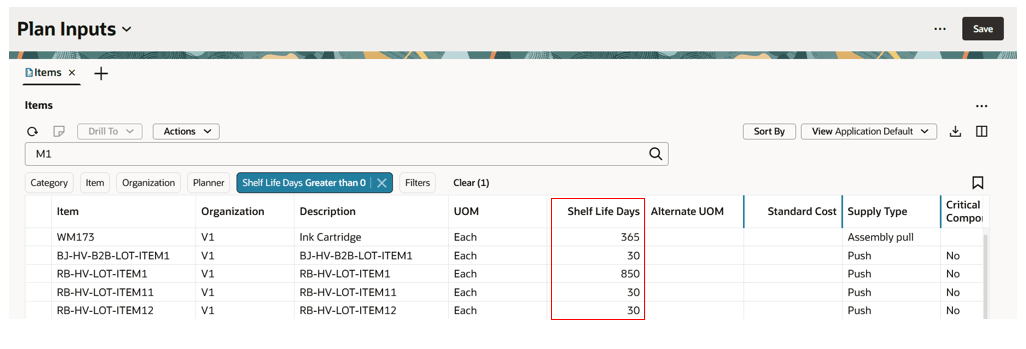
Collected Shelf Life Days item attribute displayed in Items in Plan Inputs
- External source
- You can now collect Shelf Life Days for an item that’s lot controlled from external source systems using the Items (ScpItemImportTemplate) file-based data import (FBDI) template in the Load Planning Data from Flat Files scheduled process.
- The Shelf Life Days item attribute should be a nonzero positive integer.
Collect expiration date for supplies
You can now collect an expiration date for supplies from Oracle Cloud SCM and external source systems. This is supported for scheduled receipt supplies.
To collect an expiration date for supplies:
- Enable the Specify Minimum Shelf-Life Controls for Perishable Items opt-in.
- Specify Shelf Life Days for an item, either in Oracle Cloud SCM or while collecting items from an external source using the Items (ScpItemImportTemplate) FBDI template.
- The collection process computes expiration dates for supplies and then displays those in the Expiration Date column of the Supplies and Demands table in Plan Inputs.
- For On-hand supplies, the expiration date is collected from Oracle Cloud SCM or from external source systems using the Supply On Hand (ScpOnhandImportTemplate) FBDI template in the Load Planning Data from Flat Files scheduled process.
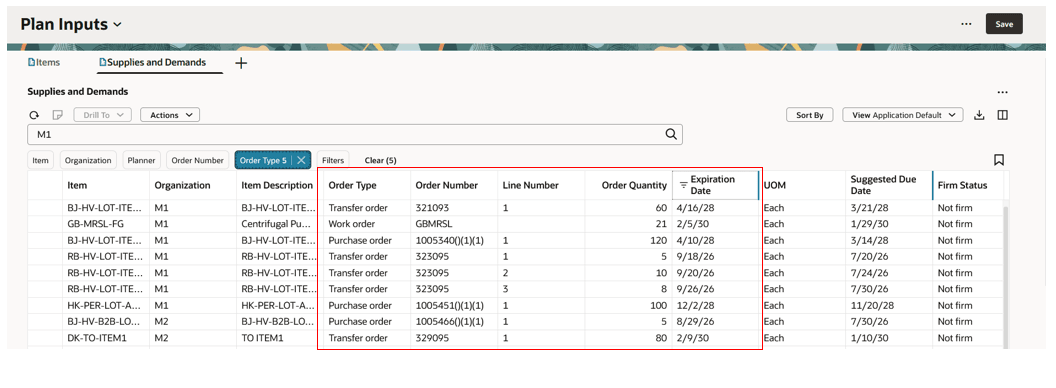
Expiration date computed by collection displayed in Plan Inputs
On-hand supplies’ expiration dates are collected as-is by data collections from Oracle Cloud SCM and external source systems. This is also applicable for on-hand supplies of non-lot-controlled items with expiration dates created when the items are part of the Configure Inventory Attributes configuration for the Item Expiration Date attribute.
The following table shows the computation logic used by collections to calculate the expiration date for various supply types.
Expiration date calculation for supplies in data collections
| Supply type | Computation logic in collection |
|---|---|
| Purchase order, Purchase requisition, work order, work order by product, work order coproduct, nonstandard work order, shipment in receiving (Purchase Order or Transfer Order) | Suggested dock date of supply in collection + shelf life days of the item-organization |
| In transit shipment of transfer orders, Open transfer orders (both interfaced to Order Management and shipping) | Ship date of the supply + shelf life days of the item in destination organization |
| In transit shipments of intra-organization transfers | Ship date of the supply + shelf life days of the item in destination organization |
| In transit shipments of purchase order | Suggested dock date of the supply + shelf life days of the item-organization |
Collect MRSL attributes for demands from Oracle Cloud SCM
Sales orders scheduled from Oracle Global Order Promising populate the following minimum remaining shelf life (MRSL) attributes in Oracle Order Management:
- Minimum Remaining Shelf Life Days
- Minimum Remaining Shelf Life Days Anchor Date Type
- Minimum Remaining Shelf Life Days from Ship Date
Order Management persists these attributes.
The collection of the sales orders entity now collects these same MRSL attributes from Order Management.
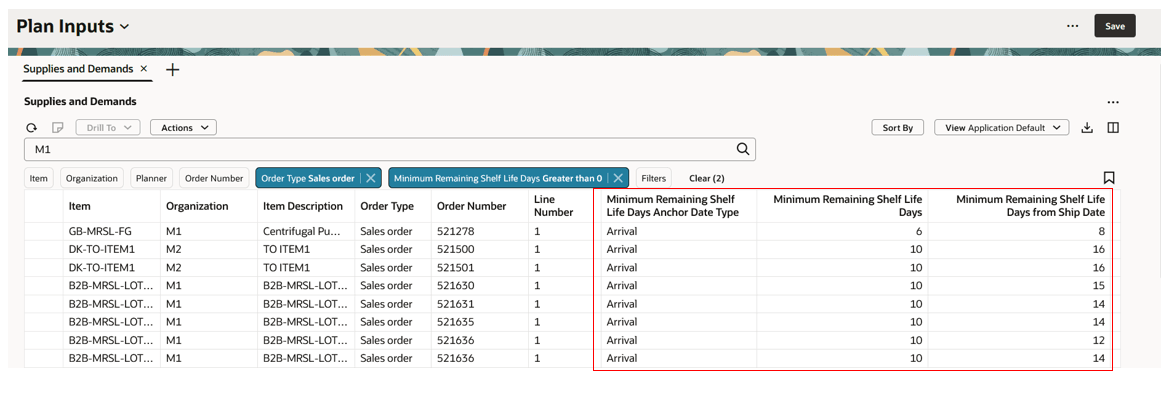
MRSL attributes for sales orders displayed in Plan Inputs
You must collect remaining shelf life rules and details from Oracle Cloud SCM to consider these attributes in supply plans.
Collect remaining shelf life rules and details
To collect remaining shelf life rules and details from Oracle Cloud SCM:
- Enable the Specify Minimum Shelf-Life Controls for Perishable Items opt-in
- Select Minimum Remaining Shelf Life Rules reference data in Collect Planning Data.
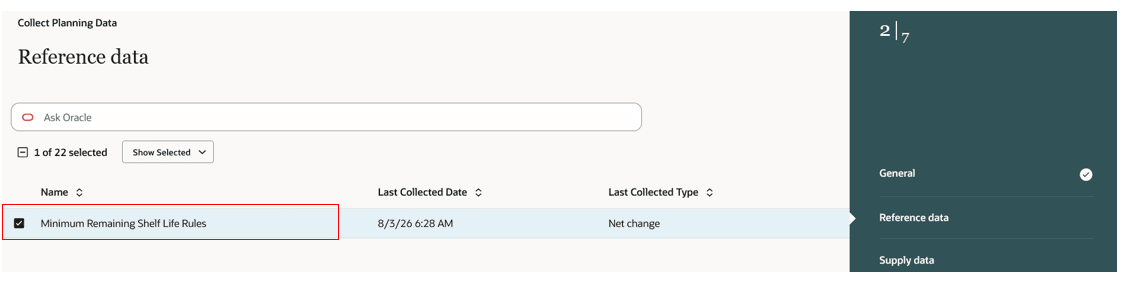
Minimum Remaining Shelf Life Rules option for reference data in Collect Planning Data
- Select Submit to collect remaining shelf life rules and details.
Remaining shelf life rules and details are supported in the following collection types:
- Targeted
- Net change
- Automatic
You can save minimum remaining shelf life rule reference data in a collection template. You can then include the template as part of a scheduled collection submission using Collect Planning Data, or from job sets or REST-based collection submissions.
Minimum remaining shelf life rule reference data can be selected for submission either from a classic or a Redwood Collect Planning Data task page.
Collected remaining shelf life rules and details are displayed on the Remaining Shelf Life Rule page, which is available in Plan Inputs.
Purge minimum remaining shelf life rule data
Minimum Remaining Shelf Life Rules reference data is also available in the Purge Data Repository scheduled process to purge the collected rules and rule details for Oracle Cloud SCM.
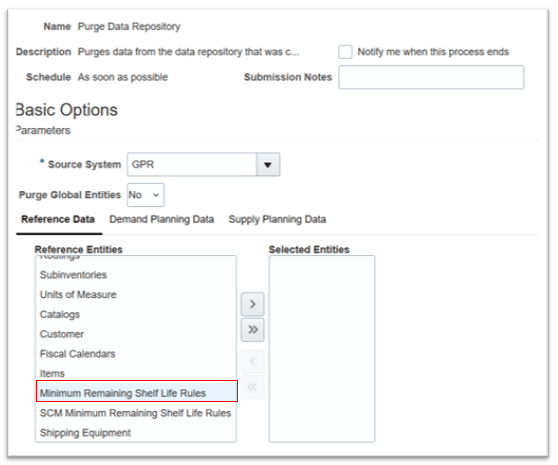
Minimum Remaining Shelf Life Rules reference data in Purge Data Repository
Use SCM Minimum Remaining Shelf Life Rules reference data in the Purge Data Repository scheduled process to purge remaining shelf life rules and details created in Oracle Cloud SCM.
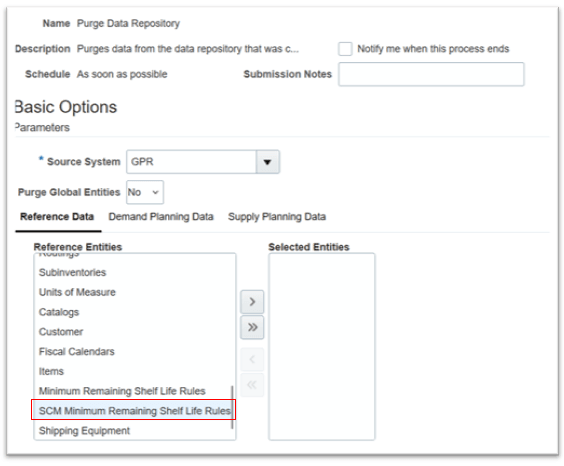
SCM Minimum Remaining Shelf Life Rules reference data in Purge Data Repository
Shelf Life Days item attribute in simulation set
A Shelf Life Days item attribute is now available in simulation sets, enabling you to define Shelf Life Days for an item-organization combination.
The Shelf Life Days attribute:
- Can be provided for both lot- and non-lot-controlled items in simulation sets
- Must be a positive integer
- Is supported only for Oracle Cloud SCM
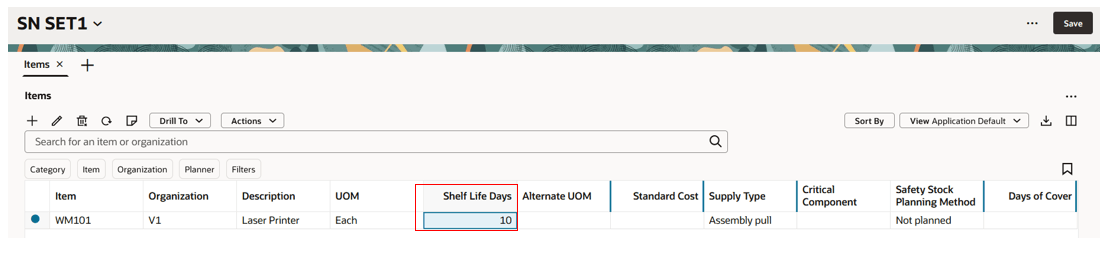
Shelf Life Days item attribute in simulation set
Remaining Shelf Life Rule page
The Remaining Shelf Life Rule page in Supply Chain Planning displays minimum remaining shelf life rule details.
To navigate to the Remaining Shelf Life Rule page:
- Navigate to Supply Chain Planning work area in the Redwood user experience.
- Select either Plan Inputs or select a supply plan or a demand and supply plan from the plan switcher.
- Select the More Actions (…) icon and then select View More.
- In the Plan Inputs section, select the Remaining Shelf Life Rule task.
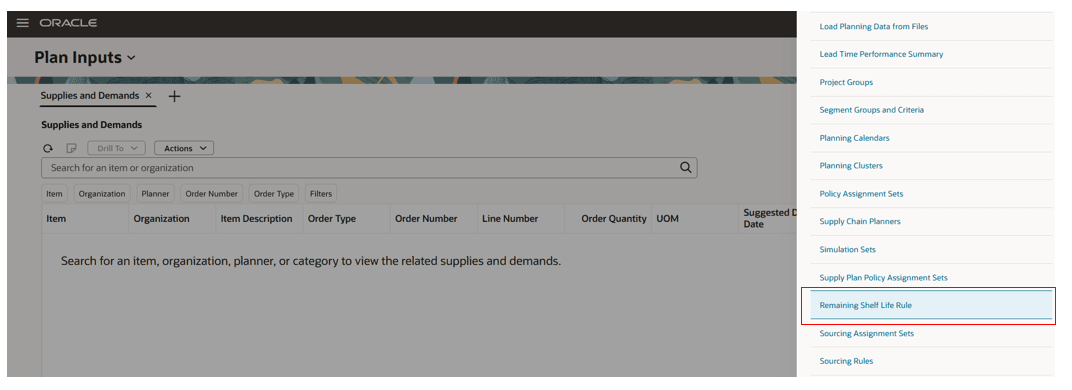
Remaining Shelf Life Rule task
- The Remaining Shelf Life Rule page opens in a new tab.
Remaining Shelf Life Rule page details
The Remaining Shelf Life Rule page in Supply Chain Planning is read-only and displays the collected data of a remaining shelf life rule and its details from Oracle Cloud SCM.
The page can be accessed if the user has a role that contains either the Manage Remaining Shelf-Life Rules or the View Remaining Shelf-Life Rules privilege.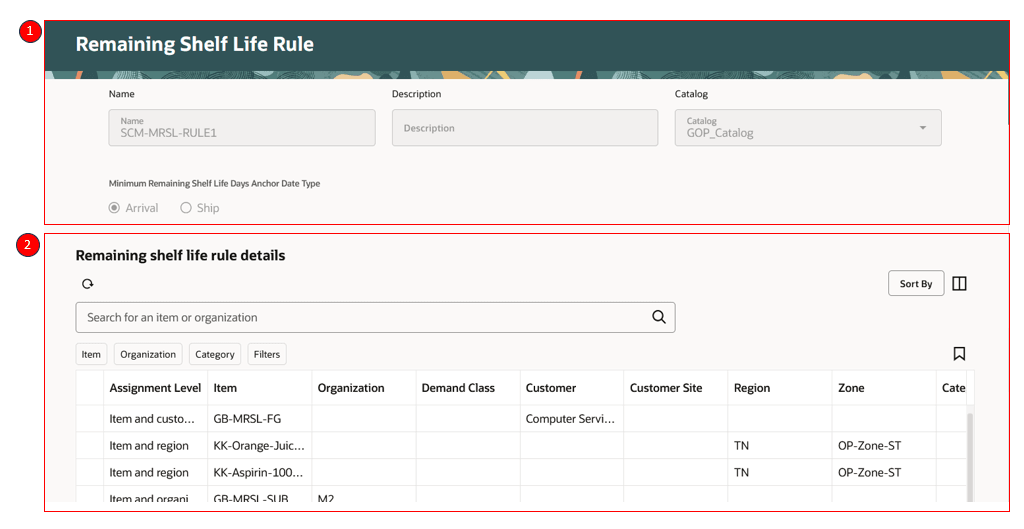
Remaining Shelf Life Rule page details
Remaining Shelf Life Rule page consists of two sections
1 – Header section displays rule name, rule description, catalog, and minimum remaining shelf life days anchor date type.
2 – Remaining shelf life rule details displays minimum remaining shelf life rules.
Remaining shelf life rule details
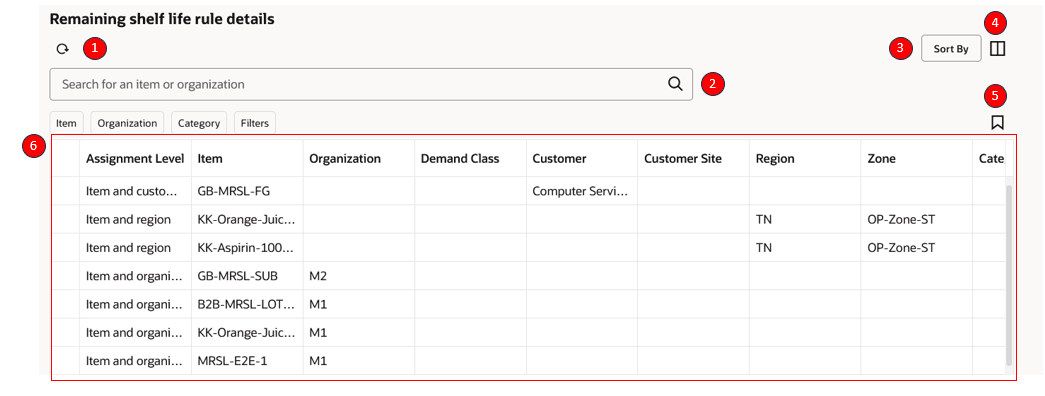
Remaining shelf life rule details in Supply Chain Planning
1 - Refresh remaining shelf life rule detail
- Select the refresh icon in the toolbar to refresh the remaining shelf life rule details.
- This refreshes the entire page but provides a warning for unsaved changes.
2 – Keyword search
- Lets you search across columns in the remaining shelf life rule details table. You can search by item or organization.
3 – Sort By
- Allows you to sort by multiple columns.
4 – Columns
- The Columns action lets you select the columns you want to display in the remaining shelf life rules table. You can reorder the columns in one of two ways:
- Within the Columns drawer, you can grab the equal sign (=) and move the column up or down.
- Within the table, you can drag and drop columns to rearrange their order.
5 – Saved Searches
- Lets you save the current keyword search and suggested filter values under a named saved search so you can reuse a set of search filters.
6 – Remaining Shelf Life rule details table
- You can view the collected remaining shelf life rule details in this table.
- Suggested filters are available for the columns displayed in the table.
- You can also perform column sorting in the table.
Respect Minimum Shelf Life material constraints in a supply plan
Supply planning respects minimum remaining shelf life (MRSL) constraints when you enable the Specify Minimum Shelf-Life Controls for Perishable Items opt-in.
Determine Shelf Life Requirements
Supply planning derives the following attributes for end demands, such as manual demands, forecasts, and transfer order demands when the destination organization isn’t planned:
- Minimum Remaining Shelf Life Days
- Minimum Remaining Shelf Life Days Anchor Date Type
- Remaining Shelf Life Date
- Remaining Shelf Life Days
For sales orders, supply planning respects the Minimum Remaining Shelf Life Days and Minimum Remaining Shelf Life Days Anchor Date Type values that Global Order Promising derives. However, supply planning derives the Remaining Shelf Life Date and Remaining Shelf Life Days.
Determine Supply Expiration Dates
Supply planning respects expiration dates that are derived during collection. If suggested dates change during planning, supply planning derives updated expiration dates.
Supply planning also performs the following actions:
- Derives expiration dates for planned order supplies.
- Stamps expiration dates to supplies that are created for safety stock.
Supply planning respects reservations collected from Oracle Cloud SCM for on-hand and other supplies.
Allocate Supplies Based on Shelf Life
Supply planning allocates supplies to demands based on the minimum remaining shelf life requirements of the demand and the expiration dates of supplies.
The planning process applies the following rules:
- Allocates existing supplies by using First Expired, First Out (FEFO) logic. This rule applies to on-hand lots and other supplies and is the default MRSL allocation method in supply plans.
- Prioritizes supplies that have expiration dates before supplies that don’t have expiration dates.
- Allocates a supply with an expiration date only when the supply expiration date is on or after the Remaining Shelf Life Date of the demand order line.
- Permits allocation when the supply expiration date equals the Remaining Shelf Life Date of the demand order line.
- Honors resource capacity, supplier capacity, and lead-time constraints when allocating existing supplies.
- Respects demand prioritization rules when allocating supplies under MRSL constraints.
Allocate Substitute Components
- Supply planning allocates substitute component supplies within the supply chain for end demands while respecting the Remaining Shelf Life Date constraints of all downstream demands.
- End-item substitution is also supported when MRSL constraints apply.
Plan Safety Stock
- Supply planning doesn’t apply Minimum Remaining Shelf Life Days to safety stock planning. However, the planning process assigns an expiration date to recommended supply.
- If that supply is pegged to a demand later in the planning horizon, its expiration date respects the MRSL constraint for that demand.
- If supply created for safety stock can’t be used for a later demand in the planning horizon, the supply expires on its expiration date. The resulting excess supply is pegged to expired lot demand.
Handle Late and Partial Demand Satisfaction
Supply planning computes additional attributes when a demand is satisfied late or when supply is allocated partially by the demand due date and partially after the due date. These computations continue to respect MRSL constraints.
Simulate and Analyze Shelf Life Constraints
Plan simulations support MRSL constraints.
Measure computations account for the expiration of non-on-hand supplies within the planning horizon.
The Redwood Supply Planning UI displays MRSL attributes and expiration details so that you can review and analyze plan output.
Derivation of MRSL attributes and expiration date for existing supplies
The following table provides the derivation details of MRSL attributes and expiration dates for various order types.
MRSL attributes and expiration date derivation for supplies and demands
| Order type | Minimum Remaining Shelf Life Days | Minimum Remaining Shelf Life Days Anchor Date Type | Minimum Remaining Shelf Life Days from Ship Date | Remaining Shelf Life Date | Remaining Shelf Life Days | Expiration Date |
|---|---|---|---|---|---|---|
| Sales order | From collected data | From collected data | From collected data | Computed in plan | Computed in plan | Not applicable |
| Forecast (local forecast - which has organization) | Derived by planning process referring to remaining shelf life rules | Derived by planning process referring to remaining shelf life rules | Not applicable | Computed in plan | Computed in plan | Not applicable |
| Global forecast | Derived by planning process referring to remaining shelf life rules | Derived by planning process referring to remaining shelf life rules | Not applicable | Computed in plan | Computed in plan | Not applicable |
| Manual demand | Derived by planning process referring to remaining shelf life rules | Derived by planning process referring to remaining shelf life rules | Not applicable | Computed in plan | Computed in plan | Not applicable |
| Transfer Order | Not applicable | Not applicable | Not applicable | Not applicable | Not applicable | Yes (can change with reschedules in planning) |
| Transfer order demand | Derived by planning process referring to remaining shelf life rules (when destination organization of the supply is not in plan scope) | Derived by planning process referring to remaining shelf life rules (when destination organization of the supply is not in plan scope) | Not applicable | Computed in plan | Computed in plan | Not applicable |
| on hand | Not applicable | Not applicable | Not applicable | Not applicable | Not applicable | From collected data |
| In transit shipments (Transfer Order/Purchase Order/intra org) | Not applicable | Not applicable | Not applicable | Not applicable | Not applicable | Yes (can change with reschedules in planning) - if the plan option - "Don't consider in-transit supplies as firm" is checked |
| Shipment in receiving (Transfer Order/Purchase Order/intra org) | Not applicable | Not applicable | Not applicable | Not applicable | Not applicable | Yes (can change with reschedules in planning) - if the plan option - "Don't consider in-transit supplies as firm" is checked |
| Work order | Not applicable | Not applicable | Not applicable | Not applicable | Not applicable | Yes (can change with reschedules in planning) |
| Work order by product | Not applicable | Not applicable | Not applicable | Not applicable | Not applicable | Yes (can change with reschedules in planning) |
| Work order co product | Not applicable | Not applicable | Not applicable | Not applicable | Not applicable | Yes (can change with reschedules in planning) |
| Planned order | Not applicable | Not applicable | Not applicable | Not applicable | Not applicable | Computed in plan |
| Planned order coproduct | Not applicable | Not applicable | Not applicable | Not applicable | Not applicable | Computed in plan |
| Planned order by product | Not applicable | Not applicable | Not applicable | Not applicable | Not applicable | Computed in plan |
| Nonstandard work order | Not applicable | Not applicable | Not applicable | Not applicable | Not applicable | Computed in plan |
| Flow schedule | Not applicable | Not applicable | Not applicable | Not applicable | Not applicable | Computed in plan |
Derivation of expiration date for existing supplies
- The planning process derives the expiration date for existing supplies by adding dock date with number of days (considered without reference to any calendar) from the Shelf Life Days item-organization attribute as the supply expiration date. This is applicable for purchase requisition, purchase order, and work order supplies.
- Expiration date of the supply = dock date + Shelf Life Days (item-organization attribute)
- The expiration date is then bucketed based on the plan bucketing calendar
- For transfer orders, the expiration date of the supply will be min ( (suggested dock date + Shelf Life Days), minimum expiration date of pegged supplies in the upstream organization transfer order demand).
- Based on the scheduling of the supply during allocation of demand, the expiration date is recomputed with reference to the suggested dock date.
- For firm supplies or supplies that aren't rescheduled in or out, the expiration dates come from collected data, and are bucketed based on planning bucketing calendar of the plan.
- If the Shelf Life Days value of an item is zero or null, the item’s supplies are deemed to never expire.
Example of expiration date update with reschedule out
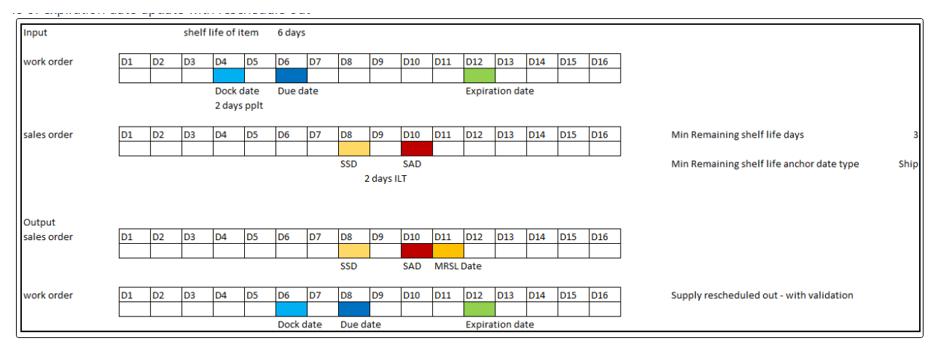
Expiration date computed in reschedule out recommendation by plan
Derivation of expiration date for planned order supplies
- The expiration date is computed only for end demand items in the plan, and only for planned order supplies being allocated to end demands.
- For make and buy planned order supplies:
- Expiration dates are computed based on suggested dock date and the Shelf Life Days item-organization attribute. The planning process adds the suggested dock date with number of days (considered without reference to any calendar) from Shelf Life Days item-organization attribute as the supply expiration date. Expiration date of the supply = suggested dock date + Shelf Life Days (item-organization attribute)
- For transfer planned order supplies:
- Expiration date of the transfer planned order supply will be min ( (suggested dock date+Shelf Life Days), minimum expiration date of pegged supplies in the upstream organization transfer planned order demand)
Derivation of MRSL Attributes for demand
The following MRSL attributes are derived for end demands in the planning process:
- Minimum Remaining Shelf Life Days
- Minimum Remaining Shelf Life Days Anchor Date Type
The planning process identifies the Minimum Remaining Shelf Life Days for a demand from the minimum remaining shelf life rules as follows:
- For the given demand, the planning process first identifies all the item-based remaining shelf life rules that match for the demand attributes.
- For category-based assignments, the rule identifies the category assignment by identifying the category to which the item is assigned. If the input attributes have organization, the rule ensures it picks the category-organization assignments that match the combination.
- For assignments with region and zone, the planning process identifies the region and zone for the remaining shelf life rules to which the demand's customer site is associated.
- Once the list of assignments are available for item and category based assignments, the assignments are then sorted in the order of level order rank.
- The planning process then compares the assignments with a combination of attributes. It first selects the assignment that matches the combination of input attributes or else it selects the next granular assignment from the subset of the combination iteratively. If no matches exist, then it returns Minimum Remaining Shelf Life Days as zero without a Minimum Remaining Shelf Life Days Anchor Date Type.
Example
Let’s say the input combination is Item, Customer, and Customer site: Paracetamol 100mg, ABC Pharma, and LOS ANGELES. Paracetamol 100mg belongs to Category - Paracetamol Drugs. LOS ANGELES - site address zip code 60250 belongs to Region - US, Zone - West US.
Rule name – ABC Company, Catalog – Pharma Drugs, Minimum Remaining Shelf Life Days Anchor Date Type - Ship
Remaining shelf life rule details
| Assignment level | Level order | Item | Organization | Demand Class | Customer | Customer Site | Region | Zone | Minimum Remaining Shelf Life Days |
|---|---|---|---|---|---|---|---|---|---|
| Item-Organization-Customer-Customer Site | 1 | Paracetamol 100 mg | M1 | ABC Pharma | LOS ANGELES | 10 | |||
| Item-Customer-Customer Site | 2 | Paracetamol 250 mg | ABC Pharma | LOS ANGELES | 12 | ||||
| Item-Customer-Customer Site | 2 | Paracetamol 100 mg | ABC Pharma | 15 | |||||
| Item-Organization-Customer | 3 | Paracetamol 100 mg | M1 | ABC Pharma | 10 | ||||
| Item-Customer | 4 | Paracetamol 100 mg | ABC Pharma | 12 | |||||
| Item-Customer | 4 | Paracetamol 250 mg | ABC Pharma | 12 |
Supply planning first checks if it can find the exact match for the input combination, either at item or category level/region and zone with denormalization. In this case, we have level order 2 as an exact match, so Application Programming Interface (API) returns Minimum Remaining Shelf Life Days as 15 and the Minimum Remaining Shelf Life Days Anchor Date Type as Ship from the rule header definition.
Remaining Shelf Life Date for demands
- If the Minimum Remaining Shelf Life Days Anchor Date Type is Arrival:
- Remaining Shelf Life Date for the demand = Suggested Arrival Date/Planned Arrival Date + Minimum Remaining Shelf Life Days
- If the Minimum Remaining Shelf Life Days Anchor Date Type is Ship:
- Remaining Shelf Life Date for the demand =Scheduled Ship Date/Suggested Ship Date + Minimum Remaining Shelf Life Days.
Minimum Remaining Shelf Life Days are added based on the Gregorian calendar and are bucketed to the end of the planning bucket.
Example
For anchor date type – Arrival.
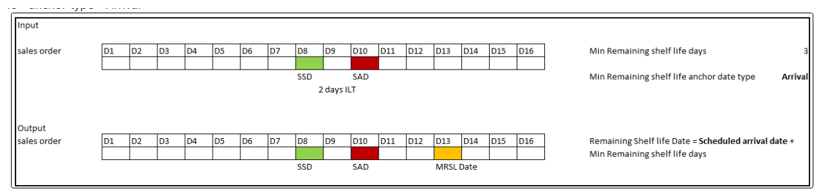
Remaining shelf life date when anchor date type is Arrival
The following table describes how Remaining Shelf Life Days for a demand are derived by the planning process.
Remaining Shelf Life Days derivation
| Minimum Remaining Shelf Life Days Anchor Date Type | Material Available date / Demand satisfied Date | Derivation formula |
|---|---|---|
| Ship | On demand due date | Remaining Shelf Life Days = Latest pegged supply's expiration date - Scheduled ship date of the demand |
| Ship | Later than demand due date | Remaining Shelf Life Days = Latest pegged supply's expiration date - Suggested ship date |
| Arrival | On demand due date | Remaining Shelf Life Days = Latest pegged supply's expiration date - Scheduled ship arrival of the demand |
| Ship | Later than demand due date | Remaining Shelf Life Days = Latest pegged supply's expiration date - planned arrival date |
Additional pegging attributes for demands satisfied within or later than the due date
A demand can be satisfied by multiple supplies or by a supply on or later than the demand due date. The material available date of the demand is the last supply available date, even when there are supplies allocated earlier to satisfy material available date of the demand.
The planning process calculates additional pegging attributes to explain how supply allocation meets the minimum remaining shelf life constraint.
The attributes are calculated as follows:
- Pegging Remaining Shelf Life Date: Pegging Suggested Ship Date or Pegging Planned Arrival Date (based on Minimum Remaining Shelf Life Days Anchor Date Type) + Minimum Remaining Shelf Life Days.
- Pegging Suggested Ship Date: Demand Due date (ship) if Supply is on or earlier than the demand due date.
- Pegging Planned Arrival Date: Demand arrival date if supply is on or earlier than the demand due date.
These attributes are computed for the demand in the pegging flow. The following example illustrates how these attributes are computed.
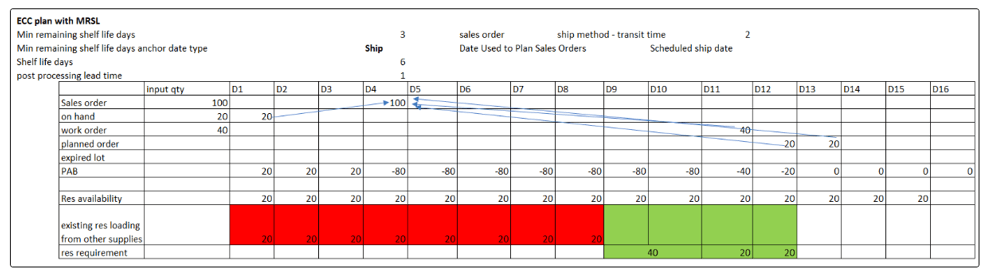
Supply allocation to a demand on and later than demand due date
Supply Pegging output
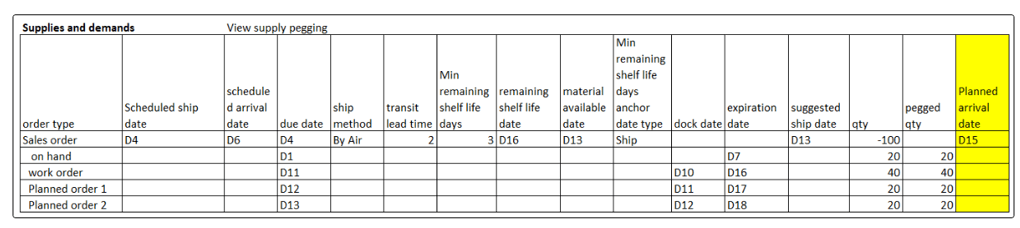
Supply pegging output
Remaining Shelf Life Date for a demand where the material available date is later than the demand due date will be calculated as:
- Suggested ship date or planned arrival date (based on Minimum Remaining Shelf Life Days Anchor Date Type) + Minimum Remaining Shelf Life Days
In this example, Remaining Shelf Life Date = suggested ship date (D13) + Minimum Remaining Shelf Life Days (3) = D16
Demand pegging output
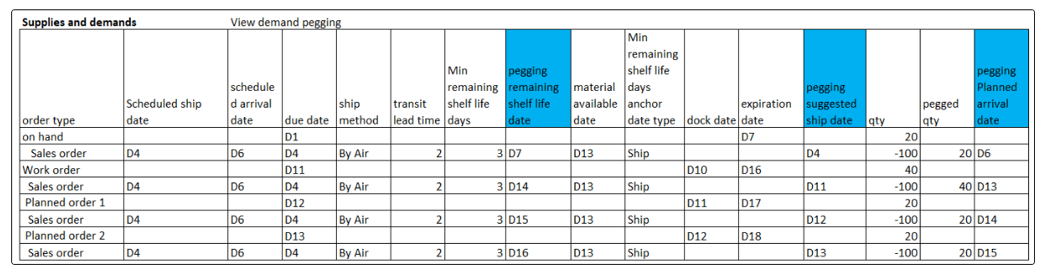
Demand pegging output
- For on-hand supply, which is partially satisfying the demand, the corresponding pegging suggested ship date is D4 (which is the same as the demand due date of the sales order). The pegging planned arrival date will be D4 + 2 days of intransit time = D6. Pegging remaining shelf life date = pegging suggested ship date (which is the reference data based on MRSL anchor date type) + 3 (MRSL days) = D7
Review and analyze plan output
The Supply Planning user interface has been enhanced to display additional attributes for reviewing plans respecting minimum remaining shelf life material constraints.
Supplies and Demands
The Redwood Supplies and Demands page displays Minimum Remaining Shelf Life Days, Minimum Remaining Shelf Life Days Anchor Date Type, Minimum Remaining Shelf Life Days from Ship Date, Remaining Shelf Life Date, Remaining Shelf Life Days, Pegging Remaining Shelf Life Date, Pegging Suggested Ship Date, and Pegging Planned Arrival Date.
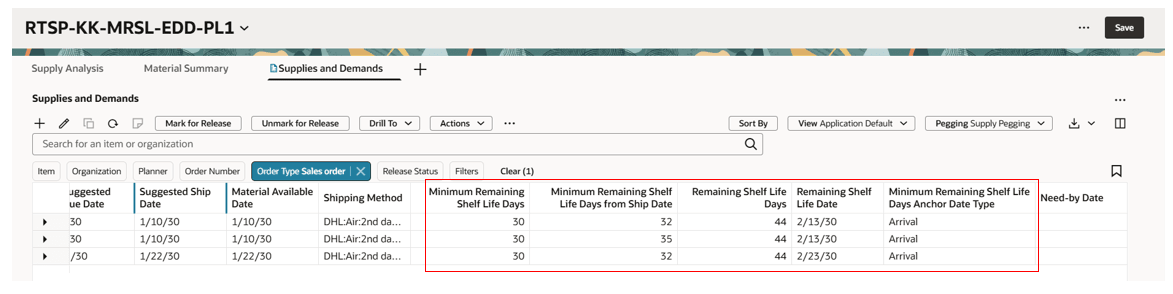
MRSL attributes derived, computed, and displayed on the Supplies and Demands page
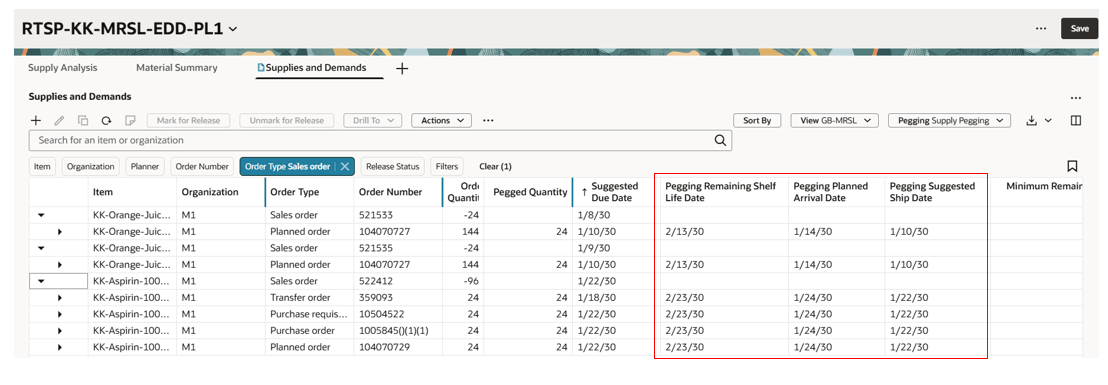
Pegging MRSL attributes computed and displayed on the Supplies and Demands page
At-Risk Demands
The Redwood At-Risk Demands page displays the Remaining Shelf Life Days attribute for the demand at risk.
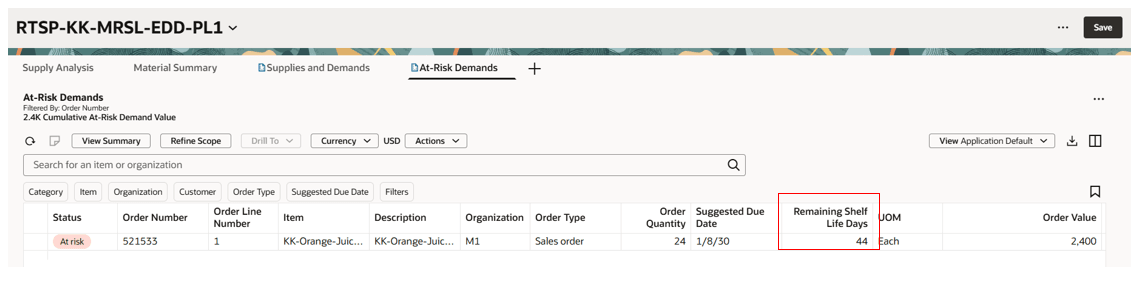
Remaining Shelf Life Days displayed on the At-Risk Demands page
Demand Fulfillment Recommendations
The Redwood Demand Fulfillment Recommendations page displays the Expiration Date of the supplies that are contributing to demands at-risk.
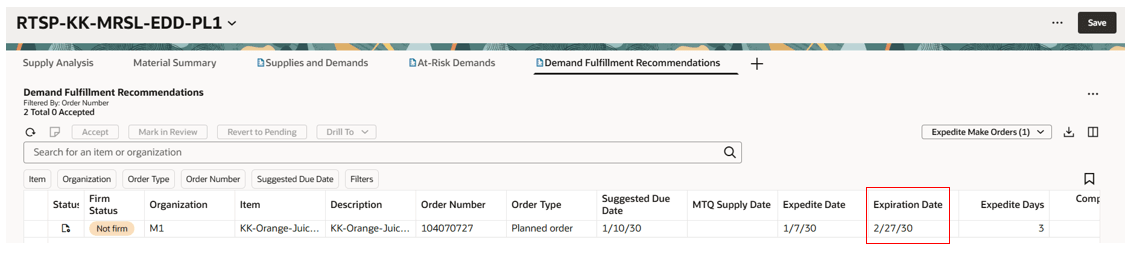
Expiration Date of the supply displayed on Demand Fulfillment Recommendations page
Steps to enable and configure
Use the Opt In UI to enable this feature. For instructions, refer to the Optional Uptake of New Features section of this document.
Offering: Supply Chain Planning
Enable the Specify Minimum Shelf-Life Controls for Perishable Items feature as follows:
- In the Offerings work area, select Manufacturing and Supply Chain Material Management offering, and then select Opt In Features.
- On the Opt In: Manufacturing and Supply Chain Materials Management page, select the Features icon for Facilities in the Manufacturing and Supply Chain Materials Management offering.
- Enable the Specify Minimum Shelf-Life Controls for Perishable Items feature.
Tips and considerations
- If you want to use the Respect Minimum Remaining Shelf Life Material Constraints in Supply Planning feature, then you must opt in to Specify Minimum Remaining Shelf-Life for Perishable Items first. Specify Minimum Remaining Shelf-Life for Perishable Items feature is a temporary opt in that expires in Release 27B.
- This feature is applicable to constrained supply plans only.
- During the end item substitution process, the remaining shelf life date on the demand from the requested item is always referenced when allocating with a substitute supply. Post substitution, the split demand line for forecast or manual demand created with substituted items inherits the Minimum Remaining Shelf Life Days and Remaining Shelf Life Date from the Requested item line.
- In plan simulations, MRSL attributes are derived for the manual demands created in the plan output. The MRSL attributes are also derived for planning for net forecast created during simulations or from gross forecast measure edits.
- For on-hand supplies or for planned orders included in a plan simulation or from a simulation set, expiration dates are computed by the planning process for allocating to demands.
- Projected available balance and projected on-hand measures are now computed considering the expiration of the non-on-hand supplies in the planning process.
- Expired lot on hand measure is computed for the on-hand supplies that are expiring after the expiration date.
- The planning process considers the supply as eligible for allocation on the day of expiration. The supply is considered expired on the expiration date + 1 day, regardless of planning aggregation buckets. Supply planning creates expired lot demand for expired supply to be removed from projected available balance.
- End demands without MRSL attributes are also planned in the planning process respecting the expiration date of the on-hand and other supplies if available from collected and simulation data.
- Component supplies’ expiration date is also considered in the planning process if the expiration date is available for the components in the plan output.
- Minimum remaining shelf life days material constrained is applicable for:
- Discrete, process, and flow manufacturing work methods
- Lot- and non-lot-controlled items
- Plans enabled with attribute-based netting rules
- The planning process respects supply expiration during prebuilds and also makes sure to avoid prebuild if the supply expires before allocating to demands respecting MRSL constraints.
- You must assign one of the following new privileges to existing custom roles:
- Manage Remaining Shelf-Life Rules (MSC_MANAGE_REMAINING_SHELF_LIFE_RULES_PRIV)
- View Remaining Shelf-Life Rules (MSC_VIEW_REMAINING_SHELF_LIFE_RULES_PRIV)
Key resources
Refer to 26D release update feature Specify minimum shelf-life controls for perishable items for additional details on configuring remaining shelf life rule details, the collection of remaining shelf life rule details, and details of how other products respect shelf life controls.
Access requirements
Users who are assigned a configured job role that contains these privileges can access this feature:
|
Privilege status |
Privilege name and code |
|---|---|
| Existing |
Monitor Supply Planning Work Area (MSC_MONITOR_SUPPLY_PLANNING_WORK_AREA_PRIV) |
| Existing | Monitor Demand and Supply Planning Work Area (MSC_MONITOR_DEMAND_AND_SUPPLY_PLANNING_WORK_AREA_PRIV) |
| New |
Manage Remaining Shelf-Life Rules (MSC_MANAGE_REMAINING_SHELF_LIFE_RULES_PRIV) |
| New | View Remaining Shelf-Life Rules (MSC_VIEW_REMAINING_SHELF_LIFE_RULES_PRIV) |
The existing privileges were available prior to this update.