Hide previous responses when viewing a reply
In Help Desk in the Redwood Experience, when this feature is enabled, when an employee replies to a Help Desk request message sent by a help desk agent. In previous releases, the message of an email reply included the entirety of the body of the received email, which usually includes previous parts of the email thread such as the agent message and other preceding messages. This resulted in the same text content appearing multiple times. With this enhancement, the message thread is much easier to read, since the Help Desk request will only show the employee's response, and will not include the Agent's response or prior messages.
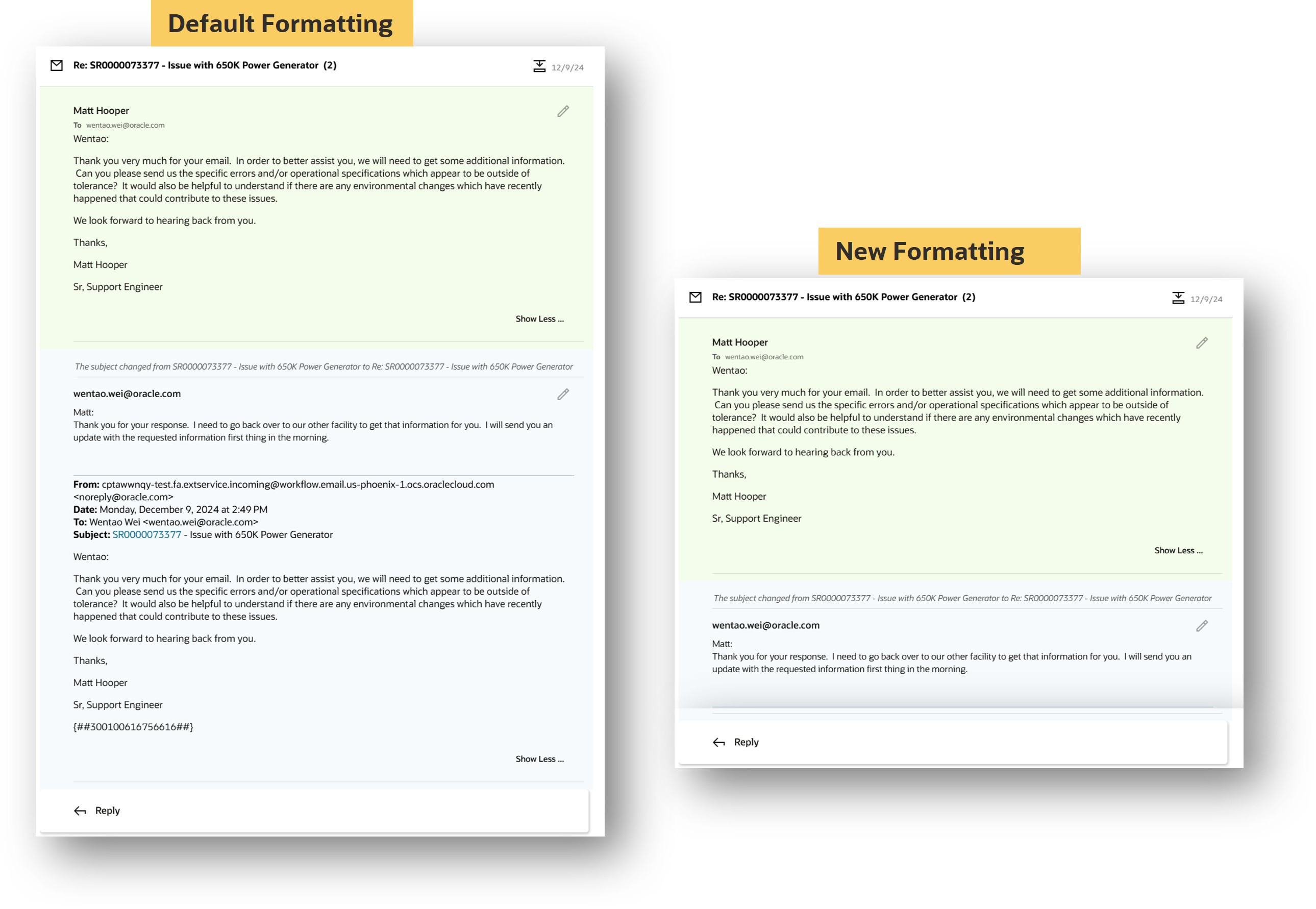
Enhanced clarity for email messages
Improved usability of Service Requests and Help Desk Requests by increasing the clarity of email message threads.
Steps to enable and configure
This feature is enabled using the profile option: ORA_SVC_PREVIOUS_RESPONSE_EMAIL_REMOVAL_ENABLED
This profile option is delivered turned off out of box. To enable this feature, set this profile option to Yes.
To set a profile option
- Go into Setup and Maintenance.
- Search for the profile option ORA_SVC_PREVIOUS_RESPONSE_EMAIL_REMOVAL_ENABLED.
- Setup profile option to Yes.
Please note this is a site level profile option and will apply to all users.
Access requirements
In order to set the profile options, you must have privileges to access Setup and Maintenance.