Chat in Browser UI: Agents Set a Preferred Chat Translation Language
An enhancement is made to the chat agent experience in the Browser UI, so that agents utilizing the Chat Language Translation feature can set a "Preferred Chat Translation Language" in their Chat Preferences. This feature ensures that all inbound and outbound chat messages display in the agent's selected language when the chat translation feature is enabled. If an agent selects & saves a Preferred Chat Translation Language, then the interface language remains unchanged, and all messages posted by the end user are translated into the configured language. As a best practice, agents should log out of the Browser UI after saving this change, then back in again before handling live chat sessions.
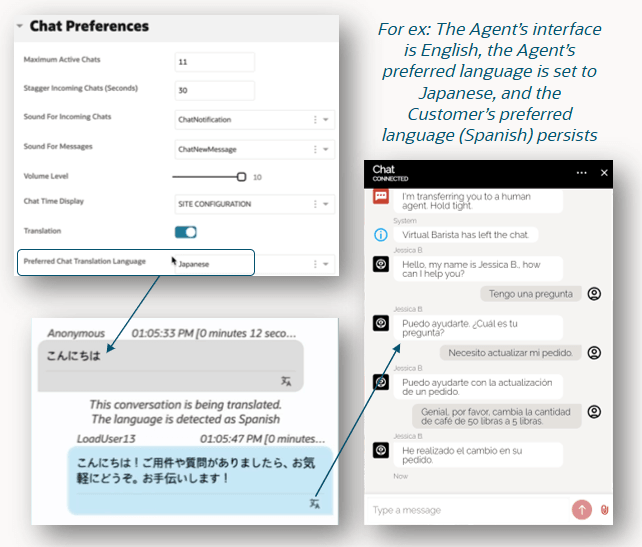
26A Preferred Chat Translation Language
Business Value:
Employee Optimization: Enhances the usability of chat within the Browser UI
Steps to enable and configure
System Requirements
- The Chat Language Translation feature is enabled for your site, interface and the related agent profile
- This feature does not require a CX upgrade
- This feature does not require a feature flag
- This feature is available in the BUI FEB I release, available on non-production sites January 23, 2026 and on production sites February 27, 2026
To set a preferred language:
- Login to Browser UI
- Navigate to the avatar (upper right corner)
- Go to Preference
- Go to Chat Preferences
- Go to "Preferred Chat Translation Language"
- Select a language
- Save changes
- As a best practice, agents should log out of the Browser UI after saving this change, then back in again before handling live chat sessions
Tips and considerations
More information about configuring this feature can be found at cx.rightnow.com, please search for Answer ID 12842: Requirements to configure Language Translation for Chat in the Browser User Interface
Access requirements
- Chat Admin
- Chat Agent