Auto Configuration of Travel Areas for Oracle Fusion Field Service
Travel Area management is now fully automated in Fusion Field Service environments, eliminating the need for manual configuration. As part of this enhancement, Travel Areas are streamlined and removed from the application, helping reduce configuration complexity and improve automation. For Oracle Field Service environments, Travel Areas will remain supported through version 26C to ensure a seamless transition.
The changes have an impact on all areas of the user interface such as Work Zone, Travel Areas configuration pages, and Reports.
Oracle Field Service
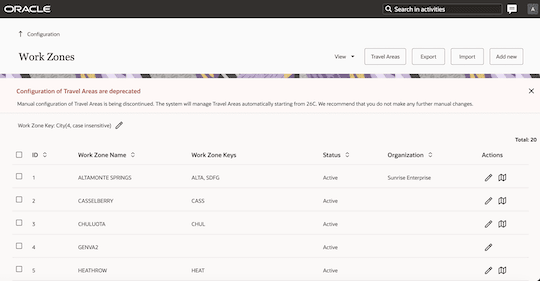
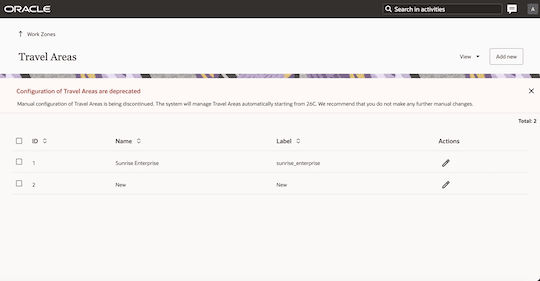
Travel Areas will remain available in Oracle Field Service environments through version 26C. Starting with version 26B, an informational banner will appear on the Work Zone and Travel Areas configuration pages to communicate that Travel Areas are being phased out and that manual configuration is no longer needed.
This screenshot shows the Work Zones page with the banner informing that Travel Areas are being phased out and manual configuration is no longer needed.
Work Zones page with the banner
This screenshot shows the Travel Areas page with the banner informing that Travel Areas are being phased out and manual configuration is no longer needed.
Travel Areas page with the banner
REST APIs
Across all REST APIs, any request parameters where Travel Area or Region are currently required become optional for Oracle Fusion Field Service environments, simplifying integrations and reducing configuration dependencies. These parameters continue to be mandatory for Oracle Field Service environments. For API responses, where Travel Area or Region are currently returned, Oracle Fusion Field Service environments consistently return a value of “default,” ensuring predictable behavior. In Oracle Field Service environments, the response continues to behave as it does today.
Business Benefits
- Simplification of configuration
- Faster implementation cycle
Steps to enable and configure
You don't need to do anything to enable this feature.