Initiate Smart Actions added to the SR action plan directly from the SR Pending Section
Customer service representatives can streamline service request handling by accessing Smart Actions directly from the Pending section of an SR.
When an action is added from the action bar (using "Add Action..."), the action will show in the Pending section. Supported actions can be edited inline, enabling users to quickly open the action, enter required details, and complete the action without leaving the Pending section.
The following Smart Actions are supported:
- Resolve SR
- Update Related Objects
- Log a Call
- Start Internal Conversation
- Create Work Order
- Create Relationship
- Compose Web Message
- Compose Message
- Compose Internal Note
- Compose Email
- Add Attachment
- Transfer SR
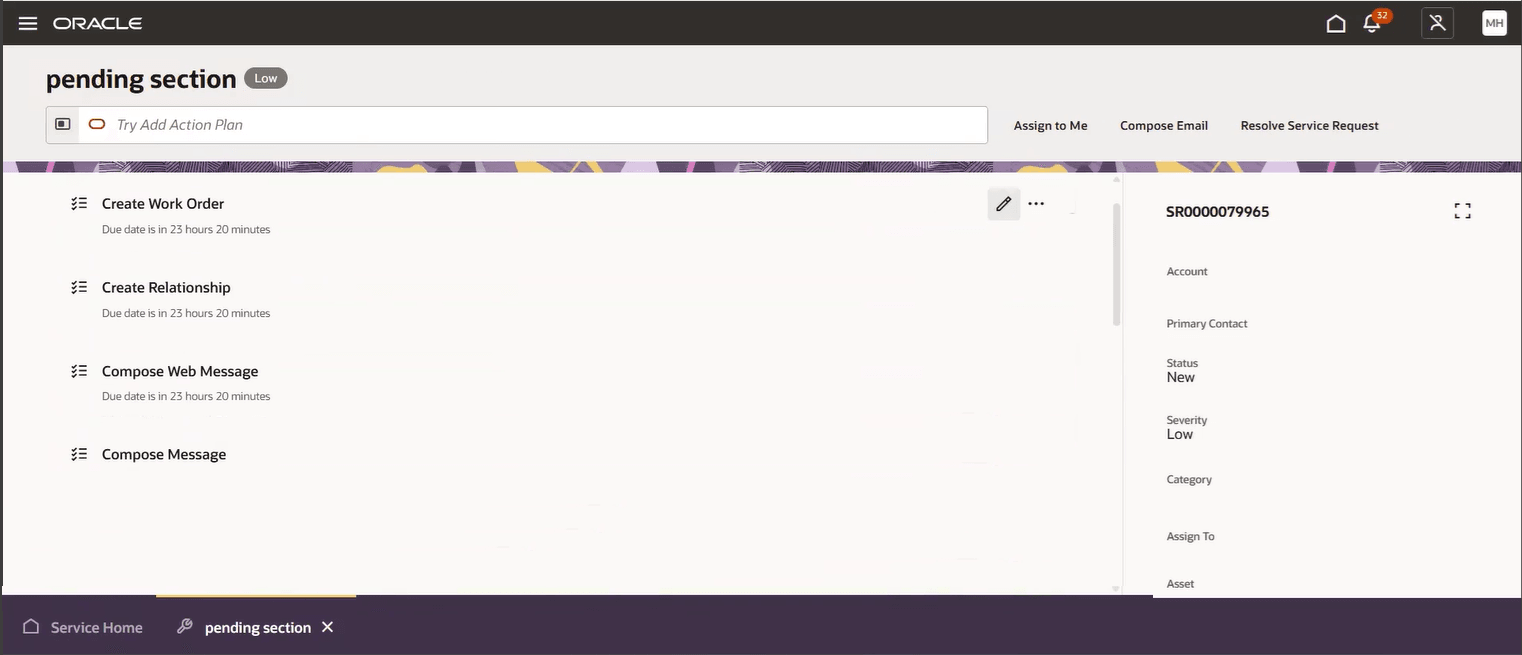
Create Work Order, Relationship, Compose Web Message or Message from the Pending Section of an SR
Simplifies the UI and reduces clicks by surfacing relevant next steps directly within pending service requests.
Steps to enable and configure
You don't need to do anything to enable this feature.
Key resources
Overview of Smart Action can be found here.