Simplified Configuration and Improved Inventory Visibility for Service Work Order Debrief
Starting with Oracle Fusion Field Service 26D, Service Work Order Debrief uses labor and expense billing items configured in Oracle Product Information Management (PIM) and the corresponding Service Activity Codes configured in Service Logistics. Administrators no longer need to maintain duplicate labor, expense, and Service Activity Code values as Oracle Fusion Field Service inventory-property enumeration values for the Debriefing plug-in. When a mobile worker records labor or expenses for an activity associated with a Fusion Service Work Order, Debrief retrieves the applicable Fusion configuration and makes the corresponding values available for selection.
The 26D Debriefing plug-in no longer requires enumeration values from the following Oracle Fusion Field Service properties to populate Service Work Order labor and expense selections:
Field Service Properties
| Field Service Property | Previous Use (Before 26D) |
|---|---|
|
|
Supplied the labor Service Activity Code list |
|
|
Supplied the labor item-number list |
|
|
Supplied labor item descriptions |
|
|
Supplied the expense Service Activity Code list |
|
|
Supplied the expense item-number list |
|
|
Supplied expense item descriptions |
|
|
Supplied the values associated with expense items |
Debrief retrieves the corresponding configuration from Fusion, including:
- Service Activity Codes from Service Logistics
- Labor and expense billing items from Product Information Management
- Applicable units of measure from the Fusion item definition
Select Billing Items by Service Activity Code
When a mobile worker records labor or an expense, Debrief uses the billing types associated with the selected Service Activity Code to present the applicable billing items.
This keeps the mobile worker's selections aligned with the Fusion configuration and removes the need to maintain the same lists separately in Oracle Fusion Field Service.
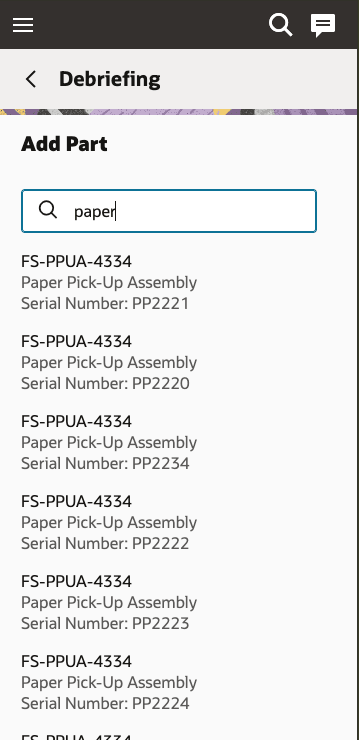
Debriefing
Display Inventory Details for Parts
When a mobile worker adds a part, Debrief displays relevant Fusion Inventory details, including subinventory information when applicable.
Business Benefits
- Reduces duplicate configuration. Labor and expense selection lists no longer need to be maintained in both Oracle Fusion Service and Oracle Fusion Field Service for Debrief.
- Aligns billing-item selections with Service Logistics configuration. Mobile workers select billing items based on the billing types associated with the selected Service Activity Code.
- Reduces configuration inconsistencies. Debrief no longer depends on potentially outdated Field Service enumeration values for these labor and expense selections.
- Simplifies ongoing administration. Labor and expense billing-item lists are maintained through their Fusion configuration rather than duplicated as Oracle Fusion Field Service enumeration values.
Steps to enable and configure
Before using this feature, ensure that the required master data and integration dependencies are configured across the applicable Fusion and Oracle Fusion Field Service environments. This feature depends on Product Information Management and Service Logistics as the source of truth for parameters used in the Field Service debrief flow, including Service Activity Codes, Labor, Expense, and item-related details.
If mobile workers add parts during Debrief, configure the applicable items and inventory organizations in Product Information Management. Configure the required subinventories, stocking locations, and item associations in Fusion Inventory and Service Logistics.
Configure Billing Types
Billing types connect items maintained in Product Information Management with the billing categories used by Service Logistics.
- In the Setup and Maintenance work area, select the Manufacturing and Supply Chain Materials Management offering.
- Select Service Logistics, and then select Manage Billing Types.
- Verify that the billing types used for labor items are assigned to the Labor billing category.
- Verify that the billing types used for expense items are assigned to the Expense billing category.
- Confirm that the required billing types are enabled.
For additional information, see Overview of Billing Types.
Configure Labor and Expense Items
Create or update the labor and expense items in Product Information Management.
- Open the Product Information Management work area and locate the applicable item.
- Review the Service Logistics attributes for the item.
- Enable service billing when required.
- Assign a billing type associated with the Labor billing category to a labor item.
- Assign a billing type associated with the Expense billing category to an expense item.
- Assign the item to the inventory organization associated with the mobile worker's default subinventory.
- Verify the item number, description, primary unit of measure, and enabled status.
Debrief retrieves labor and expense items for the applicable inventory organization. An item might not appear if it isn't assigned to that organization or doesn't have an appropriate billing type.
For additional information, see:
Configure Service Activity Codes
Configure the Service Activity Codes that mobile workers use for labor and expense entries.
- In the Setup and Maintenance work area, select the Manufacturing and Supply Chain Materials Management offering.
- Select Service Logistics, and then select Manage Service Activities.
- Create or review the Service Activity Codes used for the Field Service business process.
- Associate each Service Activity Code with the appropriate labor or expense billing types.
- Verify the transaction category and other processing options required by the business process.
- Confirm that the Service Activity Code is enabled.
The billing types associated with the Service Activity Code determine which labor or expense items are available for selection in Debrief.
For additional information, see Set Up Service Activities.
Update the Debriefing Plug-In
- Apply the available 26D update to the Debriefing plug-in.
- Verify that the Fusion application used by Debrief is correctly configured and selected in the plug-in configuration.
- You don't need to continue maintaining the former Field Service enumeration values for the labor and expense properties listed in the Feature Description.
The 26D plug-in no longer requires these properties to populate the Service Work Order labor and expense selections. Before deleting any existing property or enumeration value, verify that no customer integration, report, or other plug-in still uses it.
Tips and considerations
- The earlier version of Oracle Fusion Field Service properties might remain in an upgraded environment, but the 26D Debriefing plug-in no longer uses their enumeration values to populate Service Work Order labor and expense selections.
- Review integrations, reports, plug-ins, and operational procedures before deleting an existing Field Service property.
- If you use the existing Debrief parameters
laborItemNumberForRegLabororlaborItemNumberForTravel, verify after the 26D update that each configured value exactly matches an eligible labor billing-item number retrieved from Fusion. Debrief uses matching values to default regular-labor and travel-labor entries. If a configured value doesn't match an eligible item, Debrief doesn't use it as a default. - Fusion configuration changes become available to the mobile worker after Debrief synchronizes while online.