Set Default Saved Searches for Mobile App Users
Saved searches are predefined for Adaptive Search and Workspace users. In addition, you can set the default saved search per object for mobile app users for either specific roles or for the whole site.
Mobile users can override these and set their own default searches, to display the most relevant records in their mobile app with a single tap on the menu.
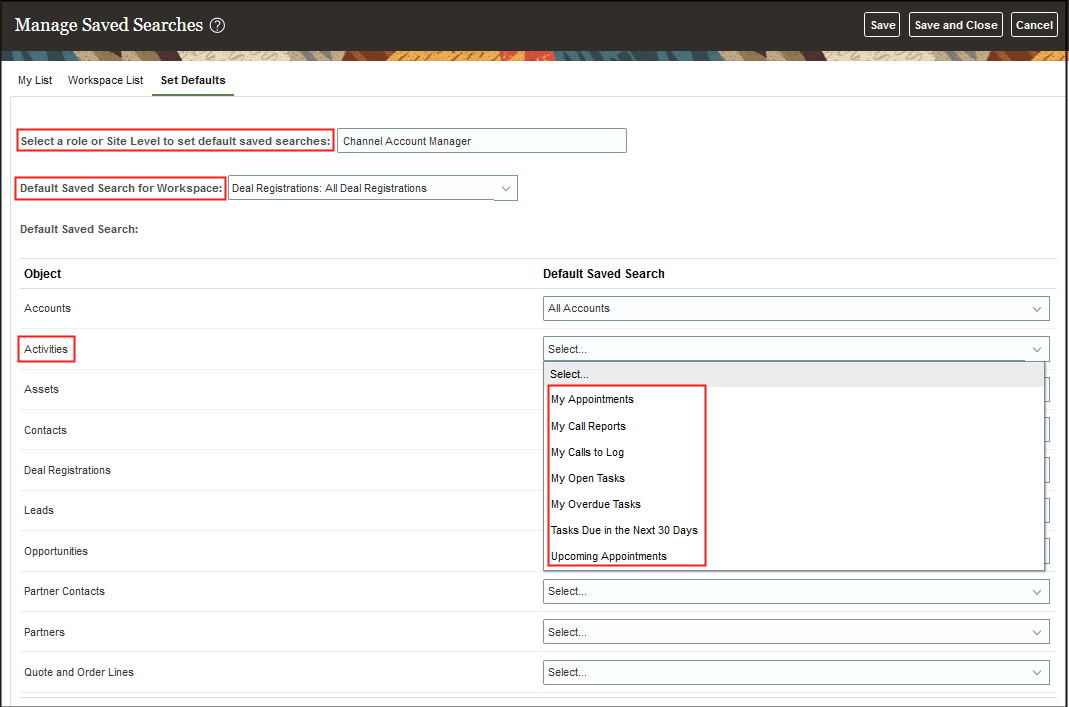
The Set Defaults tab lets you define the default saved search for each user role. However, to assign a default saved search, you also must have permission to view that specific default saved search. Otherwise, it won't appear in the list of saved searches to assign. For example, you might select the Channel Account Manager role from the Select a role or Site Level to set default saved searches drop-down list and select All Deal Registrations as your Default Saved Search for Workspace. You can also select a default saved search for other objects from the Set Defaults tab of the Manage Saved Searches page. Here's a sample screenshot of the UI.
See Overview of Saved Search Setup for more information about Adaptive Search saved searches.