Express Reports
The Express Reports tool simplifies the creation of reports with charts for sales managers, salespeople, and sales administrators. It delivers the power of Oracle’s analytics technology without requiring users to understand technical details. Express Reports are available for accounts, opportunities and their revenue lines, and custom objects.
With Express Reports, the sales organization can:
- Quickly build trend analysis reports on large sets of historical data.
- Include predefined metrics to easily track trends, such as win-loss rates in the pipeline and other key performance indicators.
- Group data by multiple factors—for example, revenue by product and by state.
- Use prebuilt visualizations to display trends and key performance indicators.
Salespeople and sales managers can build their own personal reports, while sales administrators can create and share reports with the whole organization.
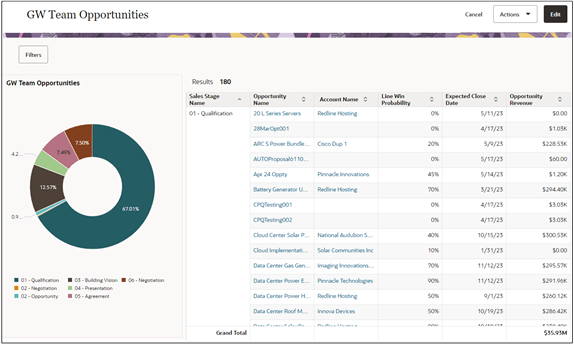
Here's an image of a sample express report with a chart of team opportunities by sales stage.
Report Types
Each report you create is based on a report type. Report types are templates created by sales administrators. They specify which Oracle Transactional Business Intelligence (OTBI) subject area you're using for the report and includes the most important columns and attributes for your report.
When salespeople use AI Assist (the Express Reports AI agent), the AI selects the appropriate report type automatically. If AI Assist is off, they must select the appropriate report type manually.
Oracle provides 4 predefined report types:
- Accounts
Create reports and visualizations for accounts. For example, you can create a report of active accounts with their potential next year's revenue.
- Opportunities
Create reports and visualizations related to opportunity revenue, such as win/loss and pipeline trends.
- Opportunities and Contacts
Create reports and visualizations on opportunities and their contacts. For example, you can create a report of contacts by opportunity and customer state.
- Opportunities and Products
Create reports and visualizations on opportunities and their products.
Sales administrators can:
- Create additional report types for custom objects.
- Add custom fields they created and published in Application Composer to the report types provided by Oracle.