About Extending the Contract Requests UI
You can add custom fields in the UI to capture more information. The entire contract request process is optimized for simplicity and speed, benefiting both the requester and the reviewing teams.
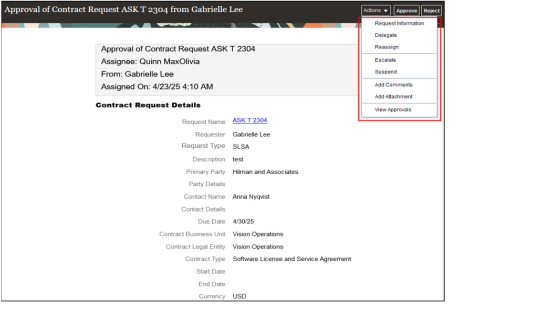
The basic contract request approval notification is replaced with a detailed notification based on a BIP template. It displays all the information from the contract request. Both the workflow and the email notifications can be changed.
You can configure the contract request approval notification to suit your requirement. The following template changes are supported:
-
Logo - Change the branding logo in the header.
-
Title - Change the workflow notification title
-
Body - Add or remove attributes to the report including standard attributes, application composer attributes, custom child objects of contract request, attributes from other contract tables or cross-pillar tables.
-
Header links - Hide Approve, Reject and Request for Information links from BIP emails
-
Footer links - Remove link to the Contract UI
-
Style -Styling the report with different fonts, colors, field position and size changes
The following modifications are supported in contract requests list and edit pages:
- Edit page
- Hide existing fields
- Make existing fields as required
- Make existing fields as read-only
- Add new custom fields
- Change the field label
- Display standard and custom fields in list page
- Create dependent fields
- Create a Create Contract custom smart action
- Application Administrator (ORA_FND_APPLICATION_ADMINISTRATOR_JOB)
- Sales Administrator (ORA_ZBS_SALES_ADMINISTRATOR_JOB)
- Customer Relationship Management Application Administrator (ORA_ZCA_CUSTOMER_RELATIONSHIP_MANAGEMENT_APPLICATION_ADMINISTRATOR_JOB)
- Application Developer (ORA_FND_APPLICATION_DEVELOPER_JOB)
For more information about how to perform modifications to contract requests, watch this video: Overview of Contract Requests.