Set Up the Pipeline Management Menu
Create a Pipeline Management menu item so that users can access the feature using the Navigator and Springboard.
- As a sales administrator or setup user, navigate to .
- Select Create Sandbox and enter a name for the sandbox.
- Select the Structure tool checkbox.
- Select Create and Enter.
- Save your work.
- While in the sandbox, navigate to .
- From the top-level menu, select and a screen similar to the following is displayed.
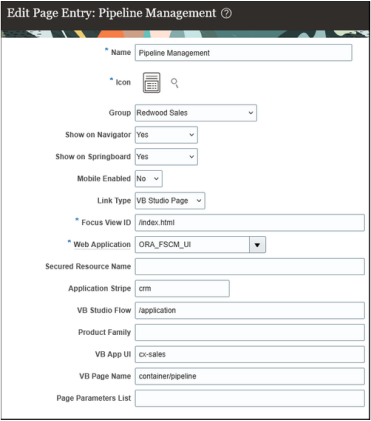
- Enter a name for the page entry and select an icon.
- Select Redwood Sales as the group.
- Select Yes for Show in Navigator and Show in Springboard.
- Select or enter values as outlined in this table to complete the setup:
Field Sample Value Mobile Enabled No Link Type VB Studio Page Focus View ID /index.html Web Application ORA_FSCM_UI Secured Resource Name Leave blank Application Stripe crm VB Studio Flow /application Product Family Leave blank VB App UI cx-sales VB Page Name container/pipeline Page Parameters List Leave blank - Save and test your work.
- Publish the sandbox.