Opt-in to the Contract Summarization Feature
You must use the opt in UI to enable the Generate Contract Summary Using AI feature for Enterprise Contracts. You can then copy the predefined Contract Summarization Agent in the Agent Studio before using it in contracts.
Access Requirements
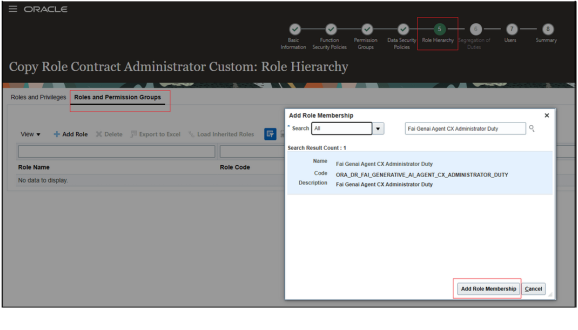
To access the Oracle AI Agent Studio for Fusion Applications and manage CX AI agents, you must be assigned a configured job role that has the following duty roles:
- Manage CX AI Agents (ORA_ZCA_MANAGE_CX_AI_AGENTS)
- Manage CX AI Agents (ORA_ZCA_MANAGE_CX_AI_AGENTS_HCM)
- Fai Genai Agent CX Administrator (ORA_DR_FAI_GENERATIVE_AI_AGENT_CX_ADMINISTRATOR_DUTY)
In the job role, enable the permission groups and navigate to the Role Hierarchy tab to add the Fai Genai Agent CX Administrator.
Copy and Publish a Contract Summarization Agent Team
Here are the steps to copy and publish a Contract Summarization Agent Team:
- Navigate to the AI Agent Studio from the Tools menu and
select the product Enterprise Contracts product.
The Contract Summarization Agent is displayed as follows:
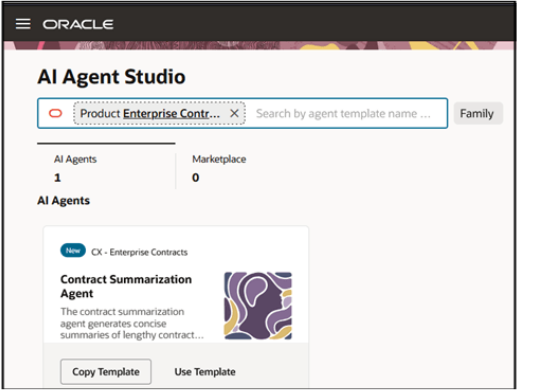
- Choose the option to either copy the template (preferred) or use template and follow the steps to create a Contract Summarization Agent team and select Continue.
- Select the Agent Team Settings icon.
- Take note of the Agent Team Code as highlighted in the
following:
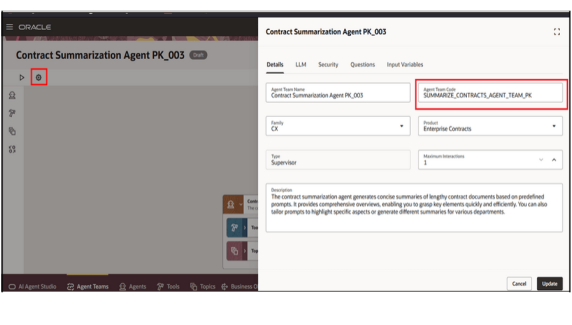
- Select the Security tab and add the roles that need to access the agent from the contract UI.
- Select Update and then Publish to publish the agent team with the predefined summarization prompt.
- From the Contract Summarization Agent UI, select the actions drop-down list
and select Edit as shown.
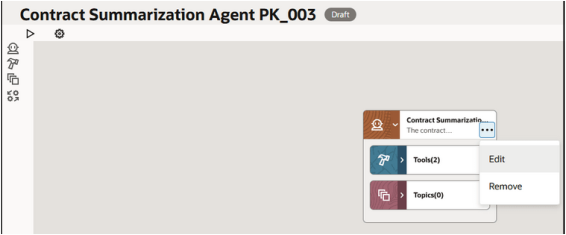
- Change only the User Prompt highlighted. Don't change
any other text.
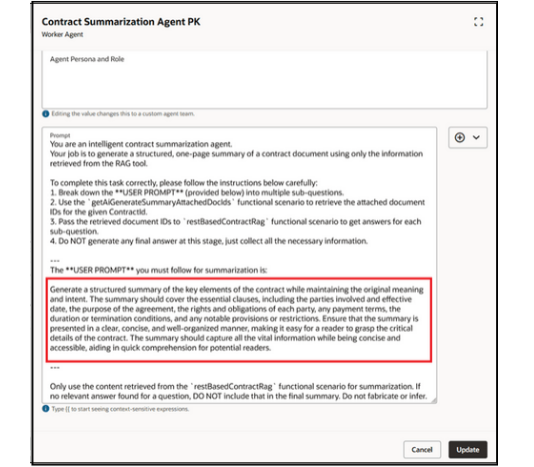
- Go to the LLM tab and edit the answer requirements of
the Summarization prompt if required as follows:
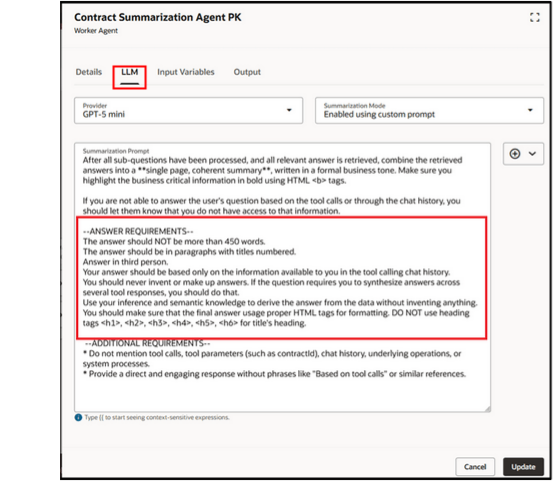
- Select Publish to publish the agent team with the changes you make to the user and summarization prompts.
Manage Contract Type UI Setup to Enable Summarization
The following setup needs to be performed in the Manage Contract Type UI to enable summarization for a specific contract type.
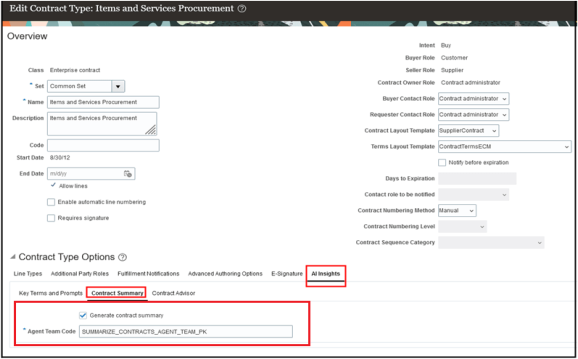
The tab AI Insights tab is available in the Manage Contract Type UI to capture the setup information related to the AI related features. The tab is displayed only to users who have the following privilege:
- Privilege Name - Manage AI Setups
- Code - OKC_MANAGE_AI_SETUPS_PRIV
- Description - Allows the definition of setups related to all AI related features
- Navigate to the Contract Summary subtab.
- Enable the Generate Contract Summary checkbox and enter
the agent team code that was copied from the agent team. See step 4 from the
Copy and Publish a Contract Summarization Agent Team
section.
Security Requirements for Generating and Editing a Contract Summary
The following privileges and duty roles are required to generate a contract summary.
| Name | Code | Description |
|---|---|---|
| Generate Contract Summary | OKC_GENERATE_CONTRACT_SUMMARY_PRIV | Allows generating contract summary using AI. This predefined
privilege is added to the following job roles:
|
| Use Generative AI Features in Sales | ZCA_USE_GENAI_IN_SALES_PRIV | Allows users to use generative AI features. |
| Fai Genai Agent Runtime Duty | ORA_DR_FAI_GENERATIVE_AI_AGENT_RUNTIME_DUTY | This duty role is needed to generate contract summary. Note: From the security console, select
Enable Permission Groups for all
appropriate job roles with this duty role. It's added to the following ready-to-use job roles:
|
| Edit Contract Summary | OKC_EDIT_CONTRACT_SUMMARY_PRIV | This privilege is required to edit the generated summary. The Edit Summary menu in the Generate Contract Summary UI is displayed for users with this privilege. It isn't added to any ready-to-use roles. |