Source Parts Using Service Logistics Parts Search
The Service Logistics parts search program locates parts needed for field service and customer support (parts-only service) as well as field stocking location replenishment.
It requires both SCM and Service Logistics setups. See the Getting Started with Service Logistics guide for details. The Service Logistics parts search also supports GOP sourcing, although Inventory Sources and GOP are generally used more for long lead-time product sales.
The Part Search is automatically executed when you create or update a part requirement when the source stocking location and ship method have not been selected by the user.
If the Parts Search didn't find the required parts in the parts supply chain, the Part Search page appears so you can change the search criteria and search for the parts again.
If parts can't be found, a back order (sales order or transfer order) is automatically created when the user selects the Save and Close button. For the transfer order back orders, inventory sourcing rules are used to determine its default source stocking location. Sales order backorders are created without a source, arrival date, or shipment method.
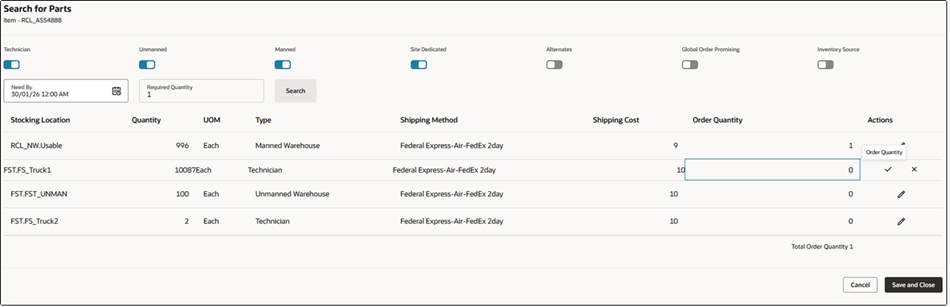
The switches control what searches are performed. All of the sourcing options are available for field service (service work orders or third-party work orders) while customer support (service requests and third party service requests) only supports manned stocking locations and GOP searches.
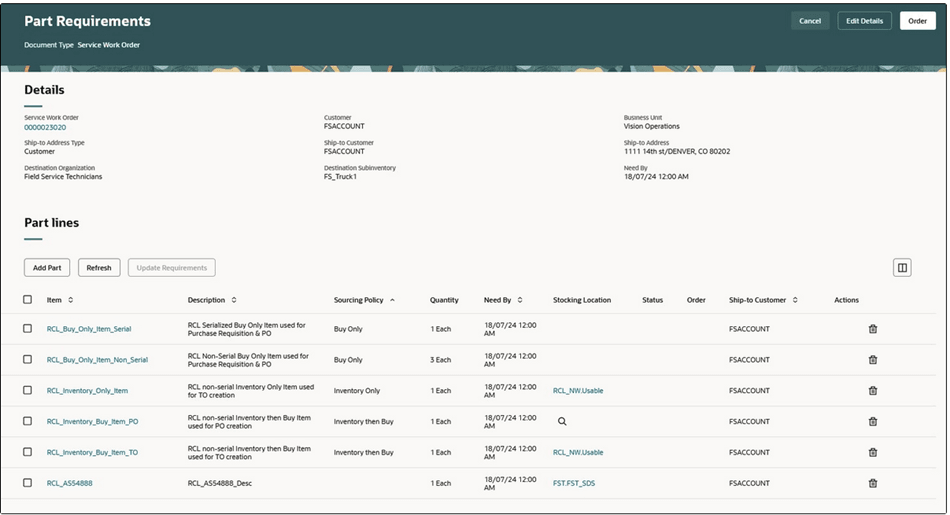
You can also access the Parts Search page by selecting the source stocking location or the magnifying glass icon.
-
The Parts Search page sorts the sourcing options from the lowest to the highest shipping costs as defined in the Transit Times page. The Parts Search page only lists the ship methods that meet the need-by date. Expected Arrival is the current date/time plus ship method’s transit time.
-
You can change the Need-By Date/Time to expand your parts search when no parts are found that can meet the date.
-
Select a row or source and then save your choice, by selecting Save and Close. This updates the part requirement with a source stocking location, shipping method, and arrival date.
The parts search program uses shipping zones of the ship to addresses to find the stocking locations/internal locations, as defined in the Transit Times page, that can supply the required parts to the ship-to address. Geographies define shipping zones and ship-to addresses map to geographies.
Let's look at how the sourcing options work.
Sourcing options available only for field service work orders:
|
Sourcing Option |
Details |
|---|---|
|
Technician |
Part is sourced from the technician's trunk stock subinventories that can supply the ship-to address zone, set up in the Manage Transit Times page. When you source and order from a technician's trunk stock subinventory, a reservation is created. It's required that you define a shipping method in the Manage Transit Times page but it's not used in this case. |
|
Site Dedicated |
Part is sourced from the site-dedicated stocking locations (subinventories) associated with the customer ship-to address in the Service Logistics Manage Stocking Locations page. When you source and order from site-dedicated locations, a reservation is created. |
|
Unmanned |
Part is sourced from unmanned warehouses that can supply to the ship-to address zone as set up in the Manage Transit Times page. When you source and order from unmanned warehouses, a reservation is created. It's required that you define a shipping method in the Manage Transit Times page but it's not used in this case. |
|
Inventory Source |
Search program uses inventory replenishment rules to find stocking locations that can resupply a field stocking location, which is usually the technician's trunk stock. The inventory sources can be defined for combinations of inventory organization, subinventory, and item. If you select this sourcing option, a transfer order is created without a shipping method or an arrival date and time, as inventory sourcing rules don't include ship methods. Inventory sources are also used to create back orders. |
Sourcing options available for service requests and field service work orders:
|
Sourcing Option |
Details |
|---|---|
|
Manned |
Part is sourced from manned warehouses that can supply to the ship-to address zone, as defined in the Transit Times page. The search program calculates the arrival date and time for each shipping method. It then filters out the shipping methods that can't meet the need-by date. If you're sourcing for a work order, a transfer order is created to ship the parts to the technician subinventory. If you're sourcing for a service request, a sales order is created to ship the parts directly to the customer. |
|
Global Order Promising |
Select to use the GOP sourcing process. |
Search and order parts from multiple stocking locations
If you're creating part requirements from the Add Part page and the parts search programs can't find the required quantity in a single location, the Parts Search page opens. This lets you search and order parts from multiple stocking locations. In this case, the required quantity appears in the header region of the page and the ordered quantity appears in the search results table. The ordered quantity defaults from the required quantity, using parts from the lowest shipping cost locations until the sum of the ordered quantities equal the required quantity. If two stocking locations have the same shipping costs, Service Logistics uses the location with the most parts. You can also change the quantities in the results based on your preferences.
Search for alternate parts:
If the original part is available, it's always used to fulfill the part requirement. However, if the part isn't available, you can search for substitute and supersession parts using the Alternates sourcing option in the interactive Parts Search page as follows:
-
Automated parts search isn't configured to search for substitute and supersession parts.
-
Substitute and supersession parts must be set up for the service parts in the Manage Item Relationships page of the Product Information Management application.
-
After you perform the search, the substitute and superseded parts that you can use will appear in the Parts Search page. The icons next to each item indicate whether the found part is a suppression or a substitute.
-
When searching for superseded parts, the Parts Search program follows the entire link of superseded relationships. For example, if the part requirement is for part A and it's superseded by part B, which is superseded by part C, then the program searches for part A, then part B, then part C. The program uses the superseded part to completion before using supersession parts. In this example, if part B is available, it's used to fulfill the part requirement before part C.
-
For substitutes, the Parts Search program looks only for direct substitutes as defined in the Manage Item Relationships page.
Additional setups:
-
Interorganization relationships must be set up in the Manage Interorganization Parameters page before you can create transfer orders to ship parts to field locations.
-
Shipping methods must be set up for source organizations in the Manage Carriers page before you can use them in the Manage Transit Times page.