Source Parts Using Service Logistics Parts Search
The Service Logistics parts search program finds parts needed for field service and customer support (parts-only service) and field stocking location replenishment.
It requires both SCM and Service Logistics setups. See the Getting Started with Service Logistics guide for details. Service Logistics parts search also supports GOP sourcing, although Inventory sources and GOP are generally used more for long lead-time product sales.
Parts Search runs automatically when you create or update a part requirement without selecting a source stocking location and shipping method. It searches for the requested item and any eligible substitute or supersession items. It then returns the closest sourcing option with the lowest shipping cost, based on the item, stocking location, and shipping method.
Parts Search uses transit times from stocking locations to the shipping zone of the Ship-to Address to find the required parts. If shipping method schedules are set up, Parts Search uses them to identify the expected ship's arrival dates and times. Otherwise, it uses the lead times configured in Transit Times to calculate these dates.
Parts Search also supports supply chain transit times for destination inventory locations. To accommodate different sourcing rules for field stocking locations and technicians within the same shipping zone, Parts Search checks whether source stocking locations are configured for the destination. If they're, Parts Search uses only those source locations and their configured transit times. If none of those locations has the required parts, Parts Search doesn't expand the search to other locations in the Ship-to Address shipping zone.
- In ADF pages, the Part Search page appears so you can change the search criteria and search for the parts again.
- In Redwood pages, you'll need to manually open the Parts Search and search for the parts again.
If shipping method schedules are set up, Parts Search uses them, along with the Ship-to Address and need by date, to calculate the ship's arrival date and time.
Shipping method schedules are used to calculate delivery dates. When a need by date is provided, Parts Search decides the latest date and time when the shipping method can deliver the parts and still meet the specified date. When a need by date isn't provided, Parts Search decides the earliest date when the shipping method can deliver the parts.
If shipping method schedules aren't set up, Parts Search uses transit times for these calculations
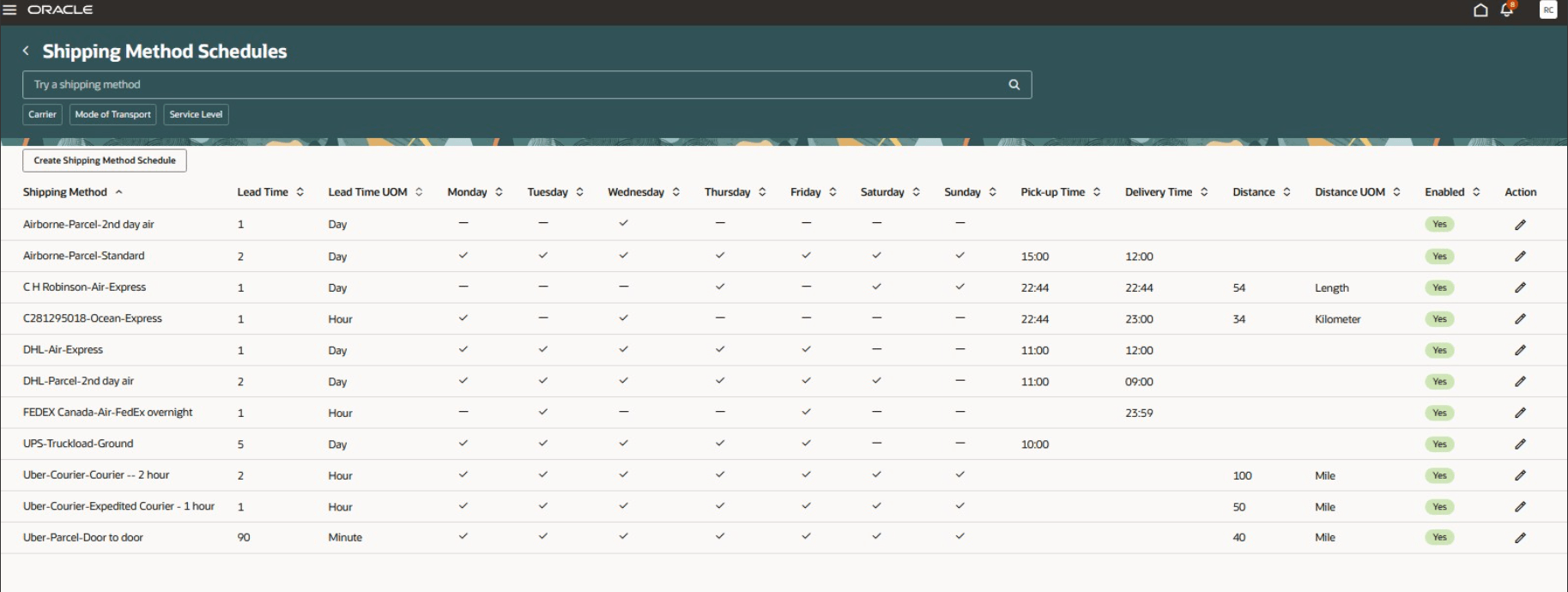
Shipping Method Schedules Search Page
-
When a need by date isn't entered: The program uses the earliest each shipping method schedule that can be used to deliver parts to the specified ship-to address.
- Expected ship date and time is based on the next available pickup time for the shipping method schedule.
-
Expected arrival date is calculated using the shipping method schedule lead time.
-
Expected arrival time is based on the delivery time defined for the shipping method schedule.
-
When a need by date is entered on the part requirement or within the Parts Search UI: The program uses the latest possible ship date and time that still meets the requested need by date and time.
- Expected ship date and time reflects the last available pickup time that satisfies the requirement.
- Expected arrival date and time are identified using the shipping method schedule lead time and delivery schedule.
If parts can't be found, a backorder (sales order or transfer order) is automatically created when the user selects Save and Close. For the transfer order backorders, inventory sourcing rules are used to identify its default source stocking location. Sales order backorders are created without a source, arrival date, or shipment method schedule.
Search for Parts Page
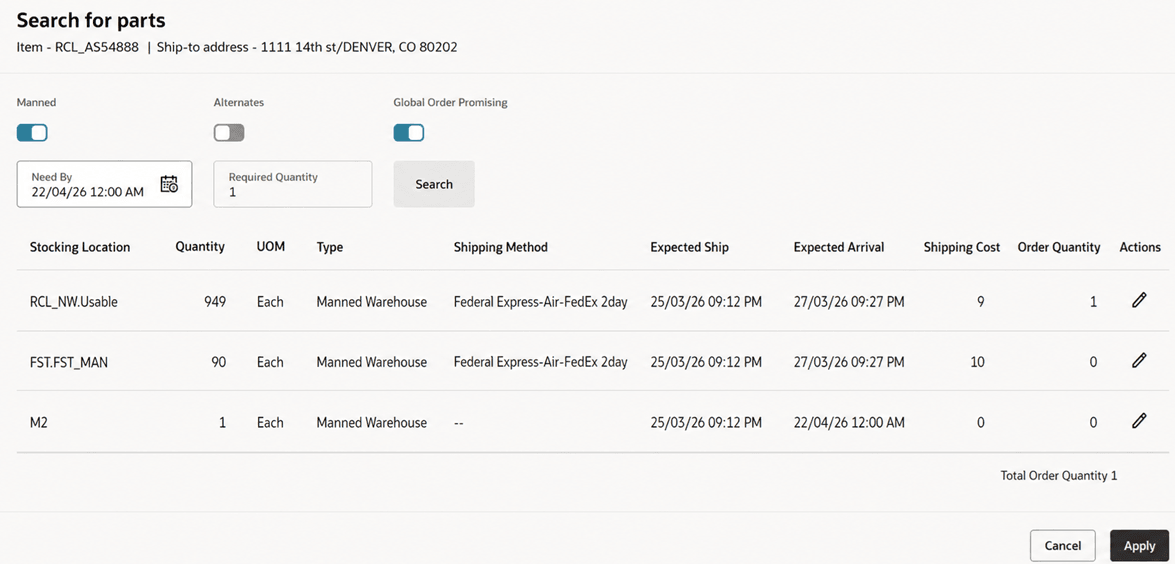
The switches control what searches are performed. All the sourcing options are available for field service (service work orders or third-party work orders) while customer support (service requests and third party service requests) only supports manned stocking locations and GOP searches.
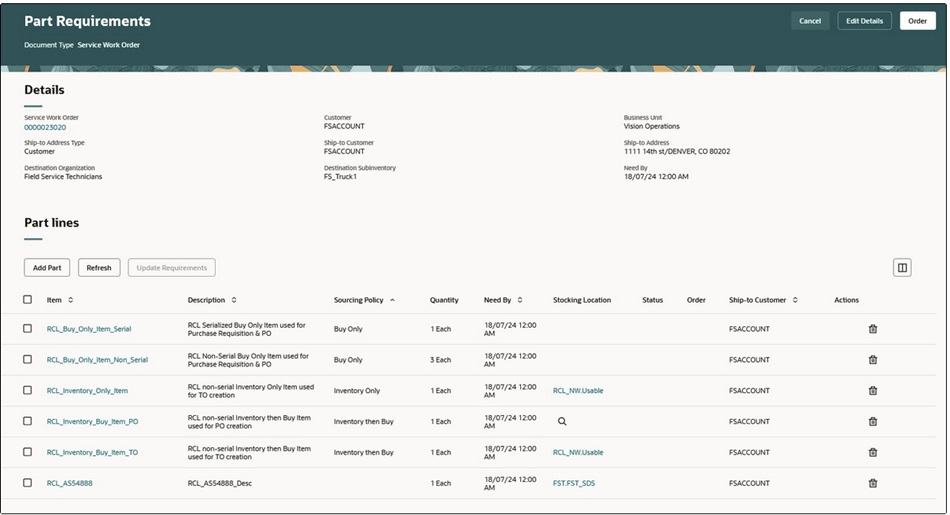
You can also access the Parts Search page by selecting the source stocking location or the magnifying glass icon.
Part Requirements- Magnifying Glass Icon
-
The Parts Search page sorts the sourcing options from the lowest to the highest shipping costs as defined in the Transit Times page. The Parts Search page only lists the shipping method schedule that meet the need by date. Expected Arrival is the current date and time plus the shipping method schedule's transit time.
-
You can change the Need By Date/Time to expand your parts search when no parts are found that can meet the date.
-
Select a row or source and select Save and Close. This updates the part requirement with a source stocking location, shipping method, and arrival date.
The parts search program uses shipping zones of the ship to addresses to find the stocking locations/internal locations, as defined in the Transit Times page, that can supply the required parts to the ship-to address. Geographies define shipping zones and ship-to addresses map to geographies.
Let's look at how the sourcing options work.
Sourcing options available only for field service work orders:
|
Sourcing Option |
Details |
|---|---|
|
Technician |
Part is sourced from the technician's trunk stock subinventories that can supply the ship-to address zone, set up in the Manage Transit Times page. When you source and order from a technician's trunk stock subinventory, a reservation is created. It's required that you define a shipping method in the Manage Transit Times page but it's not used in this case. |
|
Site Dedicated |
Part is sourced from the site-dedicated stocking locations (subinventories) associated with the customer ship-to address in the Service Logistics Manage Stocking Locations page. When you source and order from site-dedicated locations, a reservation is created. |
|
Unmanned |
Part is sourced from unmanned warehouses that can supply to the ship-to address zone as set up in the Manage Transit Times page. When you source and order from unmanned warehouses, a reservation is created. It's required that you define a shipping method in the Manage Transit Times page but it's not used in this case. |
|
Inventory Source |
Search program uses inventory replenishment rules to find stocking locations that can resupply a field stocking location, which is usually the technician's trunk stock. The inventory sources can be defined for combinations of inventory organization, subinventory, and item. If you select this sourcing option, a transfer order is created without a shipping method or an arrival date and time, as inventory sourcing rules don't include ship methods. Inventory sources are also used to create backorders. |
Sourcing options available for service requests and field service work orders:
|
Sourcing Option |
Details |
|---|---|
|
Manned |
Part is sourced from manned warehouses that can supply to the ship-to address zone, as defined in the Transit Times page. The search program calculates the arrival date and time for each shipping method. It then filters out the shipping methods that can't meet the need by date. If you're sourcing for a work order, a transfer order is created to ship the parts to the technician subinventory. If you're sourcing for a service request, a sales order is created to ship the parts directly to the customer. |
|
Global Order Promising |
Select to use the GOP sourcing process. |
Search and order parts from multiple stocking locations
If you're creating part requirements from the Add Part page and the parts search can't find the required quantity in a single location, the Parts Search page opens. This lets you search and order parts from multiple stocking locations. In this case, the required quantity appears in the header region of the page and the ordered quantity appears in the search results table. The ordered quantity defaults from the required quantity, using parts from the lowest shipping cost locations until the sum of the ordered quantities equals the required quantity. If two stocking locations have the same shipping costs, Service Logistics uses the location with the most parts. You can also change the quantities in the results based on your preferences.
Search for alternate parts:
If the original part is available, it’s used by default to fulfill the part requirement. However, the Alternates sourcing option on the Parts Search page can be used to search for substitute and supersession parts even when the original part is available, for example, when an alternate part is available locally and the original part is found far away.
-
Substitute and supersession parts are defined in the Product Information Management application. Define substitute and supersession service parts using the Type list of values (LOV) on the Manage Item Relationships page.
-
After you perform the search, the substitute and superseded parts that you can use will appear in the Parts Search page. The icons next to each item indicate whether the found part is a suppression or a substitute.
-
When searching for superseded parts, the Parts Search program follows the entire link of superseded relationships. For example, if the part requirement is for part A and it's superseded by part B, which is superseded by part C, then the program searches for part A, then part B, then part C. The program uses the superseded part to completion before using supersession parts. In this example, if part B is available, it's used to fulfill the part requirement before part C.
-
For substitutes, the Parts Search program looks only for direct substitutes as defined in the Manage Item Relationships page.
Additional setups:
-
Interorganization relationships must be set up in the Manage Interorganization Parameters page before you can create transfer orders to ship parts to field locations.
-
Shipping methods must be set up for source organizations in the Manage Carriers page before you can use them in the Manage Transit Times page.
- Stocking locations (inventory organizations and subinventories) must be assigned internal locations on the Manage Locations page. These internal locations are used as source locations when setting up transit times to a zone or destination location on the Manage Transit Times page.
- Shipping method schedules must be set up for carriers in the Shipping Methods page to incorporate shipping method schedules in parts search.