Overview of Importing Orders Into Order Management
Use the Order Import Template or REST API to import orders from your source system into Oracle Order Management.
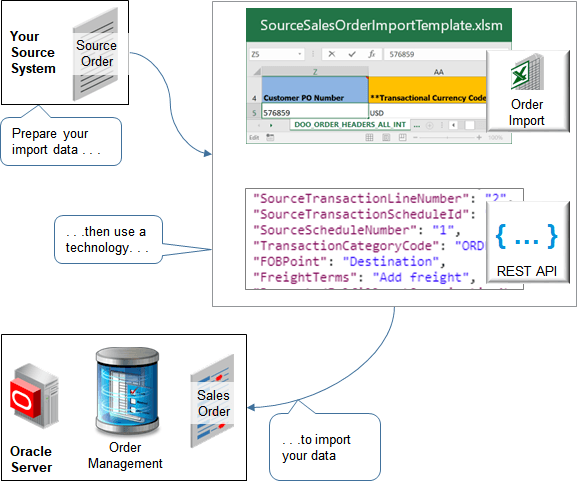
You can use the Order Import Template to reduce errors and simplify your import. This template contains a structure that the Oracle database requires. It includes a tab for each database table, and it displays tabs in a specific sequence. Columns on each tab represent the table columns that Oracle requires, and the template specifies the data type that Oracle requires for each database column.
| What You Need | Where You Can Get It |
|---|---|
| Learn how to use the Order Import Template. | Convert Source Data Into CSV File |
| Copy of the Order Import Template and details about tables that the template references. | Go to File-Based Data Import (FBDI) for SCM. In the Order Management chapter, click Import Sales Orders. |
| Example templates. | Go to Technical Reference for Order Management (Doc ID 2051639.1), then download the Payloads and Files attachment. |
| Details about the salesOrdersForOrderHub REST API. |
For details and examples, go to REST API for Oracle Supply Chain Management Cloud, expand Order Management, then click Sales Orders for Order Hub. |
| More technical details. | Master Note Importing Data using FBDI (Doc ID 2665940.1) |
Compare the Import Technologies
| What You're Doing | Order Management Work Area | File Based Data Import | REST API | ADF Desktop Integration (ADFDI) |
|---|---|---|---|---|
| Update an extensible flexfield on the order header while the sales order and the order lines are closed. | No | No | No | No |
| Update the Request Date attribute on the order line. | Yes | Yes | Yes | No |
| Update the Order Type attribute on the order header. | Yes | Yes | Yes | No |
|
Update the header of an order that isn't Canceled or Closed.
|
Yes | No | Yes | No |
| Update the Primary Salesperson on the order header. | Yes | Yes, but only if you haven't submitted the order. | Yes | No |
| Update pricing on an order line.* | Yes | Yes | Yes | No |
| Update a sales order that's in Awaiting Billing status. | No | No | No | No |
* You can update pricing only if pricing isn't frozen. For details see, Freeze Price on Sales Orders.
Import a Large Number of Source Orders
We recommend that you use file-based data import (FBDI) instead of REST API to import a large number of source orders. FBDI is more resilient and is easier to retry imports that fail without having to resend the source order from your source system.
Consider an example:
-
You process about 4,000 orders each day.
-
You average about 50 order lines in each source order.
-
You process about 200,000 order lines each day.
-
You expect to import about 330 source orders each hour from 8AM to 8 PM.
-
You currently need to import from four source systems, and you plan to expand to eight, possibly doubling overall processing to 8,000 source orders a day.
-
You must ship your sales orders the day after you import them.
-
Your orchestration process includes typical fulfillment tasks, such as schedule, reserve, ship, bill, and so on.
FBDI is the best technology to handle this kind of volume.
If you must use REST API to import your source orders, then include only one source order in each payload request.
REST API only supports the synchronous operation, so if you include more than one source order in each payload, and if the request runs for more than about 5 minutes, then you might encounter a time out error that you can't recover from.
Differences in Attribute Names and Values
The import technologies use slightly different names and values for some attributes. Order Management processes the attributes in the same way regardless of these nomenclature differences.
Attribute Names
|
Format |
Order Import Template |
REST API |
|---|---|---|
|
Capitalization of the attribute name. |
Headline, such as Payment Method Code. |
Camel case, such as PaymentMethodCode. |
|
Name of an attribute that contains a Boolean value. |
Doesn't give an indication, for example Freeze Pricing. |
Typically includes the text |
|
Name of an attribute that contains an identifier. |
Typically includes the word Identifier, such as Source Transaction Identifier. |
Typically includes the text Id, such as SourceTransactionId. |
Boolean Values
|
Technology |
True |
False |
|---|---|---|
|
Order Import Template |
Y |
N |
|
REST API |
true |
false |
Prepare for Changes to Import Behavior
Starting in update 27B, the Import and Fulfill Large Volumes of Sales Order opt-in feature comes predefined as enabled, by default. The Import Sales Orders scheduled process will use behavior that's similar to the SalesOrderForOrderHub REST API. Use these guidelines to help you prepare.
| Old | New | Recommendation |
|---|---|---|
| If you set the CreateCustomerInformationFlag attribute to true, then the import could create party, site, contact, account, site use, and account role data. | You can't set the CreateCustomerInformationFlag attribute. If the customer doesn't exist in the customer master before you import the order, then you can no longer import that order. | Use the Customer for Sales Orders REST API to create the sold-to, ship-to, and bill-to data, then use that data to create your sales orders. |
| Old | New | Recommendation |
|---|---|---|
| You could use pretransformation, transformation, and posttransformation rules. | You can't use transformation rules any more, starting in update 27B. |
Use an order management extension instead.
|
Use Objects in Extensions to Read Data
| Old | New | Recommendation |
|---|---|---|
|
An On Start of Submission Request extension runs after you submit the order, so:
|
On Start of Submission Request runs before you submit the order, so:
|
Use the Extension objects that are available in your extension to read the current sales order's data. Use a PVO to query order data only for related orders, such as a processing order when working on a revision, or the original order when working on a return. |
Split Your Order Lines
| Old | New | Recommendation |
|---|---|---|
|
You could use the SourceLineId attribute in your REST payload to revise an order. You modified the revision's overall line quantity, and Order Management accurately adjusted the quantity across split lines. For example:
|
If you use SourceLineId to revise an order, then Order Management applies that update only on the original, first fulfillment line. It doesn’t update any new or subsequent split lines, and that can lead to unintended and incorrect order changes. Example:
|
Use FulfillLineId when you update a fulfillment line after a split during a revision. Don't use SourceLineId in this scenario. |
Consider Case Sensitivity
| Old | New | Recommendation |
|---|---|---|
| The import wasn't case sensitive when converting a lookup's value to its ID. | The Import Sales Orders scheduled process is case sensitive. | Make sure your import payload uses the correct case. |
Set Default Values for Ship-to and Bill-to Attributes
| Old | New | Recommendation |
|---|---|---|
| Order import couldn't set default values for the ship-to and bill-to attributes. | If you don't include values for these attributes, then the import will populate default addresses and other attributes from your customer's party data. | If you were setting these values manually after import, you no longer need to do it. |