Sync Item Information With Oracle Health
You can sync your item master including substitute and replacement items, item location, and item cost information from Oracle Cloud ERP to Oracle Health.
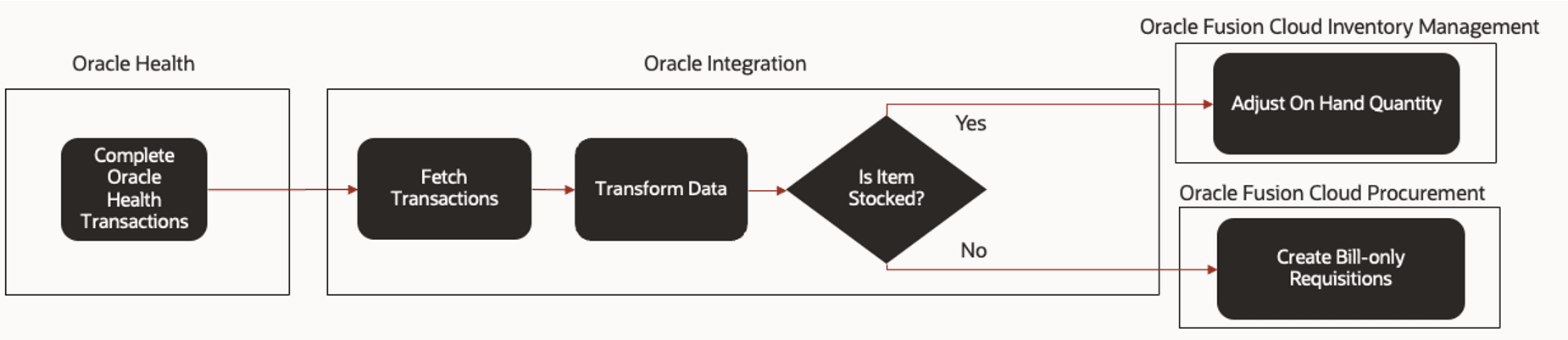
You can also sync the on hand quantities between Oracle Health and Oracle Fusion Cloud Inventory Management based on item usage and create bill-only requisitions in Oracle Cloud Procurement for nonstock items.
You can publish items from their item master thereby eliminating duplicate items that might be created in the Oracle Health EHR item master. You can access critical attributes directly in Oracle ERP Cloud and it isn't required to maintain this information in Oracle Health. This reduces errors that might occur due to manual maintenance thereby speeding up release the item for clinical purposes.
- Deploy the existing healthcare library. The standard integration works with the predefined healthcare library. For more details about healthcare library, see Use Predefined Extensible Flexfield Attributes for Maintaining Healthcare Product Data.
- Deploy and setup the Oracle Fusion Cloud SCM — Oracle Health EHR | Sync Items accelerator in Oracle Integration. For details, see the Sync Items from Oracle Fusion Cloud SCM to Oracle Health EHR guide available at docs.oracle.com.
- Opt in to the Synchronize Item Information With Oracle
Health feature and then perform the following:
- Create filters for items using the Oracle Health
spoke system to publish the item.
- In the Product Information Management work area, go to the Tasks panel tab, and click Manage Spoke Systems.
- Search for the name Oracle Health.
- In the search results, click the Oracle
Health link in the Name
column or select the row and click the
Edit icon.
The Edit Spoke System: Oracle Health page is displayed.
- Click Publication Options.
- Define filters using the Selection Criteria or Item Validation Rules, or both.
- Click Save and Close.
- In the Setup and Maintenance work area, go to the Manage
Subinventories and Locators task.
- Select the Organization and click OK.
- For the subinventories that are applicable for Oracle Health, click each subinventory, click the Edit icon, and select the Oracle Health location checkbox.
- Click Save and Close.
- Schedule the Synchronize Items with Oracle Health
schedule process with the Oracle Health spoke system. Specify the
following parameters:
- Spoke System: Oracle Health
- Synchronize Item Master: Yes
- Synchronize Item Locations: Yes
- Synchronize Item Costs: Yes
- Full Publish: No
- Click Submit to submit the process.
- Create filters for items using the Oracle Health
spoke system to publish the item.
- To enable the automatic update of the Last Contract Price attribute value with
the most recent price at which an item was purchased from Oracle Procurement
Cloud, use the ORA_EGP_SYNC_ITEM_LAST_CONTRACT_PRICE profile option:
- In the Setup and Maintenance work area, search for and select the Manage Administrator Profile Values task.
- On the Manage Administrator Profile Values page, search for and select the ORA_EGP_SYNC_ITEM_LAST_CONTRACT_PRICE profile option code.
- In the Profile Values section, set the Site level to Y. The
default value is N:
- Y = enables the feature
- N = disables the feature
- Click Save and Close. Changes in the profile value will affect users the next time they sign in.
- To sync bill-only requisitions between Oracle Cloud ERP and Oracle Health:
- Opt in for the Create Bill-Only Requisitions and Purchase Orders feature and then enable Bill-Only Requisitions on Oracle Cloud ERP. For details, see the Create Bill-Only Requisitions and Purchase Orders What's New.
- Do the following to integrate transactions and bill-only
requisitions:
- In the Setup and Maintenance work area, go to the Manage Special Handling Types task.
- In Special Handling Type, enter Bill Only and click Search.
- In Search Results, clear the Requires Single Supplier checkbox.
- Click Save and Close.
Oracle Health Item Integration Process
When the Synchronize Items with Oracle Health scheduled process starts, the Oracle Fusion Cloud SCM — Oracle Health EHR | Sync Items accelerator performs the following to integrate items, item location, and item cost:
- Downloads the ZIP files from Oracle WebCenter Content.
- Transforms data and creates files for Oracle Health EHR.
- Passes the data into interface tables.
- Communicates with administrator for resolution if data transfer fails.
The following image shows the integration process with Oracle Health EHR.

- Clinician completes case picking or documentation, or both in Oracle Health.
- Oracle Fusion Cloud SCM—Oracle Health EHR | Synchronize Items accelerator
performs the following:
- Fetches the transactions from Oracle Health using a schedule process.
- Transforms data.
- Adjusts On Hand Quantity in Oracle Fusion Cloud Inventory Management if the item is stocked.
- Creates Bill-only Requisitions in Oracle Fusion Cloud Procurement if the item isn't stocked.
- Communicates with administrator for resolution if data transfer fails.
The following image shows the transaction integration process.