How You Use Policy Assignment Sets
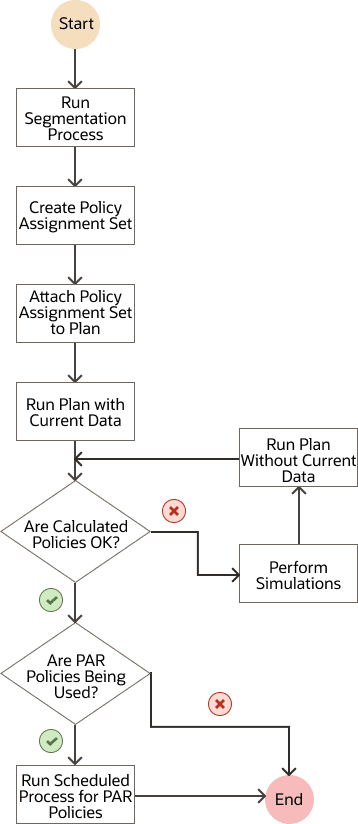
This topic provides the high-level process for using policy assignment sets in replenishment plans.
- Perform the segmentation process.
For information, see the topic titled Segmentation in Oracle Replenishment Planning.
- Create a policy assignment set, and define the policy parameters, default policies, and policy overrides for segments and policy overrides for item-location combinations.
- Attach the policy assignment set to a replenishment plan.
- Run the replenishment plan.
Generate the forecast, calculate the policy parameters, and calculate the replenishments. Refresh the plan with current data.
For information, see the topic titled Run a Replenishment Plan.
- Review the calculated policies.
- If the calculated policies aren't satisfactory, follow these steps:
- Perform simulations, and change the policy parameters, default policies, and policy overrides for segments or policy overrides for item-location combinations.
- Run the replenishment plan again.
Calculate the policy parameters and replenishments, and don't refresh the plan with current data.
- Once the calculated policies are satisfactory, if the policy type is periodic automatic
replenishment for your segments, run the scheduled process named Publish PAR
Policies.
For information, see the topic titled Publish PAR Policies.
The following is the flowchart for using policy assignment sets: