How You Use the Policy Comparison Feature
This topic provides the high-level process for using the policy comparison feature.
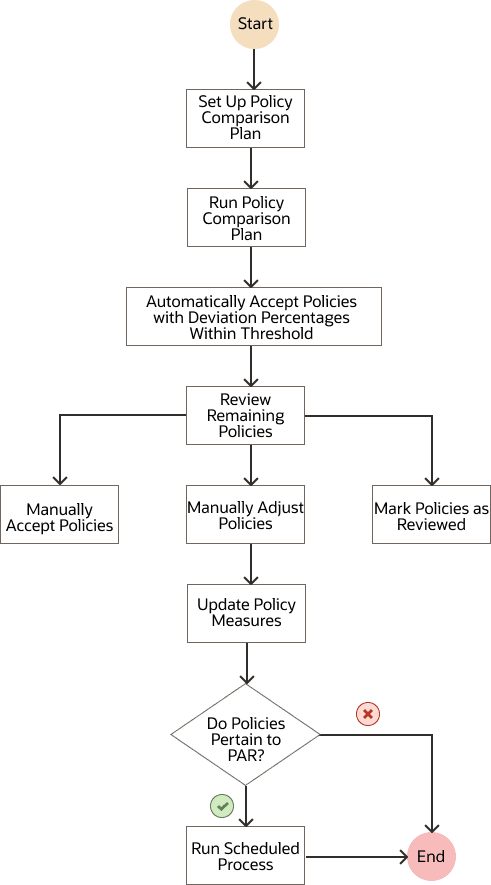
- Set up a policy comparison plan.
On the Scope tab on the Plan Options page, select the Calculate policy parameters checkbox, and don't select the Calculate replenishments and Rebalance inventory checkboxes.
In the Scope: Advanced Options dialog box that you open from the Scope tab on the Plan Options page, select the Enable for policy comparison checkbox, and enter a value in the Threshold Percentage for Policy Comparison field.
Optionally, select the Retain policy overrides checkbox to retain manual policy overrides after the replenishment plan is run with the Refresh with current data option selected on the Parameters tab in the Run Plan dialog box. The manual overrides are retained even if the deviation percentages between the suggested and existing policies are within the threshold.
- Run the policy comparison plan with the Refresh with current
data option selected on the Parameters tab in the Run Plan dialog
box.
When the deviation percentages between the suggested policies and existing policies are within the threshold, the suggested policies are automatically accepted.
- Review the remaining, suggested policies.
- Manually accept those suggested policies that don't require changes.
- Adjust those suggested policies that require changes.
- Mark the remaining, suggested policies as reviewed, or leave them as is.
These suggested policies don't take effect.
- Update the policy measures so that the manually accepted or adjusted policies overwrite
the corresponding, existing policies for item-location combinations.
The updated policies are then used by the integrated replenishment plan or automated execution plan that's linked to the policy comparison plan.
If your policies pertain to periodic automatic replenishment (PAR), run the scheduled process named Publish PAR Policies to move the policies to Oracle Fusion Cloud Inventory Management.
The following is the flowchart for using the policy comparison feature: