Use Lots and Serials That Aren't in Sequence for Return Orders
You can return a sales order when the lot or lot and serial aren't in sequence.
If you return only part of a sales order, and if you include the lot or the lot and serial in the return but they're out of sequence, then you must set up some profiles. If you don't, you might encounter an error:
An error occurred while trying to split lot or serial number lines. See the
                    inventory log for more details.
Examples
Lot
Assume you submit a sales order that has these lots:
| Attribute | Value |
|---|---|
| Item | AS92888 |
| Quantity | 5 |
| Order Number | 521287 |
| Lot Number |
S125051 S125052 S125053 S125054 S125055 |
| Attribute | Value |
|---|---|
| Lot Number |
S125051 S125054 |
The lot numbers are out of sequence, so you'll encounter the error.
Lot and Serial Example
| Attribute | Value |
|---|---|
| Item | AS54888 |
| Quantity | 5 |
| Order Number | 522126 |
| Lot Number | S125050 |
| From Serial Number | PS13438 |
| To Serial Number | PS13442 |
| Attribute | Value |
|---|---|
| Quantity | 2 |
| Lot Number | S125050 |
| From Serial Number | PS13438 |
| To Serial Number | PS13441 |
The From and To Serial number is now out of sequence, so you will encounter error.
Corrected Example Payloads
The serial is out of sequence in this example REST API payload, however the total quantity in the lotSerials entity is 2, the OrderedQuantity in the Lines entity is also 2, so this payload won't cause an error:
{
 "SourceTransactionNumber":"R13_Order110",
 "SourceTransactionSystem":"GPR",
 "SourceTransactionId":"R13_Order110",
 "BusinessUnitName":"Vision Operations",
 "BuyingPartyName":"Computer Service and Rentals",
 "BuyingPartyNumber":"1006",
 "BuyingPartyContactName":null,
 "TransactionType":"Standard Orders",
 "SubstituteAllowedFlag":false,
 "ShipsetFlag":false,
 "PartialShipAllowedFlag":true,
 "RequestedShipDate":"2024-10-29T20:49:12+00:00",
 "ShipmentPriority":"Low",
 "FOBPoint":"Destination",
 "FreightTerms":"Add freight",
 "RequestedFulfillmentOrganizationId":207,
 "PaymentTerms":"30 Net",
 "TransactionalCurrencyName":"US Dollar",
 "CanceledFlag":false,
 "RequestingBusinessUnitName":"Vision Operations",
 "FreezePriceFlag":false,
 "FreezeShippingChargeFlag":false,
 "FreezeTaxFlag":false,
 "SubmittedFlag":true,
 "PreCreditCheckedFlag":false,
 "SourceTransactionRevisionNumber":1,
 "lines":[
  {
  "SourceTransactionLineId":"1",
  "SourceTransactionLineNumber":"1",
  "SourceTransactionScheduleId":"1",
  "SourceScheduleNumber":"1",
  "TransactionCategoryCode":"RETURN",
  "TransactionLineTypeCode":"ORA_RETURN",
  "RequestedFulfillmentOrganizationId":207,
  "ProductNumber":"INV-110",
  "OrderedQuantity":2,
  "OrderedUOM":"Each",
  "RequestedShipDate":"2024-10-29T20:49:12+00:00",
  "TransactionBusinessCategoryName":"Sales Transaction",
  "originalOrderReference":[
   {
   "OriginalSourceOrderNumber":"521743",
   "OriginalSourceLineNumber":"1"
   }
  ],
  "lotSerials":[
   {
    "SourceLotSerialId":1,
    "Quantity":1,
    "ItemSerialNumberFrom":"SS0035",
    "ItemSerialNumberTo":null,
    "LotNumber":"S98021"
   },
   {
    "SourceLotSerialId":"2",
    "Quantity":1,
    "ItemSerialNumberFrom":"SS0031",
    "ItemSerialNumberTo":null,
    "LotNumber":"S98021"
    }
   ]
  }
 ]
}
Here's a similar payload from a web service:
<soap:Envelope xmlns:soap="http://schemas.xmlsoap.org/soap/envelope/">
   <soap:Body>
      <ns1:createOrdersAsync xmlns:ns1="http://xmlns.oracle.com/apps/scm/fom/importOrders/orderImportService/types/">
         <ns1:request xmlns:ns2="http://xmlns.oracle.com/apps/scm/fom/importOrders/orderImportService/">
            <ns2:Order>
               <ns2:SourceTransactionIdentifier>Return_Lot_Serial</ns2:SourceTransactionIdentifier>
               <ns2:SourceTransactionSystem>GPR</ns2:SourceTransactionSystem>
               <ns2:SourceTransactionNumber>Return_Lot_Serial</ns2:SourceTransactionNumber>
               <ns2:BuyingPartyName>FOM-Customer-001</ns2:BuyingPartyName>
               <ns2:BuyingPartyContactName>James Pattison</ns2:BuyingPartyContactName>
               <ns2:CustomerPONumber/>
               <ns2:TransactionalCurrencyCode>USD</ns2:TransactionalCurrencyCode>
               <ns2:TransactionOn>2024-10-30T00:00:00.000</ns2:TransactionOn>
               <ns2:RequestingBusinessUnitName>Vision Operations</ns2:RequestingBusinessUnitName>
               <ns2:OrigSystemDocumentReference/>
               <ns2:TransactionTypeCode>RETN</ns2:TransactionTypeCode>
               <ns2:FreezePriceFlag>false</ns2:FreezePriceFlag>
               <ns2:FreezeShippingChargeFlag>false</ns2:FreezeShippingChargeFlag>
               <ns2:FreezeTaxFlag>false</ns2:FreezeTaxFlag>
               <ns2:ShipToPartyName>FOM-Customer-001</ns2:ShipToPartyName>
               <ns2:ShipToAddress1>3486, Saratoga Road</ns2:ShipToAddress1>
               <ns2:ShipToCity>SUNNYVALE</ns2:ShipToCity>
               <ns2:ShipToPostalCode>94004</ns2:ShipToPostalCode>
               <ns2:ShipToState>CA</ns2:ShipToState>
               <ns2:ShipToCountry>US</ns2:ShipToCountry>
               <ns2:ShipToPartyContactName>James Pattison</ns2:ShipToPartyContactName>
               <ns2:BillToPartyType>ORGANIZATION</ns2:BillToPartyType>
               <ns2:BillToCustomerName>FOM-Customer-001</ns2:BillToCustomerName>
               <ns2:BillToCustomerIdentifier>300100046859202</ns2:BillToCustomerIdentifier>
               <ns2:BillToAddress1>3486, Saratoga Road</ns2:BillToAddress1>
               <ns2:BillToCity>SUNNYVALE</ns2:BillToCity>
               <ns2:BillToPostalCode>94004</ns2:BillToPostalCode>
               <ns2:BillToState>CA</ns2:BillToState>
               <ns2:BillToCountry>US</ns2:BillToCountry>
               <ns2:BillToAccountContactName/>
               <!--<ns2:SalesCredit>
                  <ns2:SourceTransactionSalesCreditIdentifier>OSC-001</ns2:SourceTransactionSalesCreditIdentifier>
                  <ns2:SalesPerson>Paul Robert Scholes</ns2:SalesPerson>
                  <ns2:Percent>100</ns2:Percent>
                  <ns2:SalesCreditTypeCode>1</ns2:SalesCreditTypeCode>
                  <ns2:SalesCreditTypeReference>Quota Sales Credit</ns2:SalesCreditTypeReference>
               </ns2:SalesCredit>-->
               <ns2:Line>
                  <ns2:SourceTransactionLineIdentifier>101</ns2:SourceTransactionLineIdentifier>
                  <ns2:SourceTransactionScheduleIdentifier>101</ns2:SourceTransactionScheduleIdentifier>
                  <ns2:SourceTransactionLineNumber>1</ns2:SourceTransactionLineNumber>
                  <ns2:SourceTransactionScheduleNumber>1</ns2:SourceTransactionScheduleNumber>
                  <ns2:ParentLineReference/>
                  <ns2:RootParentLineReference/>
                  <ns2:TransactionCategoryCode>RETURN</ns2:TransactionCategoryCode>
                  <ns2:ProductNumber>INV-110</ns2:ProductNumber>
                  <ns2:OrderedQuantity>2</ns2:OrderedQuantity>
                  <ns2:OrderedUOM>Each</ns2:OrderedUOM>
                  <ns2:RequestedFulfillmentOrganizationCode>M1</ns2:RequestedFulfillmentOrganizationCode>
                  <ns2:CustomerPONumber>8</ns2:CustomerPONumber>
                  <ns2:CustomerPOLineNumber>1</ns2:CustomerPOLineNumber>
                  <ns2:RequestedShipDate>2024-10-30T23:08:52Z</ns2:RequestedShipDate>
                  <ns2:ShippingCarrier/>
                  <ns2:PaymentTerms>30 Net</ns2:PaymentTerms>
                  <ns2:ShippingServiceLevelCode/>
                  <ns2:ShippingMode/>
                  <ns2:PartialShipAllowedFlag>false</ns2:PartialShipAllowedFlag>
                  <ns2:Comments/>
                  <ns2:TaxExempt>S</ns2:TaxExempt>
                  <ns2:ShipToPartyName>FOM-Customer-001</ns2:ShipToPartyName>
                  <ns2:ShipToAddress1>3486, Saratoga Road</ns2:ShipToAddress1>
                  <ns2:ShipToCity>SUNNYVALE</ns2:ShipToCity>
                  <ns2:ShipToPostalCode>94004</ns2:ShipToPostalCode>
                  <ns2:ShipToState>CA</ns2:ShipToState>
                  <ns2:ShipToCountry>US</ns2:ShipToCountry>
                  <ns2:ShipToPartyContactName>James Pattison</ns2:ShipToPartyContactName>
                  <ns2:BillToPartyType>ORGANIZATION</ns2:BillToPartyType>
                  <ns2:BillToCustomerName>FOM-Customer-001</ns2:BillToCustomerName>
                  <ns2:BillToCustomerIdentifier>300100046859202</ns2:BillToCustomerIdentifier>
                  <ns2:BillToAddress1>3486, Saratoga Road</ns2:BillToAddress1>
                  <ns2:BillToCity>SUNNYVALE</ns2:BillToCity>
                  <ns2:BillToPostalCode>94004</ns2:BillToPostalCode>
                  <ns2:BillToState>CA</ns2:BillToState>
                  <ns2:BillToCountry>US</ns2:BillToCountry>
                  <ns2:BillToAccountContactName/>
                  <ns2:LotSerial>
                     <ns2:SourceTransactionLotIdentifier>SN101</ns2:SourceTransactionLotIdentifier>
                     <ns2:LotNumber>S98020</ns2:LotNumber>
                     <ns2:SerialNumberFrom>SS0046</ns2:SerialNumberFrom>
                     <ns2:Quantity>1</ns2:Quantity>
                     <ns2:SerialNumberTo/>
                     <ns2:ItemRevisionNumber/>
                     <ns2:LocatorIdentifier/>
                  </ns2:LotSerial>
                  <ns2:LotSerial>
                     <ns2:SourceTransactionLotIdentifier>SN102</ns2:SourceTransactionLotIdentifier>
                     <ns2:LotNumber>S98020</ns2:LotNumber>
                     <ns2:SerialNumberFrom>SS0050</ns2:SerialNumberFrom>
                     <ns2:Quantity>1</ns2:Quantity>
                     <ns2:SerialNumberTo/>
                     <ns2:ItemRevisionNumber/>
                     <ns2:LocatorIdentifier/>
                  </ns2:LotSerial>
                  <ns2:DocumentReference>
                     <ns2:BatchIdentifier/>
                     <ns2:DocumentReferenceType>ORIGINAL_SALES_ORDER</ns2:DocumentReferenceType>
                     <ns2:DocumentIdentifier>300100619907446</ns2:DocumentIdentifier>
                     <!--SourceOrderId-->
                     <ns2:DocumentAdditionalIdentifier>GPR</ns2:DocumentAdditionalIdentifier>
                     <ns2:DocumentNumber>523671</ns2:DocumentNumber>
                     <ns2:DocumentAdditionalNumber>GPR</ns2:DocumentAdditionalNumber>
                     <ns2:DocumentLineIdentifier>300100619907486</ns2:DocumentLineIdentifier>
                     <!--SourceLineId-->
                     <ns2:DocumentAdditionalLineIdentifier/>
                     <ns2:DocumentLineNumber>1</ns2:DocumentLineNumber>
                     <!--SourceLineNumber-->
                  </ns2:DocumentReference>
               </ns2:Line>
            </ns2:Order>
         </ns1:request>
      </ns1:createOrdersAsync>
   </soap:Body>
</soap:Envelope>
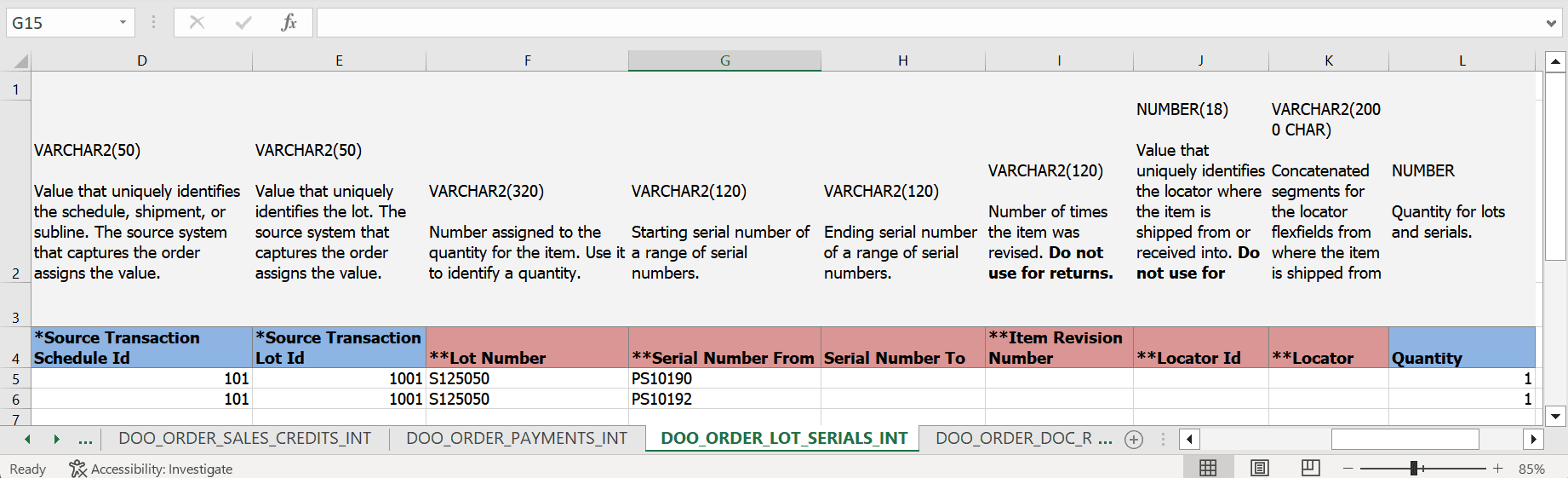
Here's a similar example from the DOO_ORDER_LOT_SERIAL_INT worksheet of SourceSalesOrderImportTemplate.xlsm for file-based data import:
Set Up
Add a profile option:
- Go to Home > My Enterprise > Setup and Maintenance > Tasks > Search > Manage Profile Options.
- Click Actions > New, set the values, then click Save and
Close:
Attribute Value Profile Option Code FOM_SPECIFY_LOT_SERIALS_QUANTITY_FOR_RETURNS Profile Display Name Specify Quantity for Lots and Lot Serials in Return Orders Application Order Management Module Manage Orders Description If you enable this profile option, then you must specify the quantity for lots or lots and serials even if they're in sequence when you return a sales order.
Enable the administrator profile:
- Search for and open the Manage Administrator Profile Values task.
- Search for the profile, set the values, then click Save and
Close:
Attribute Value Profile Option Code FOM_SPECIFY_LOT_SERIAL_QUANTITY_FOR_RETURNS Application Order Management Module Manage Orders Profile Level Site Profile Value Y
Specify the quantity:
- Include a value in the Quantity attribute in the lotSerials entity of your import payload when you import a referenced or unreferenced return.
- You must send the quantity to Oracle Receiving for each lot or lot and serial.
- The sum of all Quantity attributes that you specify in the lotSerials entity must equal the value that you specify in the Ordered Quantity attribute in the Lines entity.
Guidelines
- You must specify the quantity for lots or lots and serials even if they're in sequence when you return a sales order.
- Enable the profile only if you specify the lot or lot and serial in a return order.
- If you include only serials, then you won't encounter an error even if they're out of sequence and you don't include a quantity for them.
More: