Update and Settle Multiple Claims
Here you'll learn how to update and settle multiple customer claims.
You can update and settle multiple open customer claims together. Use mass update to update claim attributes, or mass settlement to resolve and submit claims using a credit memo or manual write-off.
Update Multiple Claims
Deduction departments may be responsible for resolving millions of deductions each year. A single dispute, such as a pricing issue, may have hundreds or thousands of related deductions.
You can use mass update of claims to quickly and efficiently update multiple related open claims together, rather than update each claim separately.
The Mass Update capability provides you with the ability to:
- Search and select multiple customer claims.
- Confirm you have selected the correct claims.
- Update the selected claims.
You can update the following attributes:
- Claim type and claim reason
- Status
- Owner
- Notes and attachments
- Descriptive flexfields with a global context
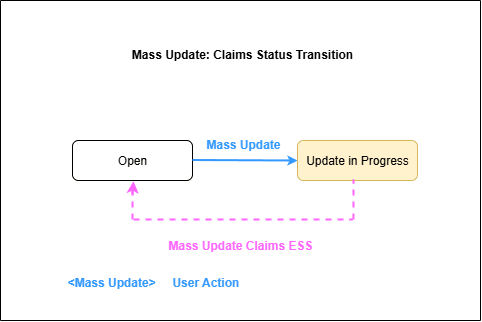
The Mass Update Claims scheduled process runs in the background to ensure a responsive user experience. During processing, the claims move to the Update In Progress status. When the update is complete, the claims return to the Open status.
The following graphic describes the claim status transitions during mass update.
Settle Multiple Claims
You can use mass settlement of claims to quickly and efficiently resolve and submit multiple related open deductions together, rather than settle each claim separately. Each related claim is assigned a Mass Settlement Number that serves as a unique tracking number for the single dispute.
The Mass Settle capability provides you with the ability to:
- Search and select multiple customer claims.
- Confirm you have selected the correct claims.
- Resolve the selected claims using either a credit memo with a single item or a single memo line description, or a manual write-off with a receivables activity.
The following table describes the claim sources that you can resolve, the settlement methods that you can use, and the resulting Receivables transaction for each use case.
| Selected Claim Sources | Resolve by | Settlement via AR Transaction |
|---|---|---|
| Invoice Deduction | Credit Memo
|
Credit Memo - On Invoice |
| Invoice Deduction | Write-off
|
Write-Off Adjustment |
|
Credit Memo
|
Credit Memo - On Account |
| Deduction | Write-off
|
Receipt Write-Off |
How Settlement of Multiple Claims Works
You can use the following additional search parameters to search for claims:
- Claim Source
- Invoice Date Range
- Mass Settlement Number
When you settle multiple claims, specify the following:
- Settlement method: Credit Memo or Manual Write-off
- Mass Settlement Number: Optionally, enter a unique number or let the application generate one for you
- Claim type and claim reason
- Owner
- Notes and attachments
- Descriptive flexfields with a global context
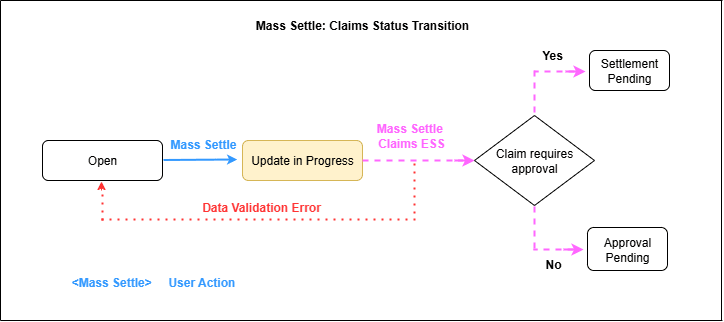
The Mass Settle Claims scheduled process runs in the background to ensure a responsive user experience.
When you submit the claims, they move to the Update In Progress status during background processing. For claims that pass validation, the subsequent status depends on whether you've opted into the Approve Customer Claims with BPM Workflow feature:
- If you've opted into the feature, then the claims move to the Approval Pending status. The application uses the configured Business Process Management workflow approval rules to process and route the claims to designated approvers. After approval, the claims move to the Settlement Pending.
- If you've not opted into the feature, then the application uses privilege based approvals. If you have the approval privilege, then the claims move to the Settlement Pending status. If you don't have the approval privilege, then the claims move to the Approval Pending status.
For more information about configuring claim approvals, see Claim Approvals in the Implementing Channel Revenue Management guide.
If validation fails for a claim during mass settlement, the claim returns to the Open status in its original state. Claims that pass validation continue through the process.
The following graphic describes the claim status transitions during mass settlement.