Applying Forecasted AEETR in Interim Provision
This setting provides AEETR calculated in the interim provision forecast to be applied in the interim tax provision at each parent level. The result is to squeeze to the AEETR rate when calculating tax on the year-to-date net profit or loss.
Example Calculation
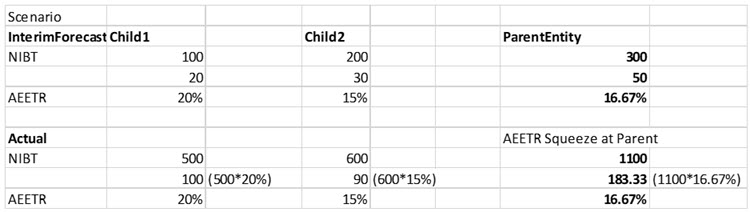
To apply forecasted AEETR in Interim Tax Provision:
- Go to Navigator.
- Select Application -> Configuration.
- Click on Tax Settings.
- Select the checkbox Apply forecasted AEETR in Interim Provision. (Automatically launches Refresh Database) under Interim provision section of the popup window.
- Click on Save. This process will run refresh database.
- Wait for the refresh database to complete (refer to the Jobs console) and then verify the Interim provision forms.
To apply forecasted AEETR in Interim Tax Provision:
- Go to Navigator.
- Navigate to the Tax Settings card.
- Select the type as Interim Provision. Select Forecasted AEETR in Interim
Provision (automatically launches Refresh Database) under Interim provision
section.

- Click on Save. This process will run refresh database.
- Wait for the refresh database to complete (refer to the Jobs console) and then verify the Interim provision forms.
Note:
If you rneed to re-enable the feature, follow the steps below:- Navigate to Variables then click on Substitution variables. Set variable: InterimProvisionSqueezeCalc_TRCS value to False
- Navigate to Tax Settings.
- Check the Forecasted AEETR in Interim Provision (automatically refreshes database) under Interim provision section and click Save.
- Wait for the Refresh database to complete re-enabling the feature (monitor progress in Jobs console).
- Verify the Interim Total forms.