Example Usecase: National
Follow the example usecase steps below:
- Enter data for the following data forms:
- Transfers
- Both Transfers and Transfers regional forms allow the Transfers deferred movement to enter on pre tax and/or tax basis.
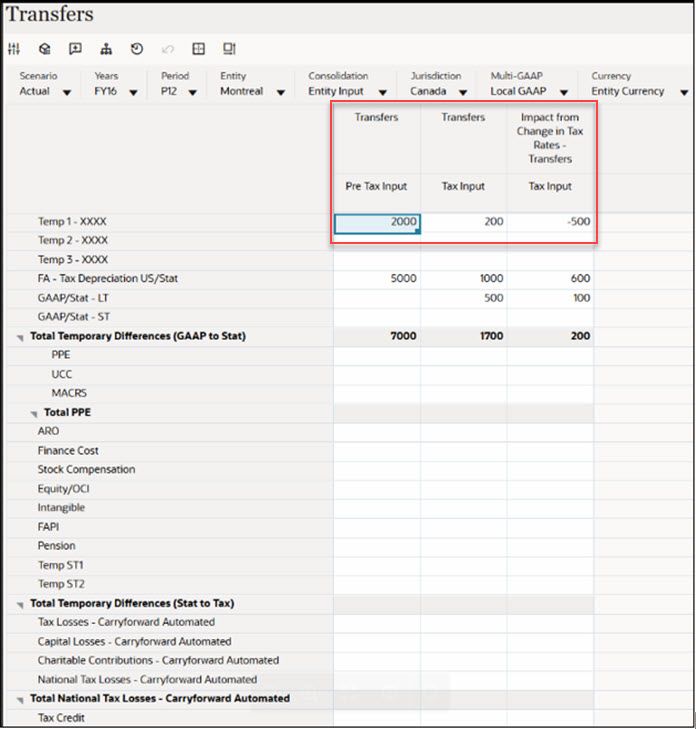
- Enter Transfers values in pre tax, tax input, and rate change columns.
- Below screenshot has Temp 1 - XXXX Account has entered Transfers Pre
Tax: 2000; Tax: 200; Impact from Change in Tax Rates - Transfers:
-500
- Divestments
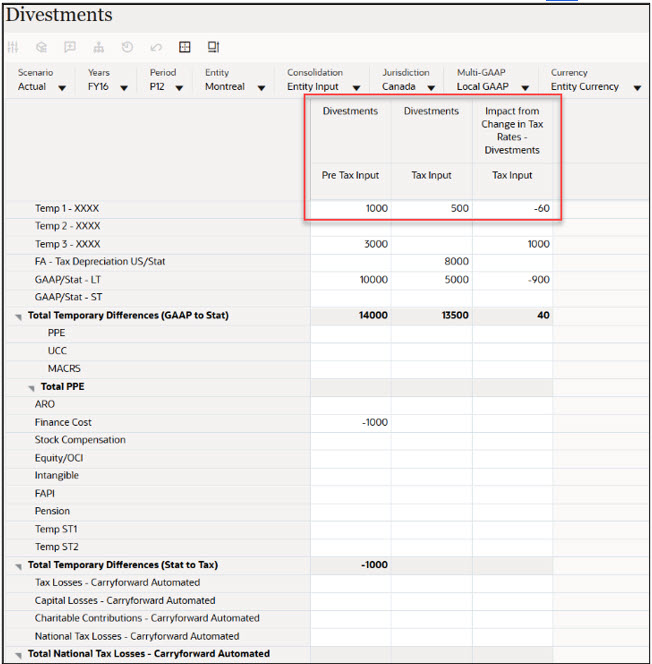
- Both Divestments and Divestments Regional forms allow the Divestments deferred movement to enter on pre tax and/or tax basis.
- Below screenshot has Temp 1 - XXXX Account has entered Divestments
Pre Tax: 1000 ; Tax: 500 ; Impact from Change in Tax Rates -
Divestments: -60
- Transfers
- After entering the data for Transfers and Divestments, click Save to save the data that you entered. On the form, under Actions, select Consolidate, and then click Launch.
- Navigate to Temporary Differences by selecting Navigator >Tax Provision
National> Package > Temporary Differences
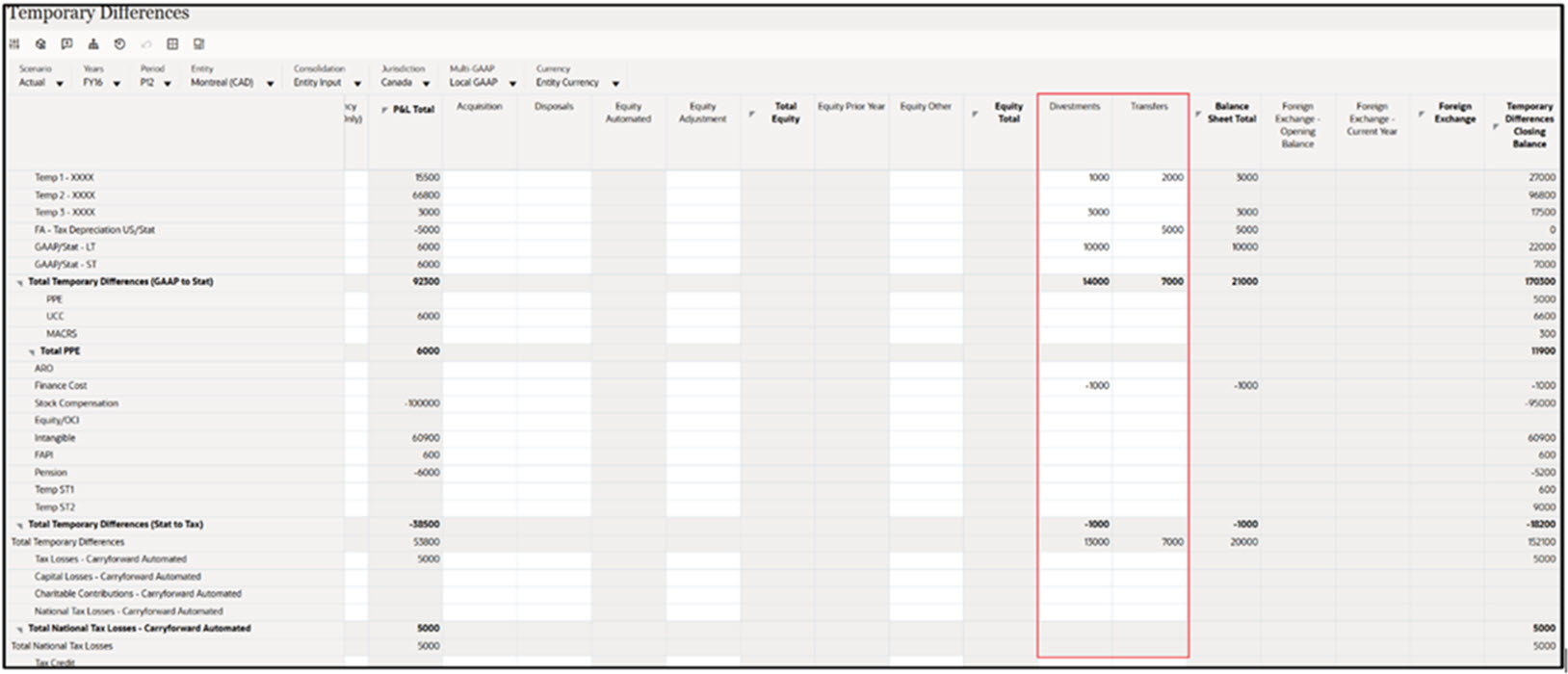
The following columns have been added to the form:
- TRCS_TransfersNp – Transfers
- TRCS_DivestmentsNp – Divestments
The screenshot below of the Temporary Differences form shows transferred data for both Transfers and Divestments.
- Navigate to Deferred Tax by selecting Navigator > Tax Provision
National > Package > Deferred Tax
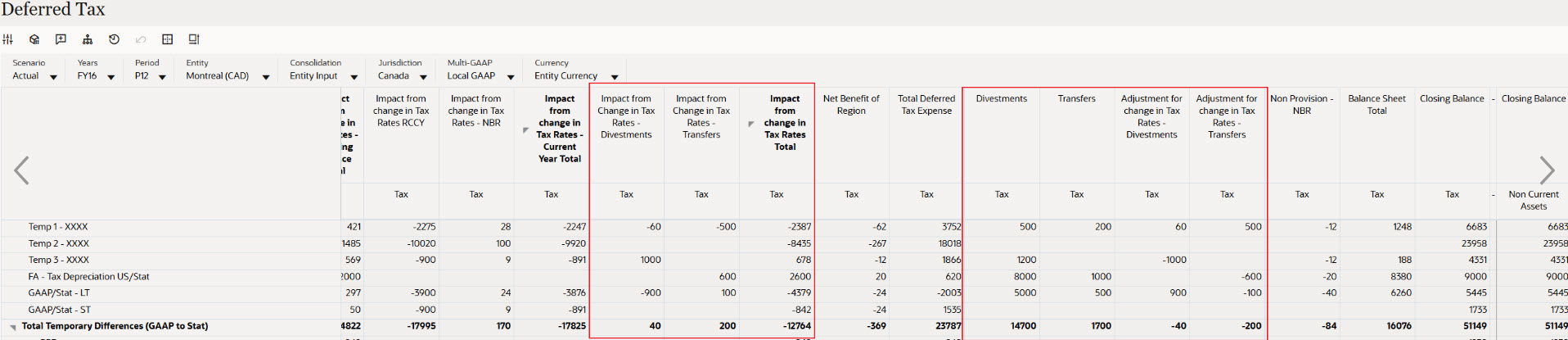
The following columns have been added to the form:
- TRCS_RCTransfersNp – Impact from change in tax rates (Transfers)
- TRCS_RCTransfersNpReversal – Adjustment for change in tax rates (Transfers)
- TRCS_RCDivestmentsNp – Impact from change in tax rates (Divestments)
- TRCS_RCDivestmentsNpReversal – Adjustment for change in tax rates (Divestments)
The screenshot below of the Deferred Tax form displays transferred and calculated data for Transfers and Divestments, including both tax-effected values and the impact from rate changes.
- Navigate to ETR by selecting Navigator → Tax Provision National
→ Package → ETR)
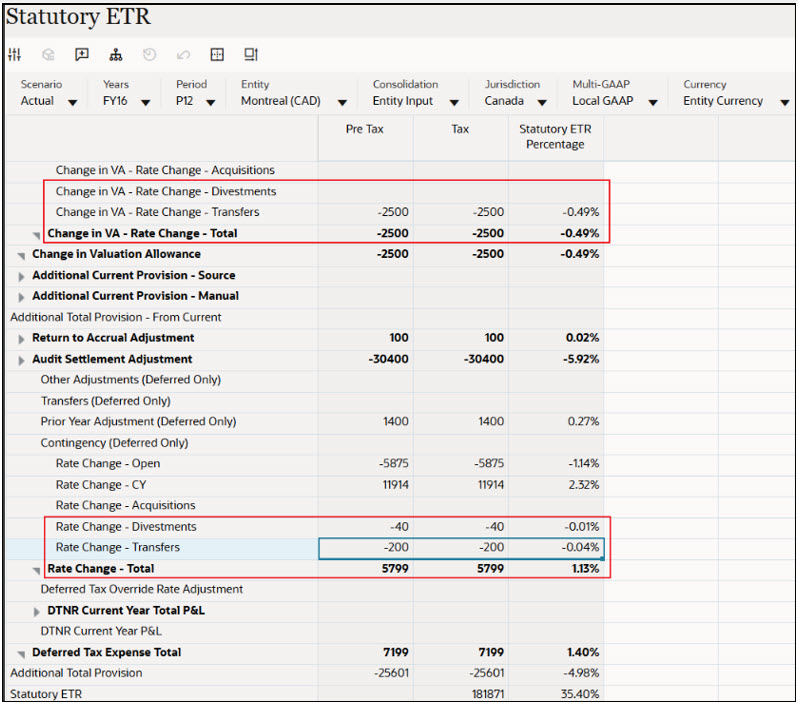
The TRCS_VARCTransfersNp and TRCS_DefTaxRCTransfersNp accounts are used to store current year rate changes related to Transfers, from both VA accounts and Deferred Tax accounts.
Similarly, TRCS_VARCDivestmentsNp and TRCS_DefTaxRCDivestmentsNp store current year rate changes for Divestments, from VA accounts and Deferred Tax accounts.
The screenshot below of the Statutory ETR (national) form shows calculated current year rate changes for Transfers and Divestments, which are applied to the Consolidated ETR.
- Similarly, navigate to TAR by selecting Navigator → Tax Provision National
→ Package → TAR
The TRCS_TARFTransfersNp account is used to store deferred tax amounts as a non-current asset or liability for Transfers, while TRCS_TARFDivestmentsNp serves the same purpose for Divestments.
For Transfers, both the deferred tax amounts and any rate change adjustments are initially recorded as Deferred Tax Assets (DTA) or Deferred Tax Liabilities (DTL) and are then reversed in the Transfers Total column.
Similarly, for Divestments, these amounts begin as DTA or DTL and are reversed in the Divestments Total column.
The TAR form below illustrates Transfers and Divestments classified as DTA (Non-Current Assets), with corresponding reversals shown in the relevant Transfers Total or Divestments Total columns.
