Example Usecase: Regional
- Enter data for the following data forms:
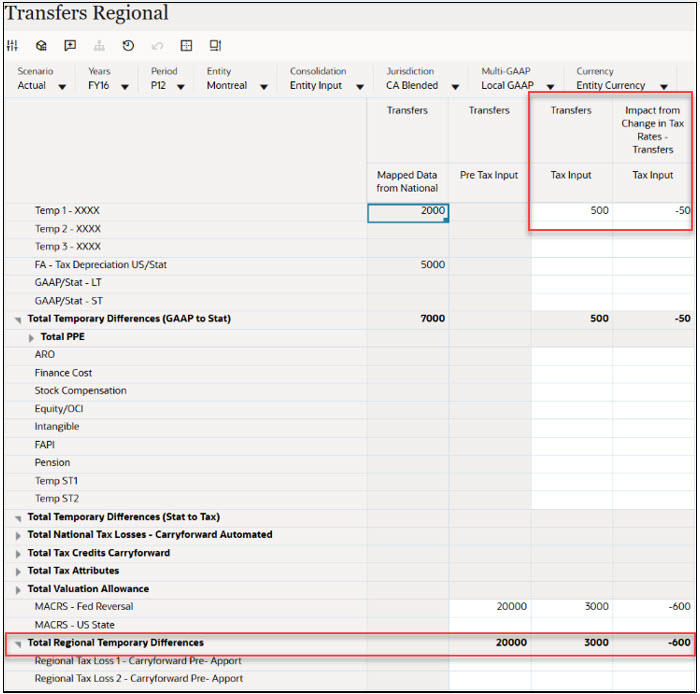
- Transfers Regional
- Below screenshot has Temp 1 - XXXX Account has entered Transfers Regional - Blended State, Tax: 500; Impact from Change in Tax Rates - Transfers: -50
- Below screenshot has MACRS - Fed Reversal Account has entered
Transfers Regional - Blended State, Pre Tax: 20000; Tax: 3000;
Impact from Change in Tax Rates - Transfers: -600
- Divestments Regional
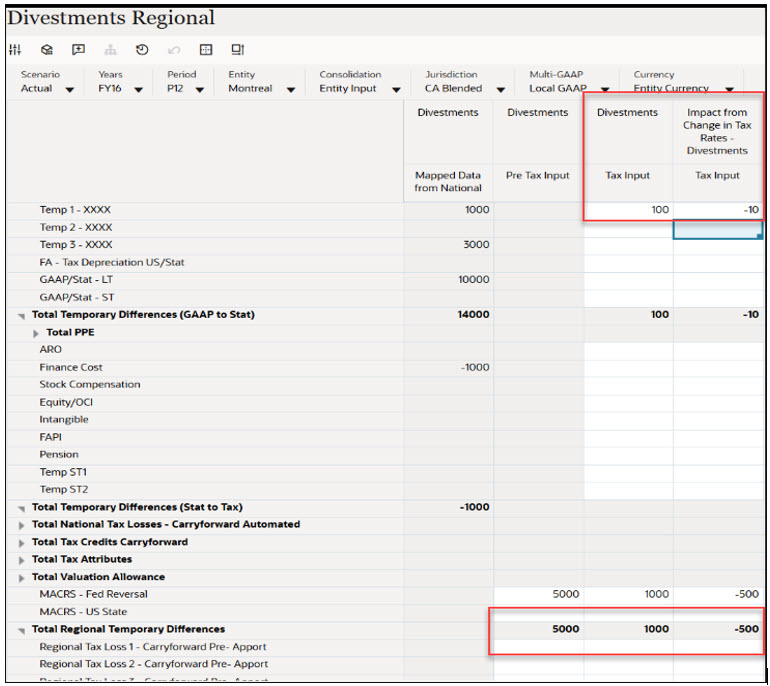
- Below screenshot has Temp 1 - XXXX Account has entered Divestments Regional - Blended State, Tax: 100; Impact from Change in Tax Rates - Transfers: -10
- Below screenshot has MACRS - Fed Reversal Account has entered
Divestments Regional - Blended State, Pre Tax: 5000; Tax: 1000;
Impact from Change in Tax Rates - Transfers: -500
- Transfers Regional
- After entering the data for Transfers Regional and Divestments Regional, click Save to save the data that you entered. On the form, under Actions, select Consolidate, and then click Launch.
- Navigate to Temporary Differences Regional by selecting Navigator → Tax
Provision Regional → Package → Temporary Differences Regional
- The TRCS_TransfersNp column (Transfers) has been added to the form.
- The TRCS_DivestmentsNp column (Divestments) has also been added.
The screenshot below of the Temporary Differences Regional form displays blended state data for Transfers and Divestments.

- Navigate to Deferred Tax Regional by selecting Navigator → Tax
Provision Regional → Package → Deferred Tax Regional
The following columns have been added to the form:
- TRCS_RCTransfersNp – Impact from change in tax rates (Transfers)
- TRCS_RCTransfersNpReversal – Adjustment for change in tax rates (Transfers)
- TRCS_RCDivestmentsNp – Impact from change in tax rates (Divestments)
- TRCS_RCDivestmentsNpReversal – Adjustment for change in tax rates (Divestments)
The screenshot below of the Deferred Tax Regional form shows Transfers and Divestments in a blended state, with both tax-effected values and the impact of rate changes transferred and calculated.

- Navigate to ETR Regional by selecting Navigator → Tax Provision
Regional → Package → Regional ETR)
The TRCS_VARCTransfersNp and TRCS_DefTaxRCTransfersNp accounts are used to store current year rate changes from VA accounts and Deferred Tax accounts related to Transfers.
Similarly, the TRCS_VARCDivestmentsNp and TRCS_DefTaxRCDivestmentsNp accounts capture current year rate changes from VA accounts and Deferred Tax accounts related to Divestments.

- Similarly, navigate to TAR Regional by selecting Navigator →Tax Provision
Regional → Package → TAR Regional)
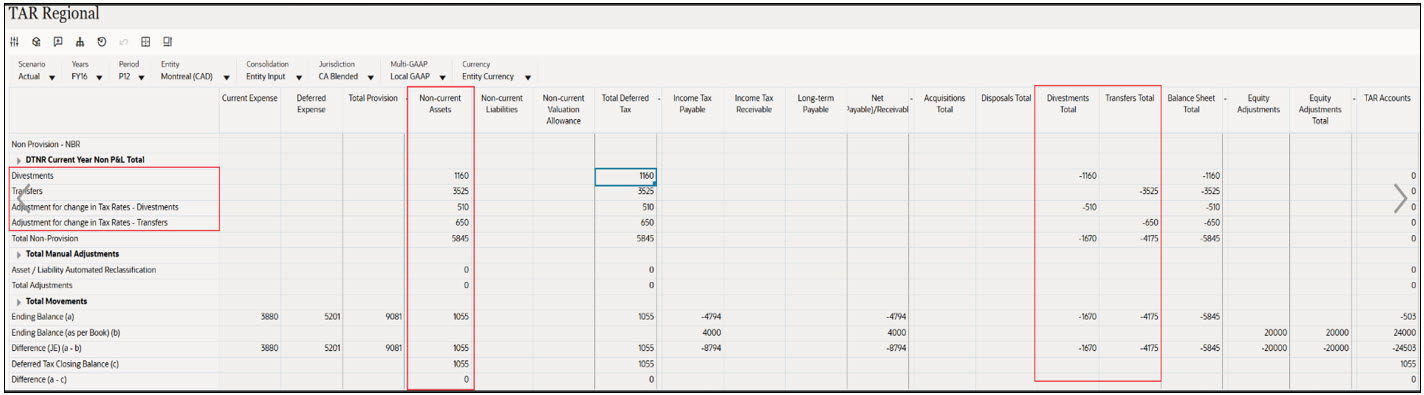
The TAR Regional form below shows Transfers and Divestments classified as DTA (Non-Current Assets) and reversed in the corresponding Transfers Total or Divestments Total column.