Goals for WMS Activities
Goals for WMS activities are configured using the Prod Goal Line Group view.
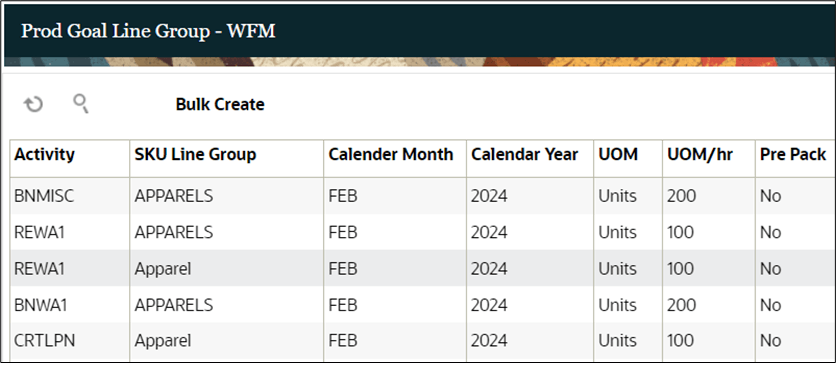
Every WMS activity needs to have at least one goal defined for each month of a year. The same activity could have different goals defined based on the SKU Line Group, UOM, Pre Pack or month of a year. As an example, for SKU Line Group, a user could receive 10 units of light weight products such as microwave or laptop in an hour. However, it could take about 1 hour for the user to receive just 1 unit of a heavy weight item such as a refrigerator. Therefore, goals for each activity needs to be defined based on the SKU Line Group. Goals could also change based on seasonality. For example, an activity with same SKU Line Group could have higher goal requirement in high peak season such as Black Friday or Christmas.
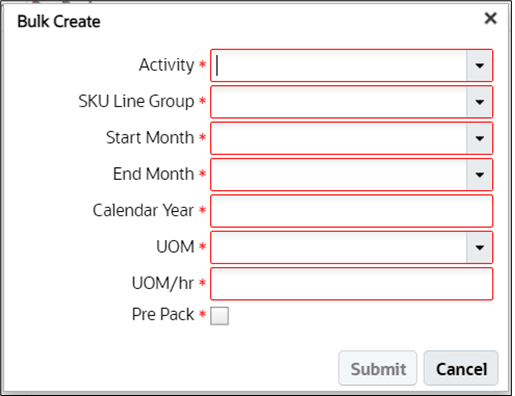
To create goals for WMS activities in bulk, use the “Bulk Create” action button.
Goals for WMS activities can also be uploaded using the Line Group Goal interface as described in the section - Input Interfaces OR posted using Prod Goal Line Group REST API as described in the section – REST APIs.