WMS Activity Track
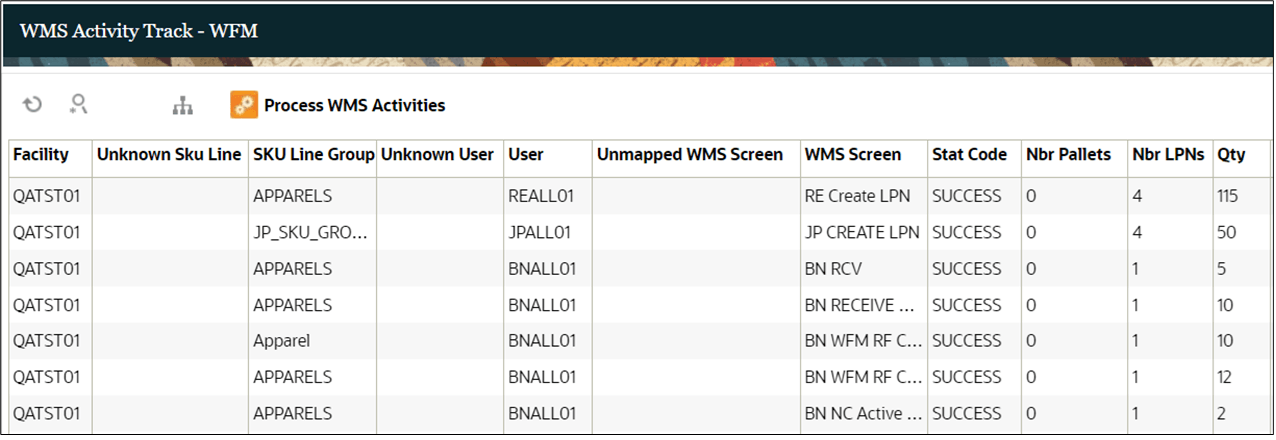
As a first step “WMS WFM interface” validates the SKU Line,User, and the WMS Screens of each record that is moved from WMS to WFM. If SKU Line and WMS Screen are configured in WFM and the user exists in WMS, the status on the record is marked as “SUCCESS”.
However, if the user has been deleted or the SKU Line/ WMS Screen is not configured in WFM, the record fails, and the appropriate “Unknown” field is populated. For example, if the SKU Line is not configured, the status on the record is marked as “ERROR” and the “Unknown SKU Line” field is populated with the SKU Line that was on the record. The begin and end time stamp capture the total time taken for the user to perform the activity. Nur Pallets, Nbr LPNs and Qty show the total quantity of Pallets, LPNs or Qty handled during the activity. Additional, details such as Pallet Nbr, LPN Nbr, handling UOM and pre-pack can be viewed in the details screen.