Snowflake
The Snowflake Replicat delivers changed data from Oracle GoldenGate trail files into Snowflake target tables.
This chapter describes Oracle GoldenGate for Snowflake Replication Best Practices.
Introduction
Oracle GoldenGate for Distributed Applications and Analytics enables real-time replication of operational data into Snowflake for analytics, reporting, data offloading, and cloud warehouse modernization. It helps organizations move from periodic batch loading to continuous CDC-based data delivery across Oracle and non-Oracle sources, including support for Snowflake native tables and Snowflake-managed Iceberg tables.
This best practices document is intended for solution architects, data engineers, GoldenGate administrators, Snowflake administrators, and operations teams who design, configure, tune, and support production GoldenGate-to-Snowflake replication.
GoldenGate provides two Snowflake delivery options: Stage and Merge and Snowflake Streaming. Stage and Merge is a micro-batch architecture for full DML workloads, including inserts, updates, deletes, and high-volume CDC, using staging and Snowflake SQL MERGE; Snowflake Streaming uses the Snowpipe Streaming API for low-latency, insert-only ingestion with Snowflake-managed serverless compute.
Architecture Overview
Oracle GoldenGate provides two Snowflake replication architectures: Snowflake Stage and Merge and Snowflake Streaming. Stage and Merge is designed for full CDC workloads and applies changes through micro-batch staging and Snowflake SQL processing. Snowflake Streaming is designed for low-latency, insert-only ingestion using the Snowpipe Streaming API. The right architecture depends on workload type, latency requirements, and compute model: Stage and Merge uses customer-managed Snowflake virtual warehouse compute, while Streaming uses Snowflake-managed serverless compute.
Figure 3: Snowflake Stage and Merge Replication
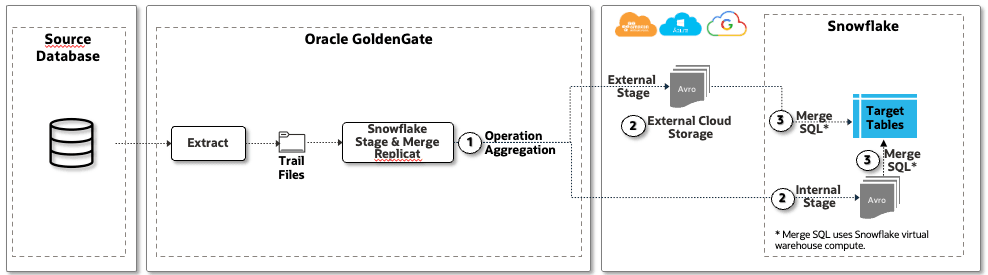
The Snowflake Stage and Merge Handler is the primary Oracle GoldenGate for DAA architecture for replicating full change data capture workloads into Snowflake. It supports workloads that include inserts, updates, deletes, truncates, and key changes by reading Oracle GoldenGate trail records, staging changed data in micro-batches, and applying those changes to Snowflake target tables through SQL MERGE processing.
Before data is staged, Oracle GoldenGate performs operation aggregation. Multiple operations on the same source record can be merged into a single final operation where possible, reducing unnecessary apply work. For example, an insert followed by several updates on the same row can be collapsed into a single insert containing the final row image. The micro-batch is controlled by ` gg.handler.snowflake.fileRollInterval`, which defaults to 3 minutes. Operation aggregation occurs within this micro-batch window. Longer intervals can improve batch efficiency, but may increase latency and Replicat memory usage.
The staged data is written as Avro OCF files to either a Snowflake internal stage or an external stage backed by cloud object storage such as Amazon S3, Azure Data Lake Storage Gen2, or Google Cloud Storage. Snowflake then applies the staged changes to the target tables using SQL MERGE, with compute provided by the configured Snowflake virtual warehouse.
Stage and Merge Replication Flow
-
Operation aggregation: Oracle GoldenGate aggregates multiple operations on the same row within the micro-batch window into a single effective operation where possible.
-
Staging: Aggregated change records are written as Avro files to either a Snowflake internal stage or an external cloud storage location.
-
Merge apply: Snowflake applies the staged changes to the target tables using
SQL MERGE.
This architecture is best suited for general-purpose Snowflake replication where source changes must preserve full CDC semantics, including updates and deletes.
Figure 4: Snowflake Streaming Replication
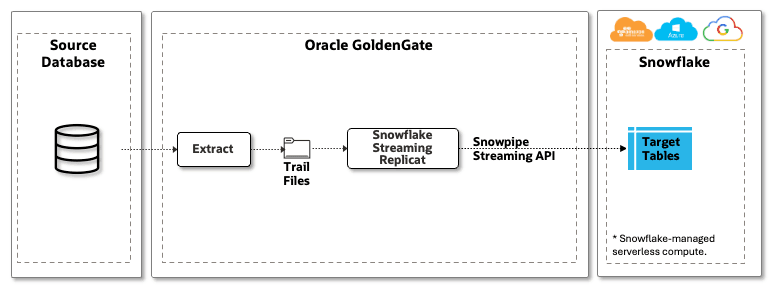
The Snowflake Streaming Handler provides a lower-latency architecture for insert-only replication into Snowflake. Instead of writing staged files and later merging them into target tables, Oracle GoldenGate reads records from the trail and streams them directly to Snowflake using the Snowpipe Streaming API.
Because this flow loads rows directly into Snowflake, it removes the intermediate staging and SQL MERGE steps used by Stage and Merge. This makes it a better fit for append-only workloads where near real-time delivery is more important than update/delete merge semantics.
Snowflake Streaming Workflow
-
Read trail records: Oracle GoldenGate Streaming Replicat reads insert records from the trail files.
-
Stream rows: The handler sends rows to Snowflake through the Snowpipe Streaming API.
-
Direct ingest: Snowflake ingests the rows directly into the target table using Snowflake-managed serverless compute.
This architecture is best suited for insert-only or append-only workloads where low-latency is the priority. If the source workload includes updates and deletes, use Stage and Merge. If update and delete operations are intentionally converted into insert records using parameters such as INSERTUPDATE, INSERTDELETE, or INSERTALLRECORDS, validate that the resulting target-table semantics are acceptable for downstream consumers.
Delivery and Recovery Semantics
Oracle GoldenGate supports exactly-once semantics for both Snowflake Stage and Merge and Snowflake Streaming replication. For Stage and Merge, Oracle GoldenGate uses checkpointed micro-batch processing and merge application to recover without duplicating committed work. For Snowflake Streaming, Oracle GoldenGate uses Snowpipe Streaming for supported insert-only workloads, where offset-based recovery preserves exactly-once ingestion behavior.
Choosing Between Snowflake Replicat Options
Table 6 Differences
| Details | Stage and Merge | Streaming Handler |
|---|---|---|
| Workload | Any (insert, update, delete, truncate) | Inserts-only |
| Latency | Micro-batch | Real-time |
| Snowflake Compute | Customer-managed virtual warehouse | Snowflake-managed serverless compute |
| API | JDBC+SQL commands (PUT/COPY INTO/MERGE) | Snowpipe Streaming using snowflake-ingest-sdk |
| Load method | Requires intermediary loading step (internal or external stage). | Direct loading into Snowflake |
Use the following guidance after reviewing the Stage and Merge and Streaming comparison table.
Table 7 Differences between Stage and Merge, and Streaming Handlers
| Requirement or Workload Pattern | Recommended Handler | Reason |
|---|---|---|
| Full CDC workload with inserts, updates, deletes, or truncates | Stage and Merge | Supports full DML replication and applies changes through staged micro-batches and Snowflake SQL MERGE. |
| Insert-only or append-only workload with lowest latency requirement | Snowflake Streaming | Uses the Snowpipe Streaming API to load rows directly into Snowflake without intermediate staging. |
| High-volume or batch-style CDC workload | Stage and Merge | Micro-batch staging and merge processing are better suited for larger batches and update/delete-heavy workloads. |
| Simpler low-latency ingestion where updates and deletes are not required | Snowflake Streaming | Avoids staging and merge processing and uses Snowflake-managed serverless compute. |
| Snowflake-managed Iceberg tables | Stage and Merge or Streaming | Choose based on workload type: Stage and Merge for full DML, Streaming for insert-only ingestion. |
In general, use Stage and Merge as the default for enterprise CDC workloads because it supports the complete change pattern from source systems. Use Snowflake Streaming when the workload is insert-only and low latency is more important than update/delete merge semantics. Do not choose Streaming only because it is lower latency; if the source workload includes updates or deletes, Stage and Merge is usually the correct architecture unless those operations are intentionally transformed into insert records and the downstream consumers accept that model.
Configuration Considerations and Best Practices
The configuration of Oracle GoldenGate Snowflake replication involves two core elements:
-
Configuration Properties: Key-value settings that govern how data is formatted, mapped, staged, and delivered from GoldenGate to Snowflake tables. These control the Snowflake JDBC connection, the number of concurrent JDBC connections to the target Snowflake database, the operation aggregation window, connection retry behavior, merge behavior (SQL
MERGEor delete-and-insert processing), and the Snowflake table type (native Snowflake tables or Iceberg tables). -
Parameters Configuration: Defines source-to-target table mappings and applies Oracle GoldenGate parameters for data reformatting use cases such as column filtering, token substitution, and SQL conversion. Careful coordination between these two elements is essential. For example, a mismatch between a column mapping defined in the parameters file and the actual target table schema can cause apply errors at merge time that are difficult to diagnose without clear logging.
-
Snowflake Session and Connection Stability Oracle GoldenGate uses Snowflake JDBC for connections. This connection might be interrupted for several reasons, and it can be controlled Snowflake JDBC options and Replicat properties.
Snowflake Session and Connection Stability
Oracle GoldenGate uses Snowflake JDBC for connections. This connection might be interrupted for several reasons, and it can be controlled Snowflake JDBC options and Replicat properties.
Implementation and Configuration
On the Snowflake JDBC level, it is recommended to use the [CLIENT_SESSION_KEEP_ALIVE](https://docs.snowflake.com/en/sql-reference/parameters#client_session_keep_alive) parameter to keep the session active even if there is no activity. In the Snowflake JDBC string, it should be set to true. For example:
jdbc:snowflake://<account>.snowflakecomputing.com/?warehouse=<warehouse>&db=<database>&schema=<schema>&**CLIENT_SESSION_KEEP_ALIVE=true**For Snowflake Stage and Merge replication, optionally you can set configuration properties for retries.
gg.eventhandler.snowflake.connectionRetries property allows you to set the number of times connections to the target data warehouse will be retried. gg.eventhandler.snowflake.connectionRetryIntervalSeconds. connectionRetries sets the delay in seconds between connection retry attempts.
For example:
gg.eventhandler.snowflake.connectionRetries=5
gg.eventhandler.snowflake.connectionRetryIntervalSeconds=30
Considerations and Best Practices
-
Set CLIENT_SESSION_KEEP_ALIVE=truein the Snowflake JDBC connection string. Oracle GoldenGate Replicat processes can run for long periods with limited Snowflake activity, especially during low-volume periods or while the operation aggregation buffer is filling. This setting helps keep the Snowflake JDBC session active and reduces the risk of session timeout before the next apply operation. -
Configure connection retries for production deployments: Transient Snowflake connectivity issues, such as warehouse scaling events, brief network interruptions, or cloud platform maintenance, can cause temporary connection failures that do not require operator intervention. A starting point of 5 retries with a 30-second interval is appropriate for most environments, but these values should be adjusted based on observed Snowflake warehouse restart times and network stability.
-
Monitor GoldenGate Replicat reports, logs, and operational alerts for Snowflake connection errors and retry attempts: Repeated retries may indicate a persistent network, warehouse, authentication, or session-management issue. Configure alerting for Replicat abends so connectivity problems are detected quickly and do not silently increase replication lag.
Snowflake Authentication
Oracle GoldenGate supports both username-password and key-pair authentication for Snowflake Stage and Merge replication. For Snowflake Streaming replication, key-pair authentication is required.
Implementation and Configuration
Username-Password Authentication
Username-password authentication is supported for Snowflake Stage and Merge replication only. It is suitable for development and testing, but key-pair authentication is recommended for production deployments.
The Snowflake username and password are configured using the following Replicat properties:
gg.eventhandler.snowflake.UserName=<snowflake_username>
gg.eventhandler.snowflake.Password=<snowflake_password>
Never store credentials in plaintext in the Replicat properties file. Instead, store them securely in the Using Identities in Oracle GoldenGate Credential Store. You can create the Credential Store entry from the Oracle GoldenGate UI by navigating to Administration Service , DB Connections and then Add DB Connection or by using the Oracle GoldenGate Rest API.
When creating the entry, provide a Credential Domain and Credential Alias, enter the Snowflake username as the User ID, and the Snowflake password as the Password. Oracle GoldenGate stores these values securely.
Once stored, reference the credentials in the Replicat properties file using the domain and alias you defined:
gg.eventhandler.snowflake.UserName=ORACLEWALLETUSERNAME[alias domain_name]
gg.eventhandler.snowflake.Password=ORACLEWALLETPASSWORD[alias domain_name]
Where <alias> is the Credential Alias and <domain> is the Credential Domain you assigned when creating the entry.
Key-Pair Authentication
Key-pair authentication is supported for both Snowflake Stage and Merge and Snowflake Streaming replication and is the recommended authentication method for production deployments.
Oracle GoldenGate uses Snowflake-recommended PKCS#8 .p8 private keys. For supported cryptographic key types and algorithms, refer to the Snowflake key-pair authentication documentation.
For Snowflake Stage and Merge replication, key-pair authentication is configured in the Snowflake JDBC connection string. The Snowflake user and private-key file password can be referenced securely from the Using Identities in Oracle GoldenGate Credential Store. You can create the Credential Store entry from the Oracle GoldenGate UI by navigating to Administration Service , DB Connections and then Add DB Connection or by using the Oracle GoldenGate Rest API.
When creating the entry, provide a Credential Domain and Credential Alias. Enter the user as the User ID, and the private_key file password as the Password. Oracle GoldenGate stores these values securely.
Once stored, reference the credentials in the Snowflake JDBC string:
jdbc:snowflake://<account_name>.snowflakecomputing.com/?warehouse=<warehouse-name>&db=<database-name>&role=<role>&
**user=ORACLEWALLETUSERNAME[alias domain]**
&private_key_file=/path/to/key/file/rsa_key.p8&
**private_key_file_pwd=ORACLEWALLETPASSWORD[alias domain]**
For more information on the configuration steps, see, Snowflake Key Pair Authentication and Snowflake Streaming Handler Key Pair Authentication.
Considerations and Best Practices
-
Use key-pair authentication for production deployments: Username-password authentication should be reserved for development and testing environments. Key-pair authentication eliminates password expiry as a source of replication outages and better aligns with enterprise security policies.
-
Restrict private-key file permissions: The private-key file should be readable only by the OS user running the GoldenGate Replicat process.
-
Never store plaintext credentials in the Replicat properties file: Use the Oracle GoldenGate Credential Store for username-password authentication. For key-pair authentication, ensure the referenced private-key file has restricted OS-level permissions.
-
Verify JDBC driver compatibility: Many key-pair authentication issues stem from JDBC driver version mismatches or unsupported key algorithms. Confirm that the Snowflake JDBC driver bundled with your GoldenGate installation supports the key type and algorithm before deploying to production.
-
Plan for zero-downtimeSnowflake key rotation: Snowflake allows a secondary public key to be assigned to a user, enabling key rotation without interrupting replication. Register the new public key as the secondary key in Snowflake, update Oracle GoldenGate to reference the new private key, confirm replication, and then remove the old public key from Snowflake.
Precise Instantiation for Snowflake
Oracle GoldenGate supports precise instantiation for databases that supportOracle GoldenGate Initial Load Extract. For Snowflake targets, precise instantiation enables a seamless transition from initial load to CDC replication without downtime or data loss. The configuration depends on the source database type. This section covers Oracle Database as the source; for other supported source databases, contact an Oracle engineer or Oracle Support.
Implementation and Configuration
Oracle GoldenGate Snowflake Replicat supports automated table creation in Snowflake. During startup, the Replicat checks whether the target table exists. If the target table does not exist, Oracle GoldenGate automatically creates it using the source table definition and the default Oracle-to-Snowflake data type mapping. If the target Snowflake table already exists, the Replicat uses the existing target table definition and data mapping.
Precise instantiation from Oracle Database to Snowflake can be configured with the following steps using the Oracle GoldenGate UI with the following steps:
-
Create and run the primary CDC extract.
-
Create a Distribution Path for the CDC extract.
Create and run the Initial Load Extract using SQLPREDICATE "AS OF SCN" in the parameter file. For example:
EXTRACT <process_name> EXTFILE <trail_name> USERIDALIAS <alias> DOMAIN <domain>
TABLE <schema>.*; SQLPREDICATE "AS OF SCN <scn_value>-
Create a Distribution Path for the Initial Load Extract.
-
Create and run the Initial Load Replicat for Snowflake.
-
Initial Load Replicat should use the trail file generated by the Initial Load Extract.
-
Use INSERTALLRECORDS Support to improve initial load performance.
-
-
Create the CDC Replicat for Snowflake using the trail file generated by CDC Extract.
Create the CDC Replicat, but do not start it yet
-
Start the CDC replicat using
Start with Options:-
Start Position: After SCN
-
CSN: The SCN value used in Initial Load Extract
-
Considerations and Best Practices
-
Run the CDC Extract before the Initial Load Extract: The CDC Extract must be capturing changes before the Initial Load begins. This ensures no changes made during the initial load window are missed. Starting the CDC Extract after the initial load risks a gap between the instantiation SCN and the point where CDC begins, leading to data loss or requiring a restart.
-
Validate the instantiation SCN before proceeding: Before creating the Initial Load Extract, confirm that the SCN retrieved from SQL*Plus is usable for flashback query and that sufficient undo retention is available for the expected duration of the initial load. The Initial Load Extract uses this SCN to read a consistent point-in-time image of the source data, and the CDC Replicat must later be started from the same value to avoid gaps or duplicates. For more information, see Refer to Oracle GoldenGate documentation for details.
-
Do not start the CDC Replicat until the Initial Load Replicat has finished: Starting the CDC Replicat before the Initial Load Replicat completes can apply change records before the corresponding base rows are loaded, which may cause missing-row conditions or incorrect target state. Monitor the Initial Load Replicat until it reaches end of trail before starting CDC.
-
Use automated table creation with caution: The auto-create feature is convenient but relies on Oracle-to-Snowflake default type mappings, which may not match your target schema requirements, for example, precision on numeric types, VARCHAR sizing, or timestamp handling. If your Snowflake tables have been pre-created with custom definitions, ensure the Replicat is pointed at an existing table and validate the column mapping before starting replication.
-
Document and retain the SCN value used for each instantiation: The SCN is the key reference point linking the initial load to CDC. Store it alongside the instantiation date, source table scope, and Oracle GoldenGate process names involved. This record is essential for troubleshooting, auditing, or repeating the instantiation for additional tables at a later stage.
Snowflake Compute and Cost Considerations
Snowflake compute usage depends on the Oracle GoldenGate Snowflake delivery architecture. Snowflake Stage and Merge uses a customer-managed Snowflake virtual warehouse to execute staging, load, and SQL MERGE operations. Snowflake Streaming uses Snowflake-managed serverless compute through the Snowpipe Streaming API and does not require a customer-managed warehouse for ingestion.
For Stage and Merge, cost is primarily influenced by warehouse size, warehouse runtime, micro-batch frequency, MERGE complexity, and the number of concurrent Replicat processes using the warehouse. For Streaming, cost is driven by Snowpipe Streaming serverless ingestion usage. The architecture should be selected based on workload semantics first, and then tuned for cost; Streaming should not be selected only for cost reasons if the workload requires updates, deletes, or merge semantics. Cost optimization should be performed after selecting the correct replication architecture because changing architectures to reduce cost may alter replication behavior, latency characteristics, or supported operation types.
Implementation and Configuration
For Stage and Merge replication, use a dedicated Snowflake virtual warehouse for Oracle GoldenGate where possible. This isolates replication workload from BI, ELT, and ad hoc queries, making it easier to monitor warehouse usage, identify expensive MERGE operations, and apply resource controls.
Size the warehouse for the expected replication workload. Use a larger warehouse during initial load, high-volume catch-up, or backlog recovery, and scale down after the workload returns to steady-state CDC. Tune the micro-batch interval using gg.handler.snowflake.fileRollInterval; smaller intervals reduce latency but can generate more frequent load and MERGE operations, while larger intervals can improve apply efficiency at the cost of higher latency.
Configure warehouse auto-suspend based on the Oracle GoldenGate batch pattern. If the warehouse suspends between every micro-batch, each apply cycle may incur warehouse resume delay and minimum billing behavior. For latency-sensitive workloads, set auto-suspend longer than the expected gap between micro-batches. For cost-sensitive workloads with infrequent changes, allow the warehouse to suspend when replication is idle.
Considerations and Best Practices
-
Use a dedicated Snowflake warehouse for Stage and Merge Replicat processes.
-
Size the warehouse for steady-state CDC, and scale up temporarily for initial loads or backlog recovery.
-
Tune
gg.handler.snowflake.fileRollIntervalwith both latency and cost in mind. Avoid unnecessarily small micro-batches that create excessive load andMERGEactivity. -
Align warehouse auto-suspend with the micro-batch interval to avoid repeated suspend/resume cycles during active replication.
-
Use Snowflake resource monitors to track and control warehouse credit usage.
-
Review Snowflake Query History and Warehouse Metering to identify expensive
MERGEoperations, warehouse queuing, and inefficient batch sizing. -
For Snowflake Streaming, monitor Snowpipe Streaming serverless ingestion usage and active ingestion behavior. Use Streaming for insert-only workloads where low latency and serverless ingestion are the primary goals. Periodically, review insert-only workloads to determine whether they remain good candidates for Snowflake Streaming replication and whether mixed DML workloads should continue using Stage and Merge.
Snowflake Schema Change Handling
Oracle GoldenGate Snowflake Streaming Replicat and Snowflake Stage Merge Replicat support propagation of source schema changes to target Snowflake tables with Automatic Schema Evolution functionality. Automatic schema evolution is the capability to detect, manage, and apply changes to a database schema — such as tables, columns, indexes, or relationships — without requiring manual intervention. Automatic Schema Evolution functionality is in limited availability mode, you can create a support ticket for more details.
Implementation and Configuration
As an alternative to automatic schema evolution, source schema changes can be monitored by enabling DDL capture in Extract and using DDL with EVENTACTIONS to report the DDL event, stop the process, or trigger an operational response. For example, DDL INCLUDE ALL EVENTACTIONS (REPORT, STOP) captures source DDL, writes it to the report file, and stops the process so the target schema can be reviewed before replication continues.
Considerations and Best Practices
-
Enable Automatic Schema Evolution carefully because schema changes can affect downstream applications: Source changes such as adding, renaming, or dropping columns may be propagated to Snowflake without manual review. Downstream consumers such as BI tools, dbt models, and data pipelines may fail if a column they depend on is changed or removed.
-
Use DDL with
EVENTACTIONSas a controlled alternative to AUTOSCHEMA for production environments. -
Align schema change procedures with Snowflake governance policies: In environments where schemas are managed through a data catalog, schema registry, or infrastructure-as-code process, automatically propagated schema changes may create drift from the governed definition.
LOB Type Replication
Oracle GoldenGate supports replication of Large Object (LOB) columns, including BLOB, CLOB, and NCLOB, from Oracle Database to Snowflake targets.
Implementation and Configuration
For LOB column replication to Snowflake, Oracle GoldenGate Integrated Extract must be configured with [TRANLOGOPTIONS FETCHPARTIALLOB ](/pls/topic/lookup?ctx=en/database/goldengate/big-data/26/gadbd&id=GWURF-GUID-B6ADFEC9-10E6-456D-9477-088513E113AF) in the Extract parameter file. Oracle GoldenGate Snowflake Replicat does not support partial LOB data. Without this option, transactions containing LOB columns that were not fully captured in the redo log can cause the Replicat to abend.
LOB columns that exceed the inline LOB threshold are processed out-of-band, which can lead to Replicat performance degradation. The gg.maxInlineLobSize property controls the maximum size, in bytes, of LOB data processed inline. The default value is 16000 bytes. Increasing this value allows larger LOB column updates to be processed within the standard micro-batch flow rather than individually out-of-band.
Before setting this value, check the trail files containing LOB data or review the source table definitions to determine the actual maximum LOB size in your data set. For example, to process LOBs up to 24 MB inline: gg.maxInlineLobSize=24000000
For details about default Oracle LOB type mappings to Snowflake types, refer to Oracle-to-Snowflake data type mapping documentation.
Considerations and Best Practices
-
Always configure Oracle Extract with
TRANLOGOPTIONS FETCHPARTIALLOBwhen replicating LOB columns. -
Measure actual LOB sizes before configuring the Snowflake replicat with LOB type and tune it using
gg.maxInlineLobSize: The inline LOB buffer is allocated per Replicat process, and setting it significantly higher than the actual maximum LOB size in your data set wastes memory. Query the source table or inspect trail file statistics to determine the realistic maximum LOB size, then setgg.maxInlineLobSizeto match or slightly exceed that value. -
Validate target Snowflake column types for LOB data before go-live: BLOB data maps to
BINARY(67108864)and CLOB/NCLOB map toSTRING(134217728)by default. Verify that downstream consumers of the Snowflake table can handle these types correctly. -
Exclude LOB columns from replication if they are not required at the target. LOB replication adds overhead to both the Extract (due to out-of-row fetching) and the Replicat (due to increased trail file size and apply time). If downstream consumers do not require LOB data, use
COLSEXCEPT -
Consider whether LOB-heavy tables warrant a dedicated Extract and Replicat process to isolate their impact on the broader replication pipeline.
Snowflake Apache Iceberg Tables
Oracle GoldenGate Snowflake Streaming Replicat andSnowflake Stage Merge Replicat support Snowflake managed Apache Iceberg table type. Snowflake Open Catalog is supported Oracle GoldenGate Apache Iceberg REST Catalog Replicat.
Implementation and Configuration
Snowflake Managed Iceberg Tables
For Snowflake-managed Apache Iceberg tables, the tableType property must be set to iceberg.
For example, in the Snowflake Stage and Merge Replicat:
gg.eventhandler.snowflake.tableType=icebergWhen tableType is set to iceberg, the following additional properties are required:
-
icebergExternalVolume: The name of the external volume that connects Snowflake to your external cloud storage for Iceberg tables. The external volume must be configured in Snowflake before any Iceberg tables can be created. -
icebergBaseLocation: The base path in external storage where Iceberg table data and metadata will be written. Oracle GoldenGate appends the qualified table name to this path when creating each Iceberg table.
Example
gg.eventhandler.snowflake.tableType=iceberg
 gg.eventhandler.snowflake.icebergExternalVolume=<external_volume_name>
 gg.eventhandler.snowflake.icebergBaseLocation=<base_location_path>
Snowflake Open Catalog
For replicating Apache Iceberg tables managed by Snowflake Open Catalog, use Compressed Update Handling. Snowflake Open Catalog does not require storage authentication at the Replicat level.
Configure the following properties in the Replicat properties file:
gg.eventhandler.iceberg.restCatalogUri=<open_catalog_rest_uri>gg.eventhandler.iceberg.restCatalogProperties=/path/to/opencat.properties
gg.classpath=/path/to/required/dependencies/*Create a catalog.properties file (for example, opencat.properties) to be referenced in the Replicat properties file:
type=rest warehouse=<warehouse_name>
credential=secret:key scope=PRINCIPAL_ROLE:ALL
For enhanced security, secure the catalog properties file using the encryption capabilities supported by Oracle GoldenGate Apache Iceberg Rest Catalog Replicat.
Considerations and Best Practices
-
Configure and validate the external volume before starting the Replicat: If the external volume is missing or misconfigured, the Replicat will fail to create Iceberg tables during startup. Validate the external volume in Snowflake using
SHOW EXTERNAL VOLUMESand confirm that Snowflake has the necessary permissions to read and write to the underlying cloud storage location before running the Replicat for the first time. -
Set icebergBaseLocation carefully — it cannot be changed after tables are created. Oracle GoldenGate appends the qualified table name to the base location path to construct the storage path for each Iceberg table. Once an Iceberg table has been created at a given path, changing the base location requires dropping and recreating the table and performing a full re-instantiation of the affected tables. Choose a base location path that is consistent with your cloud storage naming conventions and organisation structure before go-live.
-
For Open Catalog deployments, secure the catalog.properties file: Restrict file permissions so the file is readable only by the operating system user running the Replicat process. If the file contains catalog credentials, use Oracle GoldenGate-supported encryption or secret-management controls.
-
Monitor Iceberg metadata and snapshot growth: Iceberg tables generate metadata and snapshot files over time. Establish a maintenance strategy with the Snowflake administration team to manage metadata growth, snapshot retention, and storage costs for Oracle GoldenGate-replicated Iceberg tables
Handling PK Updates for Snowflake Stage and Merge Replicat
In Snowflake Stage and Merge Replicat, primary key updates require special attention because the key value used to identify the target row changes during the operation.
For primary key update operations, if the trail record is compressed or does not contain all required column values, Oracle GoldenGate may need to apply the PK update as a singleton operation - a row-by-row update applied outside the MERGE batch. This bypasses operation aggregation and significantly impacts performance in PK update-heavy workloads.
Implementation and Configuration
For uncompressed update records, configure the source extract usingLOGALLSUPCOLS for Oracle Database extracts and COMPRESSUPDATES | NOCOMPRESSUPDATES for Non-Oracle Database extracts.
In the Snowflake Stage and Merge replicat properties, set the following properties:
gg.compressed.update=false
gg.validate.keyupdate=true
These settings will allow replicat to aggregate PK update operations and improve the performance, especially for PK update heavy workloads.
For workloads with frequent primary key updates, consider enabling SQL-based operation aggregation when the trail contains uncompressed update records. SQL Aggregation allows Oracle GoldenGate to aggregate operations using SQL before the Snowflake MERGE, which can improve throughput and reduce Replicat JVM memory pressure. To enable SQL based operation aggregation, set the following property:
gg.aggregate.operations.using.sql=trueConsiderations and Best Practices
-
Ensure the trail format has uncompressed operations before starting the Replicat: If ` gg.compressed.update=false` is set but the trail contains compressed updates, the Replicat will encounter column mapping mismatches at apply time. Validate the trail format using logdump before changing this property in a running deployment.
-
Enable gg.validate.keyupdate=true whenever PK updates are present in the source workload: Some source applications generate PK update operations where the key value does not actually change — for example, as a result of application-level row refresh logic. Without this property, these false PK updates are treated as genuine key changes and cannot be aggregated into the
MERGEbatch, degrading performance unnecessarily. This property corrects the operation type before aggregation, improving both accuracy and throughput. -
Assess the source workload for PK update frequency before tuning: PK updates are relatively rare in most OLTP workloads. If PK updates represent a small fraction of total DML, the performance impact of singleton fallback may be negligible and the overhead of changing the trail format (re-running Extract with
LOGALLSUPCOLSorNOCOMPRESSUPDATES) may not be justified. Measure the proportion of PK update operations in the trail using logdump or GoldenGate statistics before committing to uncompressed trail configuration.
Oracle GoldenGate Snowflake Performance Considerations
Oracle GoldenGate Snowflake replication performance depends on the selected delivery mode, Snowflake warehouse capacity, target table design, micro-batch sizing, connection parallelism, workload characteristics, and Oracle GoldenGate/Snowflake JDBC driver versions. Most performance tuning requirements are related to frequent small batches, stage-file backlog, throttling, LOB processing, insufficient JDBC connection concurrency, or metadata-query overhead in older software versions.
Implementation and Configuration
Snowflake Stage and Merge Micro-batch window control
Oracle GoldenGate Snowflake Stage and Merge Replicat is a micro-batch process. Change data from Oracle GoldenGate trail files is staged in micro-batches at a temporary staging location, either an internal Snowflake stage or an external cloud object store such as S3, ADLS Gen2, or GCS. The staged data is then merged into Snowflake target tables using SQL MERGE statements.
The micro-batch window is controlled by the gg.handler.snowflake.fileRollInterval property. The default value is 3 minutes.
For high-volume replication, increasing the micro-batch window is recommended. Small staged files result in many small Snowflake MERGE statements, which can increase both latency and cost because each MERGE may scan more data than the number of changed rows. A larger fileRollInterval allows Stage and Merge Replicat to aggregate more operations per batch, resulting in fewer and more efficient MERGE operations.
For example, to set a 15-minute micro-batch window:
gg.handler.snowflake.fileRollInterval=15mAs part of the micro-batch process, GoldenGate Snowflake Stage and Merge Replicat runs operation aggregation. Operation aggregation reduces the number of rows written to the stage file and merged into Snowflake by collapsing multiple operations on the same row within a micro-batch into a single net operation. For example, multiple updates to the same row within the batch window are collapsed into one operation, reducing the number of rows in the staged file and the number of rows processed by the MERGE statement.
Operation aggregation requires additional JVM heap allocation. Configure the JVM heap size in the replicat properties file to accommodate the expected volume of in-flight operations within the micro-batch window.
For example:
jvm.bootoptions=-Xmx8g -Xms8gThe appropriate heap size depends on the number of tables, the volume of changes per micro-batch, and the average row size. Monitor JVM garbage collection behavior after tuning, because GC pauses during micro-batch aggregation can appear as apply-lag spikes.
Considerations and Best Practices
-
Choose the appropriate Snowflake delivery mode that works best for your requirement: Use Snowflake Stage and Merge replication for mix or update intense workloads. For low-latency and
insert onlyrequirements, evaluate Snowflake Streaming replication when the workload and supported operations fit the use case. -
Tune fileRollInterval based on workload volume and latency requirements to avoid frequent small MERGE operations.: The default 3-minute interval is a starting point, not a production target. For high-volume workloads, a longer interval — 10 to 30 minutes — produces larger, fewer stage files and more efficient MERGE operations. For low-latency requirements, a shorter interval reduces end-to-end replication lag but increases the number of MERGE statements and Snowflake warehouse compute consumption. Balance the two based on your SLA and Snowflake cost targets. Avoid values below 30 seconds in production — very short flush intervals generate excessive small Snowflake transactions, which can paradoxically increase latency under load.
-
Parallelize large initial loads by splitting the workload across multiple Initial Load Extract and Replicat processes.: This is particularly effective for large schemas or tables with high row counts. For configuration details, refer to the Precise Instantiation section.
-
Tune LOB handling intentionally: If your replicat includes LOB types, tune Oracle GoldenGate Snowflake Replicat to handle LOB type replication more efficiently. For more details, see LOB Type Replication.
-
Measure end-to-end latency: It is possible to measure the end-to-end latency between when a transaction was committed on the source and when it was committed on the target is a common requirement using extra columns on the target to store the operation type performed by GoldenGate, the source commit timestamp from the trail, and the target commit timestamp using the
CURRENT_TIMESTAMP()function as its default value. For configuration details and sample codes, refer to measuring-the-endtoend-lag-using-the-snowflake-handler. -
Handle PK updates carefully: For PK update-heavy workloads, always use uncompressed update records and SQL-based operation aggregation to enable efficient
MERGEprocessing and avoid singleton row-by-row apply. For configuration information, see Handling PK Updates for Snowflake Stage and Merge Replicat. -
Co-locate the Oracle GoldenGate Snowflake Replicat process and target Snowflake instance in the same cloud provider and in the same region: Co-locating Oracle GoldenGate Snowflake Replicat and the Snowflake instance in the same cloud provider and in the same region will optimize network latency.
-
Upgrade to GoldenGate for DAA 26ai to take advantage of optimized aggregation: The redesigned aggregation engine in 26ai delivers better throughput with lower resource consumption and enables larger batch windows without proportionally increasing JVM memory requirements.