Components of Oracle GoldenGate Microservices Architecture
About Service Manager
Service Manager is the primary watchdog service within Oracle GoldenGate Microservices that allows you to control and administer the deployments and associated microservices running on the host server.
A Service Manager allows you to manage one or multiple Oracle GoldenGate deployments on a local host. A Service Manager has a one to many relationship with the Administration Service. Each Oracle GoldenGate installation has a single Service Manager that is responsible for multiple deployments.
Optionally, Service Manager may run as a system service and maintains inventory and configuration information about your deployments and allows you to maintain multiple local deployments. Using Service Manager, you can start and stop instances, and query deployments and the other services.
See Manage Deployments from the Service Manager.
From OGGCA, you can configure the Service Manager to run in three different modes:
-
Manually
-
As a Daemon
-
Integrated with XAG agent
Its primary functions include the following tasks:
-
View and manage the status of microservices
-
Manage Deployment Configuration
-
Manage Service Manager Configuration
-
Start and stop deployments
-
Access the microservices associated with a deployment
-
Access details for Administration Service, Distribution Service, Performance Metrics Service, and Receiver Service
-
Add and Manage Oracle GoldenGate Users
-
Add and Manage Certificates
-
Add and Manage Authorization Profile for External Identity Providers
-
Monitor Log Information for Diagnosing Errors
-
Enable and Manage Debug Logs
About Administration Service
The Administration Service supervises, administers, manages, and monitors processes within an Oracle GoldenGate deployment.
The Administration Service operates as the central control entity for managing the replication components in your Oracle GoldenGate deployments. You use it to create and manage your local Extract and Replicat processes without the need to access the server where Oracle GoldenGate is installed. The key feature of the Administration Server is the REST API service Interface that can be accessed from any HTTP or HTTPS client, such as the Microservices Architecture service interfaces or other clients like Perl and Python.
In addition, the Admin Client can be used to make REST API calls to communicate directly with the Administration Server. See Admin Client for details.
The Administration Service is responsible for coordinating and orchestrating Extracts, Replicats, and paths to support greater automation and operational managements. Its operation and behavior is controlled through published query and service interfaces. These interfaces allow clients to issue commands and control instructions to the Administration Server using REST JSON-RPC invocations that support REST API interfaces.
The Administration Service includes an embedded web application that you can use directly with any web browser and does not require any client software installation.
Use the Administration Service to create and manage:
-
Extract and Replicat processes
-
Add, alter, and delete
-
Register and unregister
-
Start and stop
-
Review process information, statistics, reports, and status including LAG and checkpoints
-
Retrieve the report and discard files
-
-
Configuration (parameter) files
-
Checkpoint, trace, and heartbeat tables
-
Supplemental logging for procedural replication, schema, and tables
-
Tasks both custom and standard, such as auto-restart and purge trails
-
Credential stores
-
Encryption keys (
MASTERKEY) -
Add users and assign their roles
About Distribution Service
Distribution Service functions as a networked data distribution agent in support of conveying and processing data and commands in a distributed deployment. It is a high performance application that is able to handle multiple commands and data streams from multiple source trail files, concurrently.
Distribution Service replaces the classic multiple source-side data pumps with a single instance service. This service distributes one or more trails to one or more destinations and provides lightweight filtering only (no transformations).
Multiple communication protocols can be used, which provide you the ability to tune network parameters on a per path basis. These protocols include:
-
Oracle GoldenGate protocol for communication between the Distribution Service and the Collector in a non services-based (classic) target. It is used for inter-operability.
Note: TCP encryption does not work in a mixed environment of Classic and Microservices architecture. The Distribution Service in Microservices Architecture cannot be configured to use the TCP encryption to communicate with the Server Collector in Classic Architecture running in a deployment. Also, the Receiver Service in Microservices Architecture cannot accept a connection request from a data pump in Classic Architecture configured with
RMTHOST ... ENCRYPTparameter running in a deployment. -
WebSockets for HTTPS-based streaming, which relies on SSL security.
-
UDP protocols.
-
Proxy support for cloud environments:
-
SOCKS5 for any network protocol.
-
HTTP for HTTP-type protocols only, including WebSocket.
-
-
Passive Distribution Service to initiate path creation from a remote site. Paths are source-to-destination replication configurations though are not included in this release.
Note: Distribution Service cannot filter data in the trail. A distribution path will send all trail data from source to target based on the specified target authentication protocol.
About Receiver Service
A Receiver Service is the central control service that handles all incoming trail files. It interoperates with the Distribution Service and it replaces multiple discrete target-side Collectors with a single instance service.
Use Receiver Service to:
-
Monitor path events
-
Add target-initiated paths
-
Query the status of incoming paths
-
View the statistics of incoming paths
-
Diagnose path issues
WebSockets (ws) is the default HTTPS initiated full-duplex streaming protocol used by the Receiver Service. It enables you to fully secure your data using SSL security. The Receiver Server seamlessly traverses through HTTP forward and reverse proxy servers.
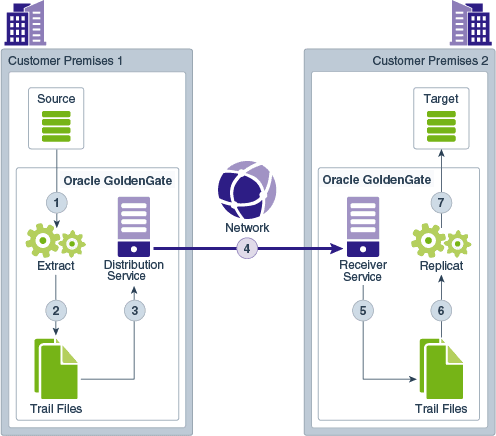
Additionally, the Receiver Server supports the following protocols:
-
UDP-based protocol for wide area networks: For more information, see http://udt.sourceforge.net/.
-
Classic Oracle GoldenGate protocol for classic deployments so that the Distribution Service communicates with the Collector and the Data Pump communicates with the Receiver Server. Note: TCP encryption does not work in a mixed environment of Classic and Microservices architecture. The Distribution Service in Microservices Architecture cannot be configured to use the TCP encryption to communicate with the Server Collector in Classic Architecture running in a deployment. Also, the Receiver Server in Microservices Architecture cannot accept a connection request from a data pump in Classic Architecture configured with
RMTHOST ... ENCRYPTparameter running in a deployment.
About Receiver Service Path
Receiver Service Paths or target-initiated paths for microservices enable the Receiver Service to initiate a path to the Distribution Service on the target deployment and pull trail files. This feature allows the Receiver Service to create a target initiated path for environments such as Demilitarized Zone Paths (DMZ) or Cloud to on-premise, where the Distribution Service in the source Oracle GoldenGate deployment cannot open network connections in the target environment to the Receiver Service due to network security policies.
If the Distribution Service cannot initiate connections to the Receiver Service, but Receiver Service can initiate a connection to the machine running the Distribution Service, then the Receiver Service establishes a secure or non-secure target initiated path to the Distribution Service through a firewall or Demilitarized (DMZ) zone using Oracle GoldenGate and pull the requested trail files.
The Receiver Service endpoints display that the retrieval of the trail files was initiated by the Receiver Service.
About Performance Metrics Service
All Oracle GoldenGate processes send metrics to the Performance Metrics Service, which enables you to monitor the performance of all processes from a single interface.
The Performance Metrics Service uses the metrics service to collect and store instance deployment performance results. This metrics collection and repository is separate from the administration layer information collection. You can monitor performance metrics using other embedded web applications and use the data to tune your deployments for maximum performance.
Use the Performance Metrics Service to:
-
Query for various metrics and receive responses in the services JSON format or the classic XML format
-
Integrate third party metrics tools
-
View error logs
-
View active process status
-
Monitor system resource utilization