Using Multiple Process Groups
Typically, only one Extract group is required to efficiently capture from a database. However, depending on the redo (transactional) values, or the data and operation types, you may find that you are required to add one or more Extract group to the configuration.
Similarly, only one Replicat group is typically needed to apply data to a target database if using Replicat in coordinated mode. However, even in some cases when using Replicat in coordinated mode, you may be required to use multiple Replicat groups. If you are using Replicat in classic mode and your applications generate a high transaction volume, you probably will need to use parallel Replicat groups.
Each Oracle GoldenGate component, Extract, trail, DISTPATH, and Replicat, is an independent module, so you can combine them in ways that suit your needs. You can use multiple trails and parallel Extract and Replicat processes to handle large transaction volume, improve performance, eliminate bottlenecks, reduce latency, or isolate the processing of specific data.
The diagram below shows some of the ways that you can configure Oracle GoldenGate to improve throughput speed and overcome network bandwidth issues.
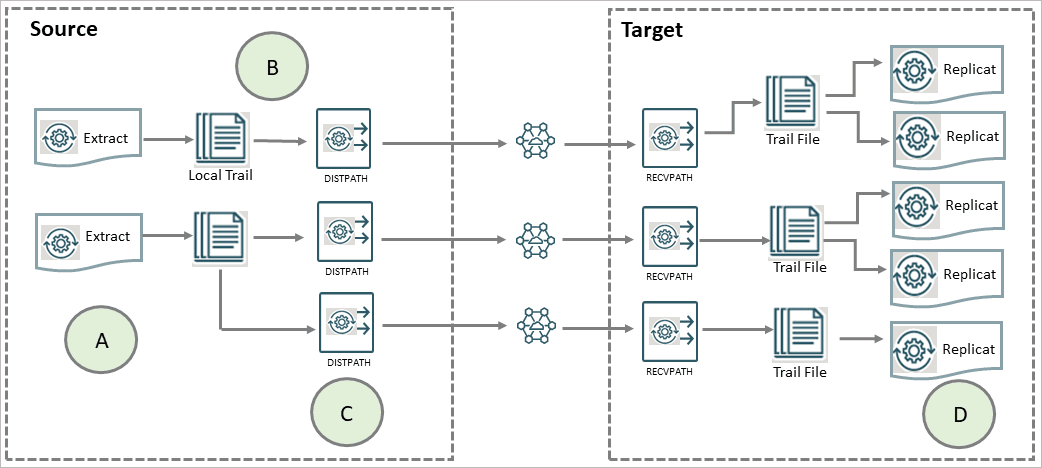
The image labels imply the following:
-
A: Parallel Extracts divide the load. For example, by schema or to isolate tables that generate fetches.
-
B: An Extract with local trail can be used for filtering, conversion, and network false tolerance.
-
C: Multiple DISTPATHS work around network per-process bandwidth limitations to enable TCP/IP throughput. Divide the
TABLEparameter statements among them. -
D: Parallel Replicats increase throughput to the database. Any trail can be read by one or more Replicats. Divide
MAPstatements among them.
Considerations for Using Multiple Process Groups
Before configuring multiple processing groups, review the following considerations to ensure that your configuration produces the desired results and maintains data integrity.
Maintaining Data Integrity
Not all workloads can be partitioned across multiple groups and still preserve the original transaction atomicity. You must determine whether the objects in one group will ever have dependencies on objects in any other group, transactional or otherwise. For example, tables for which the workload routinely updates the primary key cannot easily be partitioned in this manner. DDL replication (if supported for the database) is not viable in this mode, nor is the use of some SQLEXEC or EVENTACTIONS features that base their actions on a specific record.
If your tables do not have any foreign- key dependencies or updates to primary keys, you may be able to use multiple processes. Keep related DML together in the same process stream to ensure data integrity.
Number of Groups
The number of concurrent Extract and Replicat process groups that can run on a system depends on how much system memory is available. Each Extract and classic Replicat process needs approximately 25-55 MB of memory or more, depending on the size of the transactions and the number of concurrent transactions. The Oracle GoldenGate command interface fully supports up to 5,000 concurrent Extract and Replicat groups (combined) per instance of Oracle GoldenGate. At the supported level, all groups can be controlled and viewed in full with commands such as the INFO and STATUS commands.
Beyond the supported level, group information is not displayed and errors may occur. Oracle GoldenGate recommends keeping the number of Extract and Replicat groups (combined) at a more manageable level, such as 100 or below, in order to manage the environment effectively. The maximum number of groups is controlled by the MAXGROUPS parameter, which has a default value of
1000.
For Windows Server environments, the number of process groups that can be run are tightly coupled to the ‘non-interactive’ Windows desktop heap memory settings. The default settings for Windows desktop heap may be enough to run very small numbers of process groups, but as you approach larger amounts of process groups, more than 60 or so, you will either need to adjust the ‘non-interactive’ value of the SharedSection field in the registry, based on this information from Microsoft (Windows desktop heap memory), or increase the number of Oracle GoldenGate homes and spread the total number of desired process groups across these homes. Note: For more information on modifying the Windows Desktop Heap memory, review the following Oracle Knowledge Base document (Doc ID 2056225.1).
Memory
The system must have sufficient swap space for each Oracle GoldenGate Extract and Replicat process that will be running. To determine the required swap space:
-
Start up one Extract or Replicat.
-
Run Admin Client.
-
View the report file and find the line
PROCESS VM AVAIL FROM OS (min). -
Round up the value to the next full gigabyte if needed. For example, round up 1.76GB to 2 GB.
-
Multiply that value by the number of Extract and Replicat processes that will be running. The result is the maximum amount of swap space that could be required
See the CACHEMGR parameter in Parameters and Functions Reference for Oracle GoldenGate for more information about how memory is managed.
Isolating Processing-Intensive Tables
You can use multiple process groups to support certain kinds of tables that tend to interfere with normal processing and cause latency to build on the target. For example:
-
Extract may need to perform a fetch from the database because of the data type of the column, because of parameter specifications, or to perform SQL procedures. When data must be fetched from the database, it affects the performance of Extract. You can get fetch statistics from the
STATS EXTRACTcommand if you include theSTATOPTIONS REPORTFETCHparameter in the Extract parameter file. You can then isolate those tables into their own Extract groups, assuming that transactional integrity can be maintained. -
In its classic mode, Replicat process can be a source of performance bottlenecks because it is a single-threaded process that applies operations one at a time by using regular SQL. Even with
BATCHSQLenabled (see Parameters and Functions Reference for Oracle GoldenGate) Replicat may take longer to process tables that have large or long-running transactions, heavy volume, a very large number of columns that change, and LOB data. You can then isolate those tables into their own Replicat groups, assuming that transactional integrity can be maintained.