Add MCP Server
Add an MCP server, select its authentication model, and configure shared or per-user OAuth for workflow execution. See Build Your Own MCP Server to build your own MCP server from scratch.
- Centralize your MCP server list to avoid re-entering server details for each workflow.
- Authenticate using direct/no-auth, bearer token, Basic authentication, OAuth authorization-code, client credentials, or Auth Request mode, depending on your MCP server.
- Use OAuth mode when the provider requires a browser authorization flow and registered callback URL.
- Use shared OAuth when the source owner authorizes one connection for permitted callers. Use per-user OAuth when each workflow caller must authorize independently.
- Use Auth Request mode when the server issues a bearer token from a token endpoint after Agent Factory sends configured credentials.
Note: Tokens refresh automatically after OAuth or Auth Request authentication.
MCP Configuration Model
An MCP source contains:
| Field | Purpose |
|---|---|
| Name | The display name used when selecting the MCP server in Agent Builder. |
| URL | The server endpoint, such as https://<host>:<port>/mcp or https://<host>:<port>/sse. The URL must include the correct path. |
| Authentication mode | Determines how Agent Factory obtains credentials and sends requests to the MCP server. |
| OAuth execution mode | For OAuth sources, determines whether the source owner authorizes one shared connection or each workflow caller authorizes during execution. Shared is the default. |
| Tool discovery result | The tools returned by the MCP server and made available for selection in Agent Builder. |
MCP requests run from the Agent Factory application container. The MCP URL must be reachable from that container, not only from your browser.
Authentication Modes
| Mode | Use when | Notes |
|---|---|---|
| Direct or no auth | The MCP server is protected by network controls or does not require credentials. | Use only in trusted networks. |
| Bearer token | You already have a static token for the MCP server. | Treat the token as a secret and rotate it according to your policy. |
| Basic | The MCP server requires a username and password. | Agent Factory sends Authorization: Basic; the password remains wallet-only. |
| OAuth | The provider requires an authorization-code browser flow. | Register the Agent Factory callback URL with the provider, then select shared or per-user authorization. |
| Client credentials | The provider issues a token from client ID and client secret without browser authorization. | Use for service-to-service MCP servers when supported. |
| Auth Request | The server exposes a token endpoint that accepts configured credentials and returns an access token. | Agent Factory stores the returned token for use by the MCP source. |
Client-credentials renewal remains non-interactive. It does not pause a chat or API workflow for browser authorization.
Existing OAuth sources without an execution-mode value continue to use shared authorization.
Configure an MCP Server With OAuth Authentication
-
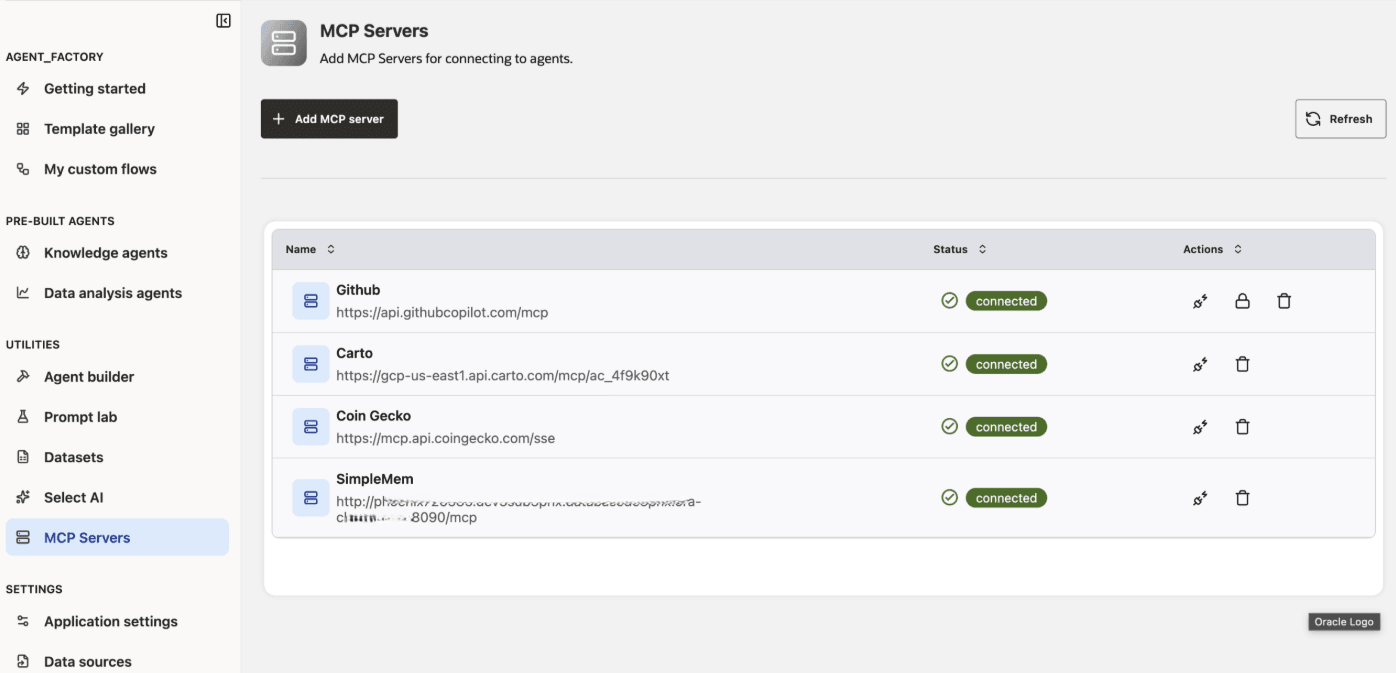
Click the MCP Servers tab from the left-side navigation.
-
Select Add MCP Server.
-
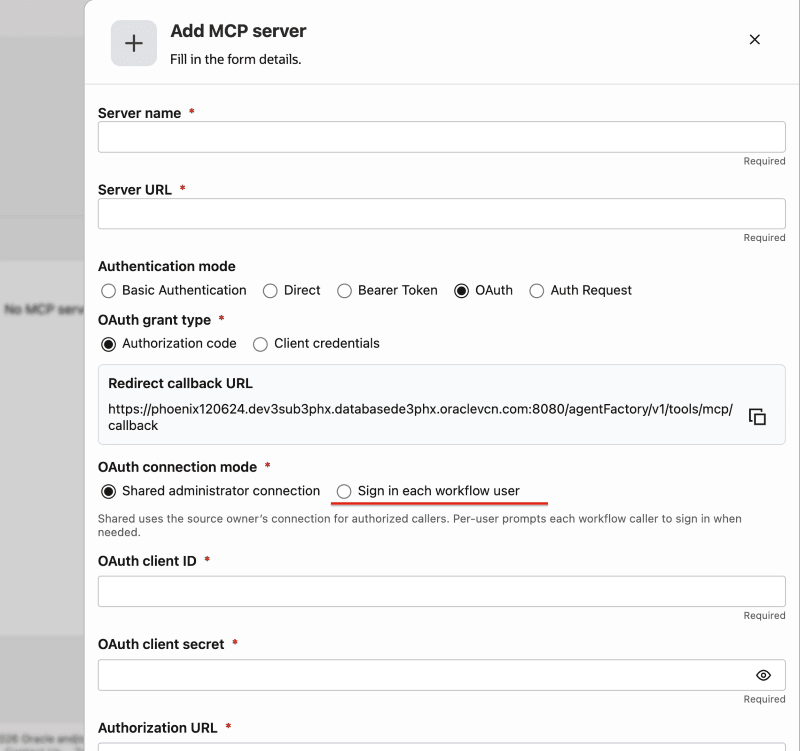
Provide a unique name for your MCP Server. This name will be used to configure the MCP Server Node in the Agent Builder workflow.
-
Set the URL of MCP server to
https://<host>:<port>/mcporhttps://<host>:<port>/sse. The URL fully defines the endpoint path, there are no extra path fields. -
Select OAuth as the authentication mode.
-
Configure an application in your MCP server provider, using the provided Redirect Callback URL.
The redirect URL must match exactly. Match the protocol, host name, port, and path that users use to access Agent Factory. If Agent Factory is behind a load balancer, reverse proxy, bastion tunnel, or private subnet access path, register the externally reachable URL, not the container’s internal host name.
-
Enter all required credentials for MCP Server OAuth.
-
Select the OAuth execution mode:
- Shared administrator connection: The source owner authorizes the connection once. Authorized callers reuse the source-level connection.
- Sign in each workflow user: Each caller authorizes the source when a workflow reaches a protected MCP action. The source is not globally marked connected for all callers.
-
Select Add MCP Server once all details are entered.
-
If you selected Shared administrator connection, select Authorize shared connection when prompted and complete the provider authorization.
-
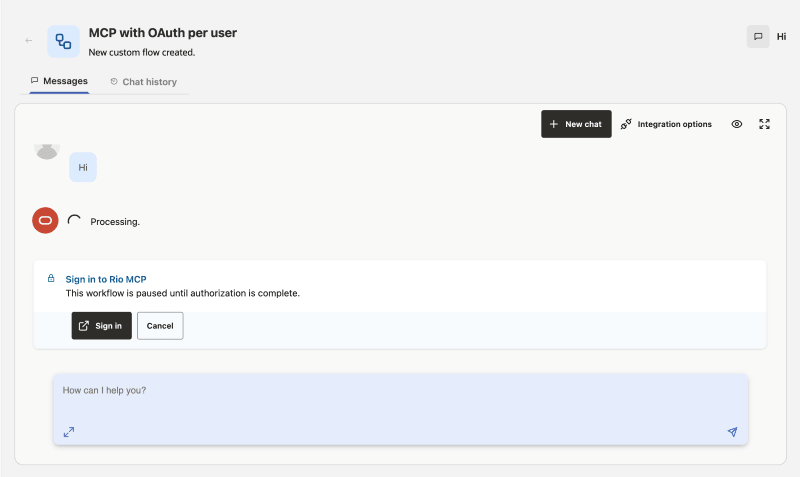
If you selected Sign in each workflow user, Agent Factory requests authorization when a workflow needs the source. The workflow pauses before MCP discovery or tool execution until the caller authorizes or cancels.
-
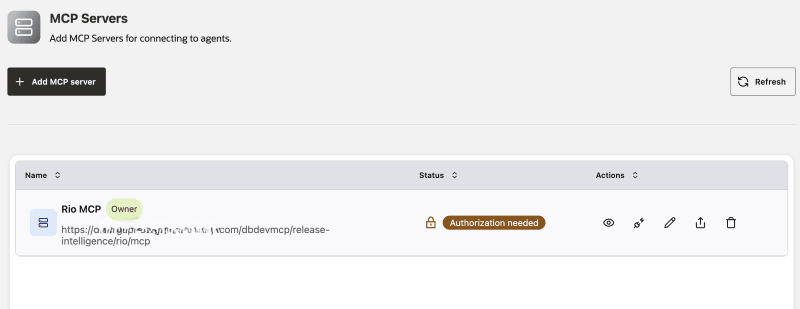
After authorization is complete, the MCP Server is listed in the table. A per-user source can show Authorization needed until the current caller authorizes it.
See MCP Server to learn how to use your MCP Server in the Agent Builder workflow.
OAuth Callback Flow
For a shared administrator connection, the OAuth flow works as follows:
- An administrator creates the MCP source and selects OAuth authentication.
- Agent Factory displays a redirect callback URL.
- The administrator registers that callback URL in the MCP provider application.
- The administrator selects Shared administrator connection and then selects Authorize shared connection.
- The provider redirects the browser back to Agent Factory after authorization.
- Agent Factory stores the token in the source owner’s wallet.
- Agent Factory tests the source and discovers the MCP tools.
- Agent Builder workflows can select the MCP source and optionally restrict which discovered tools are available to an agent.
If the provider reports a redirect mismatch, compare the provider’s rejected redirect_uri value with the callback URL registered in the provider. The values must be identical.
For per-user authorization, Agent Factory creates one pending request for the executing caller when the workflow reaches the protected MCP action. The request is bound to the caller, room, message, source, signed state, and expiration time. Agent Factory stores the resulting token in an executing-user wallet alias and resumes the chat turn exactly once after a successful callback.
For API calls, a pending per-user authorization returns HTTP 202 with the room, source, request, expiration, and authorization start URL. Follow the start and status flow, then explicitly resume or cancel the request. A resume can return another 202 when the workflow reaches another OAuth source.
Configure an MCP Server With Basic Authentication
- Select the MCP Servers tab in the navigation.
- Select Add MCP Server.
- Enter a unique server name and the MCP server URL.
- Select Basic as the authentication mode.
- Enter the username and password required by the MCP server. The password remains masked and is stored in the Agent Factory wallet.
- Select Add MCP Server and test the connection.
Agent Factory sends the credentials as Authorization: Basic when it discovers or invokes MCP tools. It does not store the password in database tables or expose it in logs.
Share an MCP Server
You can share an MCP server that you own or for which you have the Can manage access level.
- Open MCP Servers.
- Select Share from the Actions menu for the server.
- In the Share dialog, review the users and groups that have access and their current access levels.
- Search for and select users or groups to add, change an existing access level, or remove access. Click Save changes to apply the changes.
The Share dialog identifies the resource owner as Owner. You cannot change or remove the owner’s access. See Manage Identity and Access for access-level definitions.
Note: Sharing an MCP source grants resource access; it does not transfer ownership of shared OAuth, Bearer, or Basic credentials. Only the owner manages shared credentials and retained-secret reuse.
Troubleshoot MCP Servers
| Symptom | Likely cause | Action |
|---|---|---|
| Test fails with DNS or connection error | Agent Factory cannot reach the MCP server from the container network. | Verify URL, DNS, firewall, proxy, and private subnet routing. |
| OAuth provider reports redirect mismatch | Callback URL registered with the provider differs from the actual Agent Factory callback. | Register the exact callback URL shown in Agent Factory or reported as redirect_uri. |
| A per-user source shows Authorization needed | The current workflow caller has not authorized the source, or the caller’s token expired. | Run the workflow and select Sign in when prompted. Complete authorization before the request expires. |
| Chat remains paused for MCP authorization | The caller has not completed or canceled the pending request. | Select Sign in or Cancel in the authorization panel. Rerun the workflow if the request expired. |
| Basic authentication fails | The username or password is invalid, or the server does not accept Basic authentication. | Confirm the credentials with the MCP service owner and test the source again. |
| Test succeeds but no tools are listed | The MCP server did not expose tools or the endpoint path is wrong. | Verify /mcp or /sse path and inspect MCP server logs. |
| Agent calls an unexpected tool | Too many tools are exposed or descriptions are ambiguous. | Restrict allowed tools and improve tool names/descriptions on the server. |
| Tool calls time out | The tool runs longer than the node timeout, or the MCP server is slow/unreachable. | Increase the timeout only after confirming the server is receiving requests. |