AI Knowledge Store
An AI Knowledge Store provides storage for semantic information associated with database sources. Agent Factory uses this information, including annotations and Business Knowledge Graph content, to help supported AI features interpret database data.
Before You Begin
- Have an Oracle database schema available for the store.
- Prepare connection details and credentials for the schema.
- If you use a wallet connection, have the wallet and a TNS alias available.
- Ensure that you have access to the store and the database sources that you want to associate with it.
Create an AI Knowledge Store
- Open Data Sources.
- Select Add data source, then select AI Knowledge Store.
- Enter a name and description for the store.
- Select Oracle and a connection type: Basic, Connection string, or Wallet. Enter the required connection details.
- Optionally select database sources to associate with the store.
- Select Test connection. After the test succeeds, select Add AI knowledge store.
You must test the connection before you can add the store. If you change a connection field after a successful test, test the connection again.
Associate a Database Source
You can associate a database source with an AI Knowledge Store when you add the database source or when you edit the store.
To associate a store while adding a database source:
- Open Data Sources and select Add data source, then select Database.
- Enter the database source name and connection details.
- Optionally select an AI Knowledge Store for the database source. The selector starts empty. Select a store when you want to register the database with semantic metadata for workflows such as Business Knowledge Graphs.
- Test the database connection and select Add database source.
- Wait for schema registration to finish before using the database with knowledge tools.
If you use a database source only with its selected tables and views, an AI Knowledge Store association is not required. You can also associate an existing database source by editing the store and updating Link data source.
An AI Knowledge Store can be associated with multiple database sources. A database source can be associated with one AI Knowledge Store at a time. Applied AI Datasets cannot be linked to an AI Knowledge Store.
Manage an AI Knowledge Store
Open an AI Knowledge Store from the Data Sources list to review its details and associated database sources. You can update the store description and database associations.
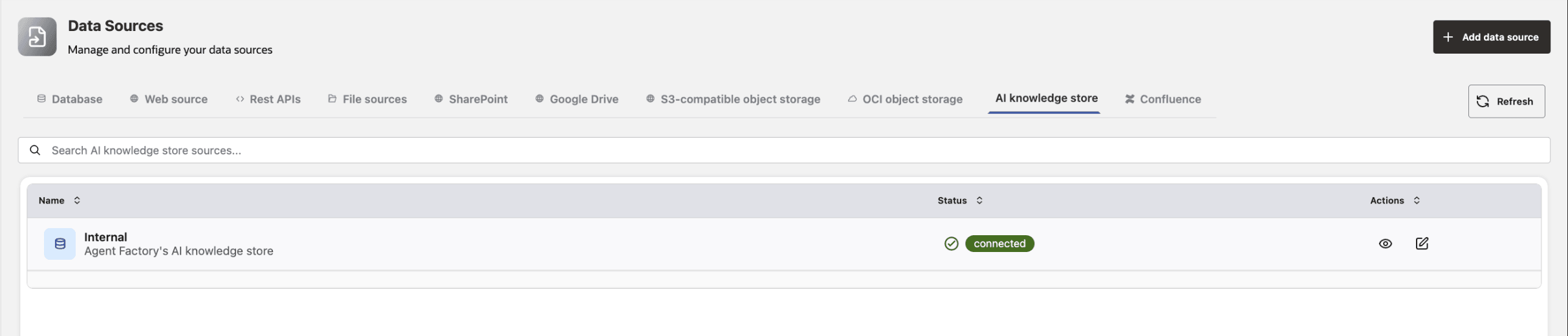
To change database associations, open the store’s edit form, update Link data source, and select Save changes.
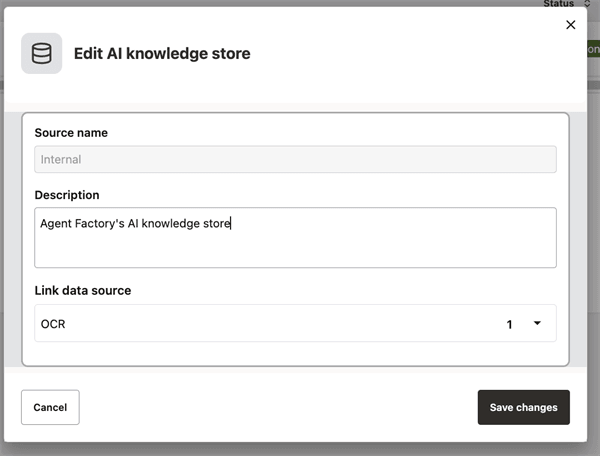
Description of the illustration ai-knowledge-store-association.png
The built-in Internal AI Knowledge Store is provided by Agent Factory and cannot be deleted.