6.3 About the SQL Scripts Page
The SQL Scripts page displays an interactive report of all SQL scripts created by the current user.
If you are a workspace administrator, this page displays all SQL scripts created by workspace users. You can alter the layout of report data by choosing the columns you are interested in, applying filters, highlighting, and sorting. You can also define breaks, aggregations, different charts, group bys, and add your own computations.
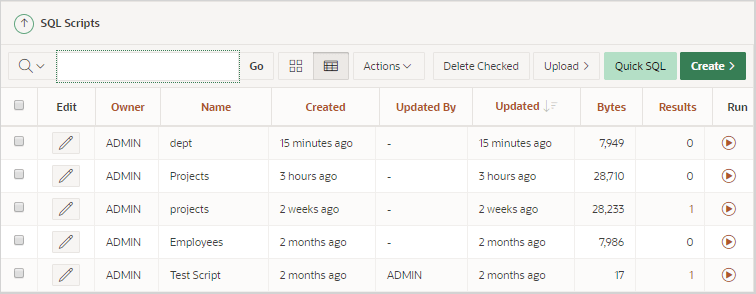
A search bar displays at the top of every interactive report and includes the following features:
-
Columns to Search - Resembles a magnifying glass. Click Columns to Search to narrow your search to specific columns.
-
View Icons - Displays each script as an icon identified by the script name.
-
View Report - Displays each script as a line in a report. Each line includes a check box to enable the selection of scripts for deletion, the script name, the script owner, when the script was last updated and by whom, the size in bytes, the number of times the script has been run linked to the run results, a Copy icon, and a Run icon. Click the script Name to load it into the script editor
Reports view offers the following additional controls:
-
Delete Checked - In Reports view, select the check box associated with the script you want to delete and click Delete Checked.
-
Sort - In Reports view, click a column heading to sort the listed scripts by that column.
-
-
Upload - Click Upload to upload a script from your local file system into SQL Scripts.
-
Create - Click Create to create a script in the Script Editor.
See Also:
-
Customizing Interactive Reports in a Running Application in Oracle APEX App Builder User’s Guide
Parent topic: Using SQL Scripts