18.6.2 Accessing Background Process Status
Use the APEX_APPL_PAGE_BG_PROC_STATUS view to show users
the progress of background processes.
If you configure an execution chain's Return ID into Item property, use the execution ID saved in the target page item to query this view by EXECUTION_ID to find that particular background job's status.
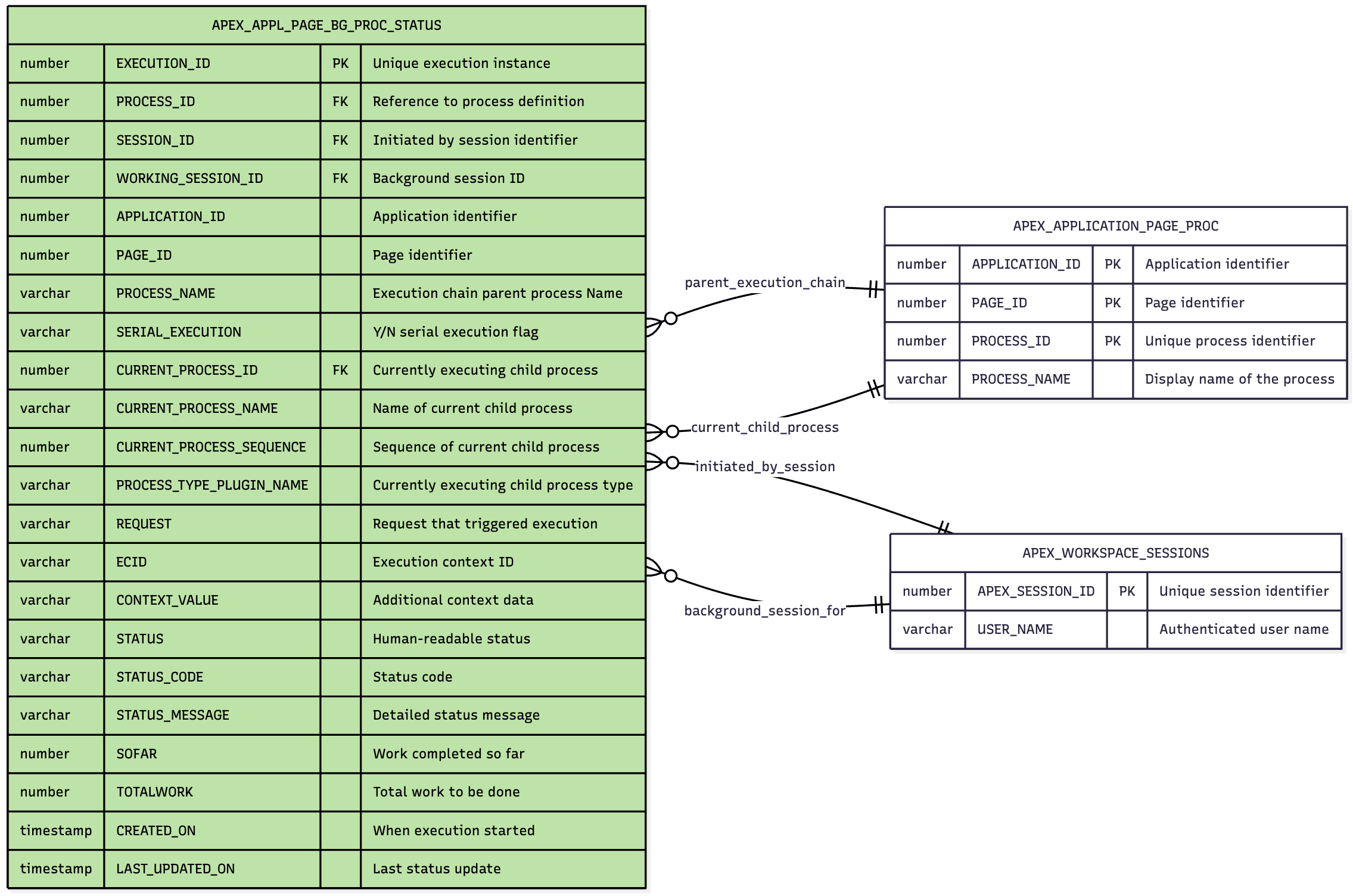
APEX_APPL_PAGE_BG_PROC_STATUS view relate to
APEX_APPLICATION_PAGE_PROC and
APEX_WORKSPACE_SESSIONS views:
PROCESS_ID– page process definition the background job is an instance ofCURRENT_PROCESS_ID– currently executing child page process definition in the chainSESSION_ID– session that initiated the background processWORKING_SESSION_ID– private session for the background process
Tip:
Notice that for filtering convenience, the view includes the PROCESS_NAME and CURRENT_PROCESS_NAME columns already.
The figure shows how the dictionary view APEX_APPL_PAGE_BG_PROC_STATUS
relates to two other views containing information about the page processes and sessions
via the foreign key columns described above.
Figure 18-15 Views Providing Progress of Background Processes
Parent topic: Reporting Background Progress