25.2.6.1 Applying Activities to Patient Onboarding
Review the native workflow activities used to automate patient onboarding.
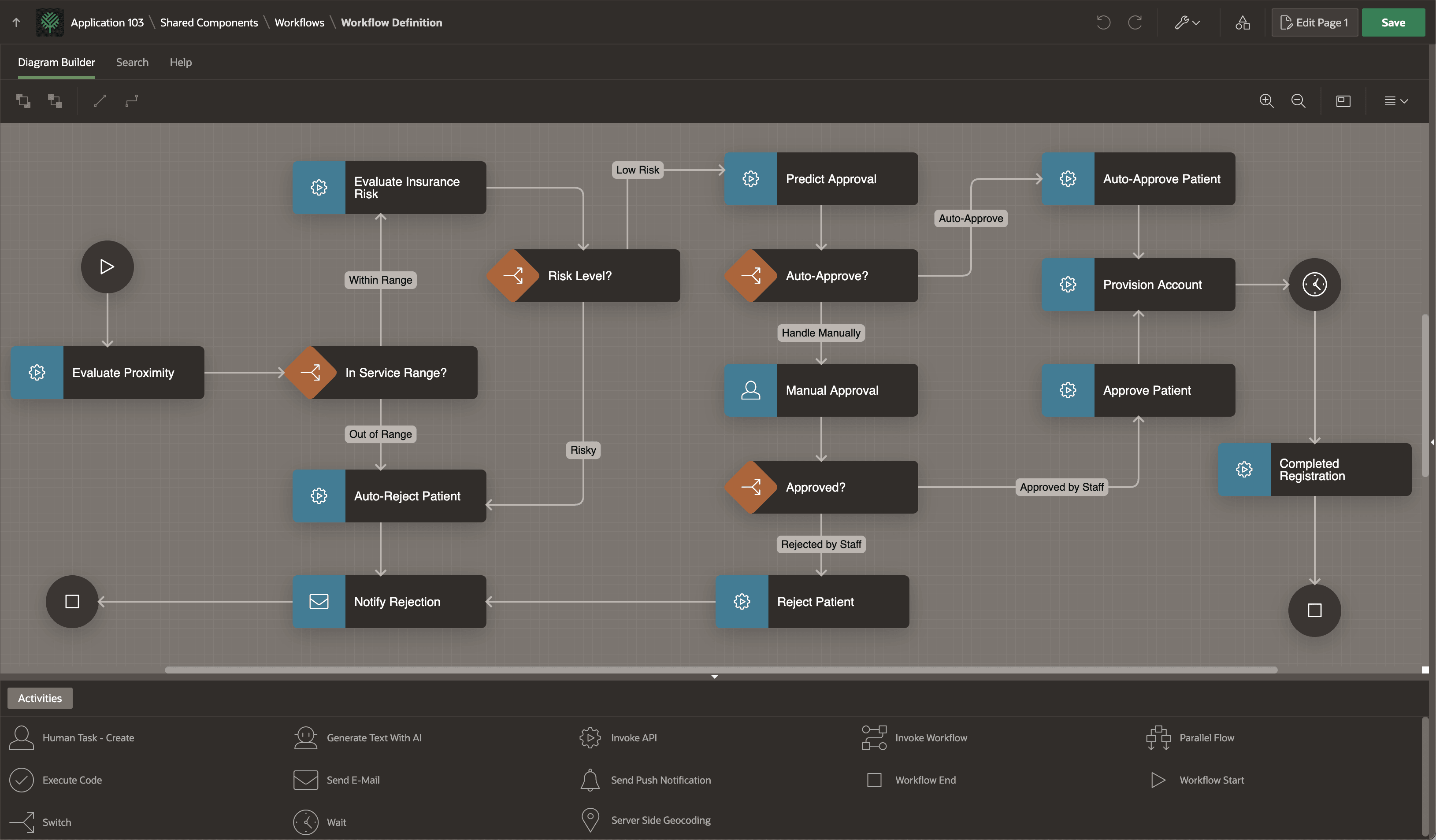
You can create the Patient Onboarding workflow shown below to automate the
Woods Clinic's manual business process. The diagram uses the following native
activities:
- 9 Invoke APIs run procedures to evaluate proximity and insurance risk, predict approval, and more
- 4 Switchs route a patient outside service range, with risky insurance, auto-approved, or rejected
- 1 Human Task - Create assigns the patient for manual approval if not auto-approved
- 1 Send E-Mail notifies the patient of a rejection, and
- 1 Wait pauses until approved patient uses portal to supply proof of insurance and birth date.
- 2 Workflow Ends terminate the rejected and approved paths separately.
Figure 25-79 Woods Clinic Patient Onboarding Workflow in App Builder
Parent topic: Building Patient Onboarding Visually